Cloudnet AEWS 7주차 스터디를 진행하며 정리한 글입니다.
이번 포스팅에서는 AWS Auto Mode에 대해 알아보도록 하겠습니다.
EKS Auto Mode


EKS Auto Mode는 AWS가 EKS 리소스의 일부를 관리하고 책임지는 기능입니다.
노드 인프라를 직접 구성하거나 관리하지 않아도, Pod를 배포하면 AWS가 알아서 실행 환경을 만들어줍니다.
EC2 인스턴스를 직접 생성하거나, NodeGroup 또는 Karpenter 설정을 통해 노드를 관리하고, 스케일링, OS 패치, Capacity 조정 등을 수동 또는 반자동으로 수행해야 하는 등 관리 부담은 Kubernetes를 처음 접하는 사용자나, 빠르게 환경을 구성하고 싶은 팀에겐 진입 장벽이 됩니다. 하지만, Auto Mode는 노드는 AWS가 알아서 관리하고, 사용자는 파드만 정의 방식으로 Kubernetes를 단순한 파드 실행 플랫폼으로 사용할 수 있게 합니다.
https://docs.aws.amazon.com/eks/latest/userguide/automode.html
Automate cluster infrastructure with EKS Auto Mode - Amazon EKS
Help improve this page To contribute to this user guide, choose the Edit this page on GitHub link that is located in the right pane of every page. Automate cluster infrastructure with EKS Auto Mode EKS Auto Mode extends AWS management of Kubernetes cluster
docs.aws.amazon.com
EKS Auto Mode 아키텍처
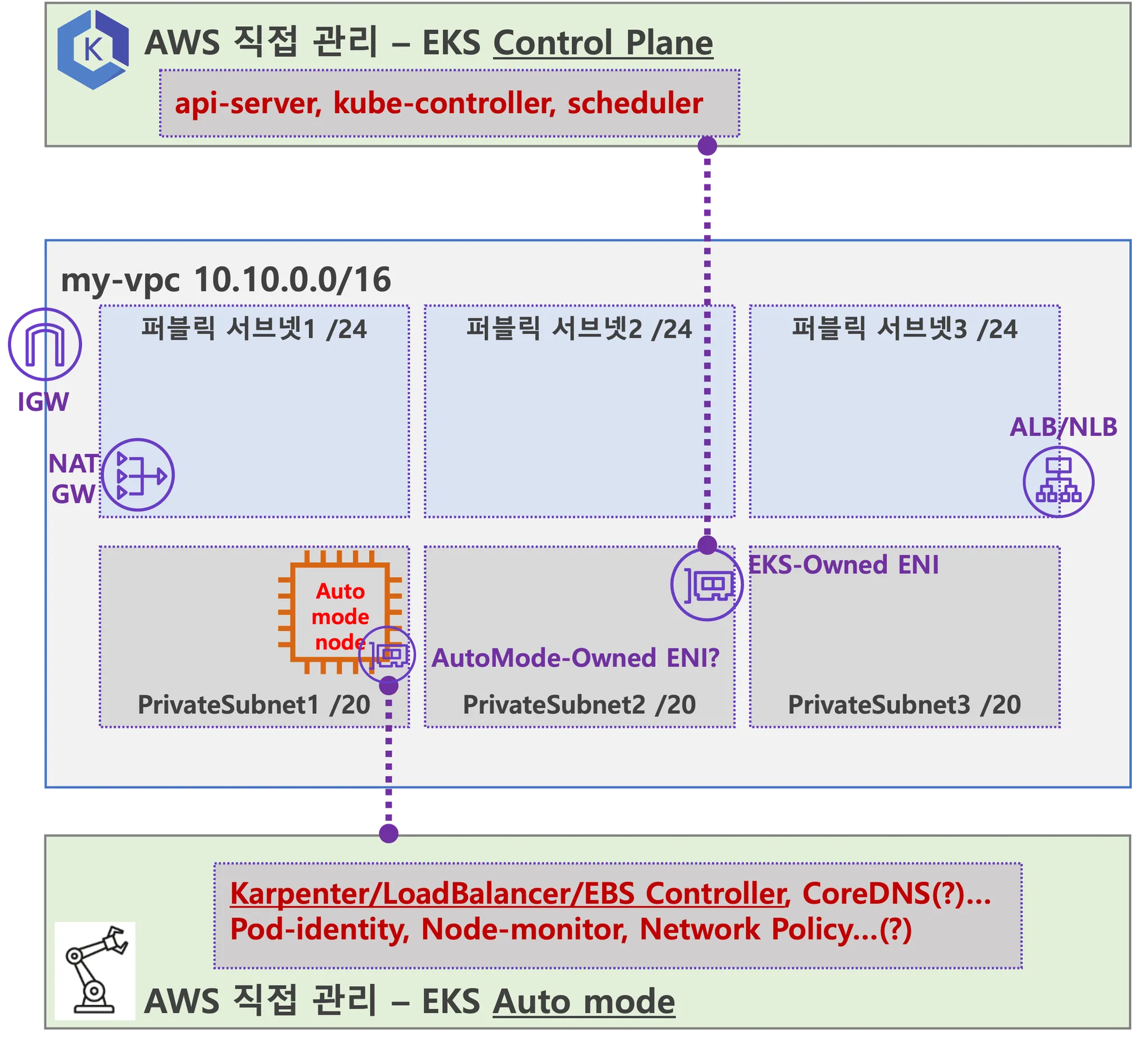

사용자가 파드를 배포하면, AWS가 자동으로 Auto Mode용 EC2 인스턴스를 띄우고, 그 안에 주요 컴포넌트가 프로세스로 실행됩니다.
- kube-proxy, kubelet, eks-pod-identity-agent, eks-node-monitor-agent, eks-healthcheck, eks-ebs-csi-driver, csi-node-driver-registrar, coredns, containerd, aws-network-policy-agent, apiserver, ipam
EKS Auto Mode 배포
https://github.com/aws-samples/sample-aws-eks-auto-mode
GitHub - aws-samples/sample-aws-eks-auto-mode
Contribute to aws-samples/sample-aws-eks-auto-mode development by creating an account on GitHub.
github.com
위 terraform 코드로 EKS Auto Mode를 배포 하였을때, 클러스터는 생성 되었지만, Node와 Pod를 조회했을 때 아무것도 나오지 않는 것을 확인할 수 있습니다.
❯ kubectl cluster-info
Kubernetes control plane is running at https://72C0810BAB767D0EC4E3CC59338ABD47.gr7.ap-northeast-2.eks.amazonaws.com

To further debug and diagnose cluster problems, use 'kubectl cluster-info dump'.
❯ kubectl get node
No resources found

❯ kubectl get pod -A
No resources found
콘솔에서 확인했을 때 EKS Auto mode가 활성화 된 것을 알 수 있으며, 별도의 노드 풀, 노드가 없이 내장 노드 풀을 사용하는 것을 알 수 있습니다. 또한, 기존에 사용하던 CoreDNS 등 별도의 Add-on도 없는 것을 알 수 있습니다.


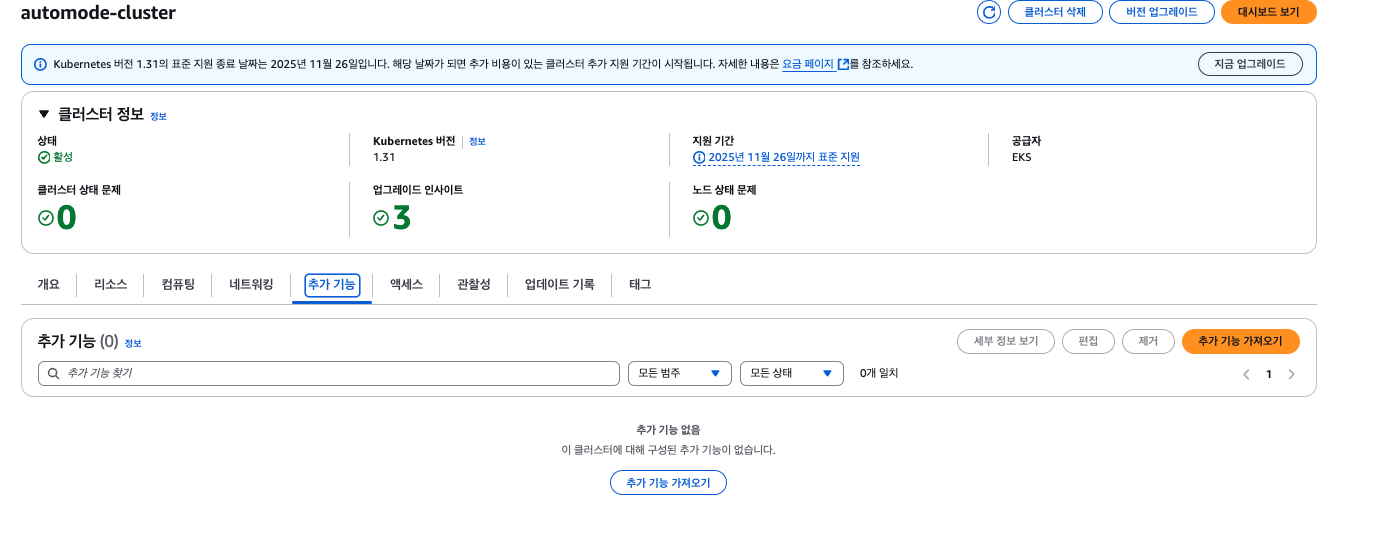
임의의 파드를 배포하여 사용자가 노드를 직접 생성하거나 관리할 필요 없이 파드를 배포 하는 것만으로 AWS가 노드를 자동으로 생성하고 관리해주는지 확인해보도고 하겠습니다.
특히, 스케일링 상황에서 자동으로 노드를 생성하고 제거하는지 확인해보겠습니다.
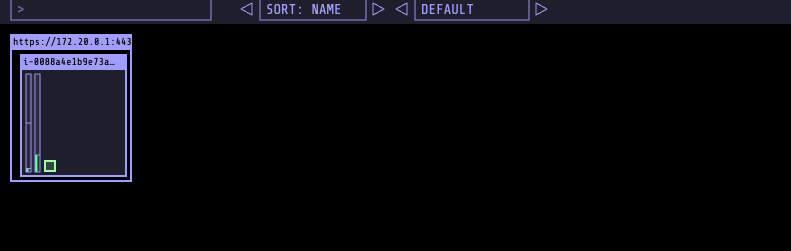
# Node Viewer로 확인
1 nodes (         0/1480m) 0.0% cpu ░░░░░░░░░░░░░░░░░░░░░░░░░░░░░░░░░░░░░░░░ $0.086/hour | $62.7
1 pods (1 pending 0 running 0 bound)

i-0088a4e1b9e73a3c1 cpu ░░░░░░░░░░░░░░░

# 쿠버네티스 이벤트 확인
❯ kubectl get events -w --sort-by '.lastTimestamp'
LAST SEEN   TYPE     REASON      OBJECT              MESSAGE
46m         Normal   Finalized   nodeclass/default   Finalized eks.amazonaws.com/termination
0s          Normal   Launched    nodeclaim/general-purpose-vldkj   Status condition transitioned, Type: Launched, Status: Unknown -> True, Reason: Launched
0s          Normal   DisruptionBlocked   nodeclaim/general-purpose-vldkj   Nodeclaim does not have an associated node
1s          Normal   Starting            node/i-0088a4e1b9e73a3c1          Starting kubelet.
1s          Warning   InvalidDiskCapacity   node/i-0088a4e1b9e73a3c1          invalid capacity 0 on image filesystem
1s          Normal    NodeHasSufficientMemory   node/i-0088a4e1b9e73a3c1          Node i-0088a4e1b9e73a3c1 status is now: NodeHasSufficientMemory
1s          Normal    NodeHasNoDiskPressure     node/i-0088a4e1b9e73a3c1          Node i-0088a4e1b9e73a3c1 status is now: NodeHasNoDiskPressure
1s          Normal    NodeHasSufficientPID      node/i-0088a4e1b9e73a3c1          Node i-0088a4e1b9e73a3c1 status is now: NodeHasSufficientPID
1s          Normal    NodeAllocatableEnforced   node/i-0088a4e1b9e73a3c1          Updated Node Allocatable limit across pods
0s          Normal    NodeHasSufficientMemory   node/i-0088a4e1b9e73a3c1          Node i-0088a4e1b9e73a3c1 status is now: NodeHasSufficientMemory
0s          Normal    NodeHasNoDiskPressure     node/i-0088a4e1b9e73a3c1          Node i-0088a4e1b9e73a3c1 status is now: NodeHasNoDiskPressure
0s          Normal    NodeHasSufficientPID      node/i-0088a4e1b9e73a3c1          Node i-0088a4e1b9e73a3c1 status is now: NodeHasSufficientPID
0s          Normal    Registered                nodeclaim/general-purpose-vldkj   Status condition transitioned, Type: Registered, Status: Unknown -> True, Reason: Registered
0s          Normal    NodeReady                 node/i-0088a4e1b9e73a3c1          Node i-0088a4e1b9e73a3c1 status is now: NodeReady
0s          Normal    Ready                     node/i-0088a4e1b9e73a3c1          Status condition transitioned, Type: Ready, Status: False -> True, Reason: KubeletReady, Message: kubelet is posting ready status
0s          Normal    Starting                  node/i-0088a4e1b9e73a3c1
0s          Normal    Synced                    node/i-0088a4e1b9e73a3c1          Node synced successfully
0s          Normal    Initialized               nodeclaim/general-purpose-vldkj   Status condition transitioned, Type: Initialized, Status: Unknown -> True, Reason: Initialized
0s          Normal    Ready                     nodeclaim/general-purpose-vldkj   Status condition transitioned, Type: Ready, Status: Unknown -> True, Reason: Ready
0s          Normal    RegisteredNode            node/i-0088a4e1b9e73a3c1          Node i-0088a4e1b9e73a3c1 event: Registered Node i-0088a4e1b9e73a3c1 in Controller
0s          Normal    DisruptionBlocked         node/i-0088a4e1b9e73a3c1          Node is nominated for a pending pod
이제 실제 파드를 급격하게 증가시키며 확인해보도록 하겠습니다.
# 기존 컴퓨터 리소스 (노드풀)을 확인
❯ kubectl get nodepools
NAME              NODECLASS   NODES   READY   AGE
general-purpose   default     1       True    169m

# 샘플 어플리케이션 배포
cat <<EOF | kubectl apply -f -
apiVersion: apps/v1
kind: Deployment
metadata:
  name: inflate
spec:
  replicas: 1
  selector:
    matchLabels:
      app: inflate
  template:
    metadata:
      labels:
        app: inflate
    spec:
      terminationGracePeriodSeconds: 0
      nodeSelector:
        eks.amazonaws.com/compute-type: auto
      securityContext:
        runAsUser: 1000
        runAsGroup: 3000
        fsGroup: 2000
      containers:
        - name: inflate
          image: public.ecr.aws/eks-distro/kubernetes/pause:3.7
          resources:
            requests:
              cpu: 1
          securityContext:
            allowPrivilegeEscalation: false
EOF


# Node Viewer로 확인
1 nodes (         1/1930m) 51.8% cpu █████████████████████░░░░░░░░░░░░░░░░░░░ $0.086/hour | $62.
2 pods (0 pending 2 running 2 bound)

i-0088a4e1b9e73a3c1 cpu ██████████████████░░░░░░░░░░░░░░░░░  52% (2 pods) c5a.large/$0.0860 On-D
•
←/→ page • q: quit

# 쿠버네티스 이벤트 확인
5s          Normal    Scheduled                 pod/inflate-b6b45f8d4-8xzbm       Successfully assigned default/inflate-b6b45f8d4-8xzbm to i-0088a4e1b9e73a3c1
5s          Normal    Pulling                   pod/inflate-b6b45f8d4-8xzbm       Pulling image "public.ecr.aws/eks-distro/kubernetes/pause:3.7"
5s          Normal    SuccessfulCreate          replicaset/inflate-b6b45f8d4      Created pod: inflate-b6b45f8d4-8xzbm
5s          Normal    ScalingReplicaSet         deployment/inflate                Scaled up replica set inflate-b6b45f8d4 to 1
1s          Normal    Pulled                    pod/inflate-b6b45f8d4-8xzbm       Successfully pulled image "public.ecr.aws/eks-distro/kubernetes/pause:3.7" in 3.344s (3.344s including waiting). Image size: 2002080 bytes.
1s          Normal    Created                   pod/inflate-b6b45f8d4-8xzbm       Created container: inflate
1s          Normal    Started                   pod/inflate-b6b45f8d4-8xzbm       Started container inflate
증가! 했더니 파드들이 펜딩 상태가 되면서 스케줄 되지 못하고 있습니다.
# Node Viewer로 확인
1 nodes (         1/1930m) 51.8% cpu █████████████████████░░░░░░░░░░░░░░░░░░░ $0.086/hour | $62.
101 pods (99 pending 2 running 2 bound)

i-0088a4e1b9e73a3c1 cpu ██████████████████░░░░░░░░░░░░░░░░░  52% (2 pods) c5a.large/$0.0860 On-D
•

# 쿠버네티스 이벤트 확인
0s          Warning   FailedScheduling          pod/inflate-b6b45f8d4-b8hxt       0/1 nodes are available: 1 Insufficient cpu. preemption: 0/1 nodes are available: 1 No preemption victims found for incoming pod.
0s          Warning   FailedScheduling          pod/inflate-b6b45f8d4-qn8bk       0/1 nodes are available: 1 Insufficient cpu. preemption: 0/1 nodes are available: 1 No preemption victims found for incoming pod.
0s          Warning   FailedScheduling          pod/inflate-b6b45f8d4-b7nj6       0/1 nodes are available: 1 Insufficient cpu. preemption: 0/1 nodes are available: 1 No preemption victims found for incoming pod.
0s          Warning   FailedScheduling          pod/inflate-b6b45f8d4-9kbsj       0/1 nodes are available: 1 Insufficient cpu. preemption: 0/1 nodes are available: 1 No preemption victims found for incoming pod.
0s          Warning   FailedScheduling          pod/inflate-b6b45f8d4-dgvfk       0/1 nodes are available: 1 Insufficient cpu. preemption: 0/1 nodes are available: 1 No preemption victims found for incoming pod.
0s          Warning   FailedScheduling          pod/inflate-b6b45f8d4-f2fn4       0/1 nodes are available: 1 Insufficient cpu. preemption: 0/1 nodes are available: 1 No preemption victims found for incoming pod.
0s          Warning   FailedScheduling          pod/inflate-b6b45f8d4-f2qnb       0/1 nodes are available: 1 Insufficient cpu. preemption: 0/1 nodes are available: 1 No preemption victims found for incoming pod.
0s          Warning   FailedScheduling          pod/inflate-b6b45f8d4-9hppf       0/1 nodes are available: 1 Insufficient cpu. preemption: 0/1 nodes are available: 1 No preemption victims found for incoming pod.
0s          Warning   FailedScheduling          pod/inflate-b6b45f8d4-h6p6g       0/1 nodes are available: 1 Insufficient cpu. preemption: 0/1 nodes are available: 1 No preemption victims found for incoming pod.
0s          Warning   FailedScheduling          pod/inflate-b6b45f8d4-jghrr       0/1 nodes are available: 1 Insufficient cpu. preemption: 0/1 nodes are available: 1 No preemption victims found for incoming pod.
0s          Warning   FailedScheduling          pod/inflate-b6b45f8d4-jq97q       0/1 nodes are available: 1 Insufficient cpu. preemption: 0/1 nodes are available: 1 No preemption victims found for incoming pod.
0s          Warning   FailedScheduling          pod/inflate-b6b45f8d4-jzvg5       0/1 nodes are available: 1 Insufficient cpu. preemption: 0/1 nodes are available: 1 No preemption victims found for incoming pod.

하지만, 시간이 조금 지나자 필요한 리소스에 맞게 노드가 증설되고 파드도 점차 스케줄 됩니다.
(100 증설을 했지만, 시간이 소요되어 일부만 파드가 스케줄 되는 것을 확인하고 삭제하였습니다.)
# Node Viewer 확인
2 nodes (         8/9840m) 81.3% cpu █████████████████████████████████░░░░░░░ $0.430/hour | $313
101 pods (92 pending 9 running 9 bound)

i-0fce4e6539834df06 cpu ███████████████████████████████░░░░  88% (7 pods) c5a.2xlarge/$0.3440 On
i-0088a4e1b9e73a3c1 cpu ██████████████████░░░░░░░░░░░░░░░░░  52% (2 pods) c5a.large/$0.0860   On
•

# 쿠버네티스 이벤트 확인
0s          Normal    Nominated                        pod/inflate-b6b45f8d4-b7nj6       Pod should schedule on: nodeclaim/general-purpose-4qtzc
0s          Normal    Nominated                        pod/inflate-b6b45f8d4-f2qnb       Pod should schedule on: nodeclaim/general-purpose-4qtzc
0s          Normal    Nominated                        pod/inflate-b6b45f8d4-f2fn4       Pod should schedule on: nodeclaim/general-purpose-4qtzc
0s          Normal    Nominated                        pod/inflate-b6b45f8d4-lwj4v       Pod should schedule on: nodeclaim/general-purpose-4qtzc
0s          Normal    Nominated                        pod/inflate-b6b45f8d4-rxz5n       Pod should schedule on: nodeclaim/general-purpose-4qtzc
0s          Normal    Nominated                        pod/inflate-b6b45f8d4-9hdzf       Pod should schedule on: nodeclaim/general-purpose-4qtzc
0s          Normal    Nominated                        pod/inflate-b6b45f8d4-457ch       Pod should schedule on: nodeclaim/general-purpose-4qtzc
0s          Normal    Nominated                        pod/inflate-b6b45f8d4-plbt4       Pod should schedule on: nodeclaim/general-purpose-4qtzc
0s          Normal    Nominated                        pod/inflate-b6b45f8d4-jq97q       Pod should schedule on: nodeclaim/general-purpose-4qtzc
0s          Normal    Nominated                        pod/inflate-b6b45f8d4-k6j5v       Pod should schedule on: nodeclaim/general-purpose-4qtzc
0s          Warning   InsufficientCapacityError        nodeclaim/general-purpose-4qtzc   NodeClaim general-purpose-4qtzc event: creating nodeclaim, creating instance, insufficient capacity, with fleet error(s), VcpuLimitExceeded: You have requested more vCPU capacity than your current vCPU limit of 32 allows for the instance bucket that the specified instance type belongs to. Please visit http://aws.amazon.com/contact-us/ec2...
0s          Warning   TerminationGracePeriodExpiring   nodeclaim/general-purpose-4qtzc   All pods will be deleted by 2025-03-30T14:24:22Z
0s          Normal    Finalized                        nodeclaim                         Finalized karpenter.sh/termination
0s          Warning   InsufficientCapacityError        nodeclaim/general-purpose-5hbc9   NodeClaim general-purpose-5hbc9 event: creating nodeclaim, creating instance, insufficient capacity, with fleet error(s), VcpuLimitExceeded: You have requested more vCPU capacity than your current vCPU limit of 32 allows for the instance bucket that the specified instance type belongs to. Please visit http://aws.amazon.com/contact-us/ec2...
0s          Warning   TerminationGracePeriodExpiring   nodeclaim/general-purpose-5hbc9   All pods will be deleted by 2025-03-30T14:24:58Z
0s          Normal    Finalized                        nodeclaim                         Finalized karpenter.sh/termination
1s          Warning   InsufficientCapacityError        nodeclaim/general-purpose-n52gk   NodeClaim general-purpose-n52gk event: creating nodeclaim, creating instance, insufficient capacity, with fleet error(s), VcpuLimitExceeded: You have requested more vCPU capacity than your current vCPU limit of 32 allows for the instance bucket that the specified instance type belongs to. Please visit http://aws.amazon.com/contact-us/ec2...

EKS Auto Mode 필요한 경우
- 인프라 구성 없이 빠르게 서비스 배포가 필요할 때
- 소규모 팀, 테스트/개발 환경, 이벤트성 서비스에 적합
- 노드 수준 운영 지식 없이도 Kubernetes 기반 서비스를 운영하고 싶을 때
EKS Auto mode 제약사항
- 노드에 대해 불변으로 취급되는 AMI를 사용
- EKS Auto mode에서 사용하는 노어ㅢ 최대 수명은 21일
- SSH 또는 SSM 액세스를 허용하지 않음으로써 노드에 대한 직접 액세스를 방지
- 자동 업그레이드: EKS 자동 모드는 최신 패치를 통해 Kubernetes 클러스터, 노드 및 관련 구성 요소를 최신 상태로 유지하면서 구성된 Pod Disruption Budgets(PDB) 및 NodePool Disruption Budgets(NDB)를 준수
- EKS Auto Mode에서 생성된 EC2 인스턴스는 다른 EC2 인스턴스와 다르며 관리되는 인스턴스입니다. 이러한 관리되는 인스턴스는 EKS가 소유하고 있으며 더 제한적
'스터디 > AEWS' 카테고리의 다른 글
| [AEWS] 8주차 Argo Rollout 이해하기 (0) | 2025.03.30 |
|---|---|
| [AEWS] 8주차 Jenkins를 통한 CI/CD 구성하기 (0) | 2025.03.30 |
| [AEWS] 7주차 AWS Fargate (0) | 2025.03.29 |
| [AEWS] 7주차 Terraform (0) | 2025.03.29 |
| [AEWS] 6주차 EKS 환경에서 인증/인가 (0) | 2025.03.12 |