Cloudnet Cilium 2주차 스터디를 진행하며 정리한 글입니다.
이번 포스팅에서는 prometheus와 grafana을 이용하여 cilium에 대해 관측해보겠습니다.
실습 환경 세팅 - Prometheus, Grafana 설치
실습에 필요한 샘플 어플리케이션과, prometheus, grafana을 설치합니다.
Cilium, Hubble, 그리고 Cilium Operator는 기본적으로 메트릭을 노출하지 않는다. 메트릭을 활성화하면 클러스터의 각 노드에서 9962 (Cilium), 9965 (Hubble), 9963 (Cilium Operator) 포트가 열리게 됩니다. 이들 서비스의 메트릭은 Helm 값으로 각각 독립적으로 설정할 수 있습니다.
- prometheus.enabled=true : cilium-agent 메트릭 활성화
- operator.prometheus.enabled=true : cilium-operator 메트릭 활성화
- hubble.metrics.enabled : 지정된 Hubble 메트릭 활성화
(단, hubble.enabled=true가 먼저 설정되어 있어야 함)
# 샘플 어플리케이션 배포
cat << EOF | kubectl apply -f -
apiVersion: apps/v1
kind: Deployment
metadata:
  name: webpod
spec:
  replicas: 2
  selector:
    matchLabels:
      app: webpod
  template:
    metadata:
      labels:
        app: webpod
    spec:
      affinity:
        podAntiAffinity:
          requiredDuringSchedulingIgnoredDuringExecution:
          - labelSelector:
              matchExpressions:
              - key: app
                operator: In
                values:
                - sample-app
            topologyKey: "kubernetes.io/hostname"
      containers:
      - name: webpod
        image: traefik/whoami
        ports:
        - containerPort: 80
---
apiVersion: v1
kind: Service
metadata:
  name: webpod
  labels:
    app: webpod
spec:
  selector:
    app: webpod
  ports:
  - protocol: TCP
    port: 80
    targetPort: 80
  type: ClusterIP
EOF


# k8s-ctr 노드에 curl-pod 파드 배포
cat <<EOF | kubectl apply -f -
apiVersion: v1
kind: Pod
metadata:
  name: curl-pod
  labels:
    app: curl
spec:
  nodeName: k8s-ctr
  containers:
  - name: curl
    image: nicolaka/netshoot
    command: ["tail"]
    args: ["-f", "/dev/null"]
  terminationGracePeriodSeconds: 0
EOF

root@k8s-ctr:~# kubectl get deploy,svc,ep webpod -owide
Warning: v1 Endpoints is deprecated in v1.33+; use discovery.k8s.io/v1 EndpointSlice
NAME                     READY   UP-TO-DATE   AVAILABLE   AGE   CONTAINERS   IMAGES           SELECTOR
deployment.apps/webpod   2/2     2            2           18s   webpod       traefik/whoami   app=webpod

NAME             TYPE        CLUSTER-IP      EXTERNAL-IP   PORT(S)   AGE   SELECTOR
service/webpod   ClusterIP   10.96.201.129   <none>        80/TCP    18s   app=webpod
NAME               ENDPOINTS                        AGE
endpoints/webpod   172.20.1.142:80,172.20.2.28:80   18s

# 애드온 - prometheus, grafana 배포
root@k8s-ctr:~# kubectl apply -f https://raw.githubusercontent.com/cilium/cilium/1.17.6/examples/kubernetes/addons/prometheus/monitoring-example.yaml
namespace/cilium-monitoring created
serviceaccount/prometheus-k8s created
configmap/grafana-config created
configmap/grafana-cilium-dashboard created
configmap/grafana-cilium-operator-dashboard created
configmap/grafana-hubble-dashboard created
configmap/grafana-hubble-l7-http-metrics-by-workload created
configmap/prometheus created
clusterrole.rbac.authorization.k8s.io/prometheus created
clusterrolebinding.rbac.authorization.k8s.io/prometheus created
service/grafana created
service/prometheus created
deployment.apps/grafana created
deployment.apps/prometheus created


root@k8s-ctr:~# kubectl get deploy,pod,svc,ep -n cilium-monitoring

Warning: v1 Endpoints is deprecated in v1.33+; use discovery.k8s.io/v1 EndpointSlice
NAME                         READY   UP-TO-DATE   AVAILABLE   AGE
deployment.apps/grafana      0/1     1            0           11s
deployment.apps/prometheus   0/1     1            0           11s

NAME                              READY   STATUS              RESTARTS   AGE
pod/grafana-5c69859d9-g2fzf       0/1     ContainerCreating   0          11s
pod/prometheus-6fc896bc5d-lp9nx   0/1     ContainerCreating   0          11s

NAME                 TYPE        CLUSTER-IP     EXTERNAL-IP   PORT(S)    AGE
service/grafana      ClusterIP   10.96.99.193   <none>        3000/TCP   11s
service/prometheus   ClusterIP   10.96.11.188   <none>        9090/TCP   11s

NAME                   ENDPOINTS   AGE
endpoints/grafana      <none>      11s
endpoints/prometheus   <none>      11s

# 각 노드에 해당 포트 열려있는 것 확인
root@k8s-ctr:~# ss -tnlp | grep -E '9962|9963|9965'
LISTEN 0      4096                *:9965             *:*    users:(("cilium-agent",pid=7363,fd=45))
LISTEN 0      4096                *:9962             *:*    users:(("cilium-agent",pid=7363,fd=7))
LISTEN 0      4096                *:9963             *:*    users:(("cilium-operator",pid=5427,fd=7))
hostPC에서 접속을 위한 Nodeport 설정을 합니다.
root@k8s-ctr:~# kubectl get svc -n cilium-monitoring
NAME         TYPE        CLUSTER-IP     EXTERNAL-IP   PORT(S)    AGE
grafana      ClusterIP   10.96.99.193   <none>        3000/TCP   52m
prometheus   ClusterIP   10.96.11.188   <none>        9090/TCP   52m

root@k8s-ctr:~# kubectl patch svc -n cilium-monitoring prometheus -p '{"spec": {"type": "NodePort", "ports": [{"port": 9090, "targetPort": 9090, "nodePort": 30001}]}}'
kubectl patch svc -n cilium-monitoring grafana -p '{"spec": {"type": "NodePort", "ports": [{"port": 3000, "targetPort": 3000, "nodePort": 30002}]}}'
service/prometheus patched
service/grafana patched

root@k8s-ctr:~# kubectl get svc -n cilium-monitoring
NAME         TYPE       CLUSTER-IP     EXTERNAL-IP   PORT(S)          AGE
grafana      NodePort   10.96.99.193   <none>        3000:30002/TCP   53m
prometheus   NodePort   10.96.11.188   <none>        9090:30001/TCP   53m

# 접속 주소 확인
echo "http://192.168.10.100:30001"  # prometheus
echo "http://192.168.10.100:30002"  # grafana
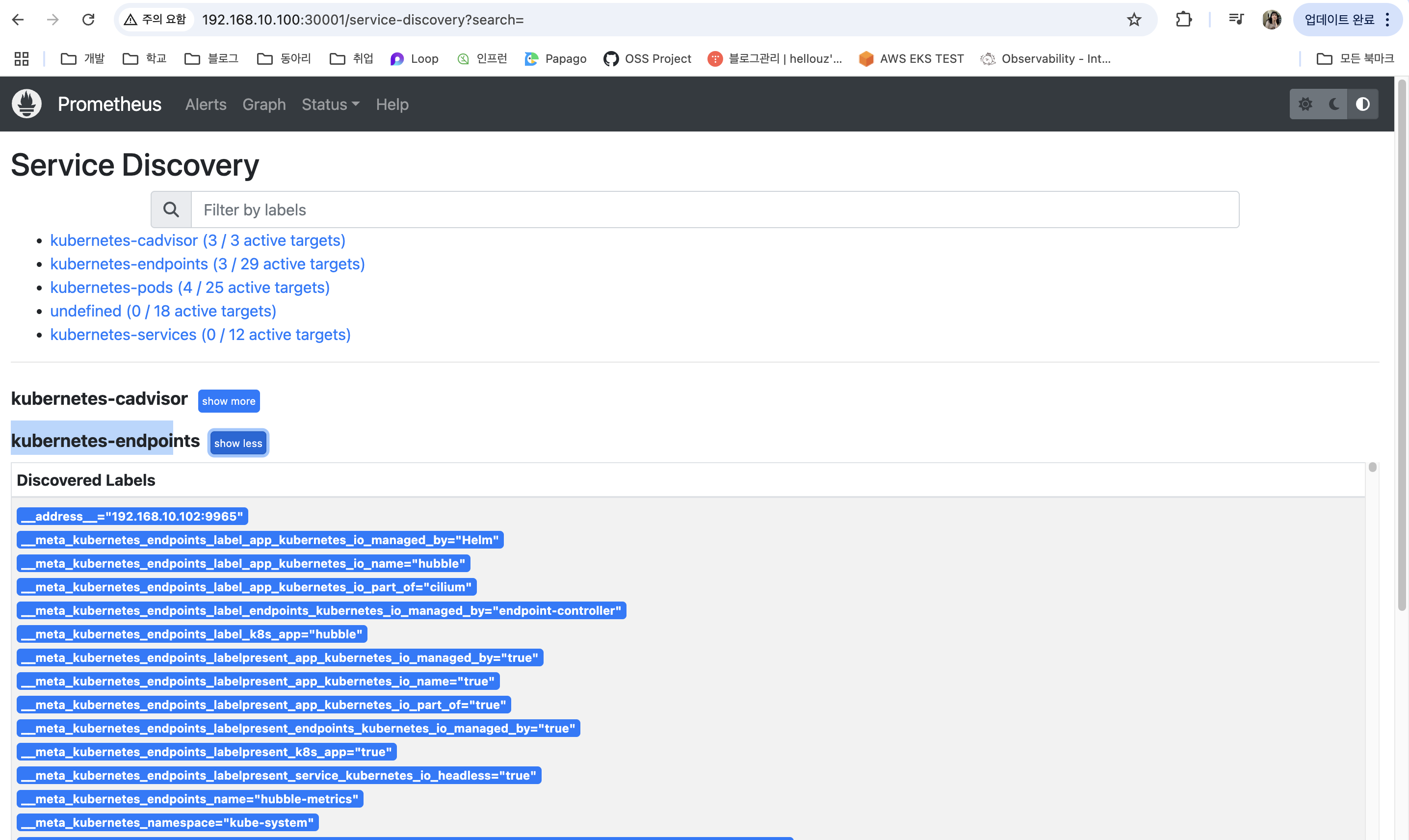
프로메테우스 화면에서 수집되는 메트릭을 확인해보겠습니다.
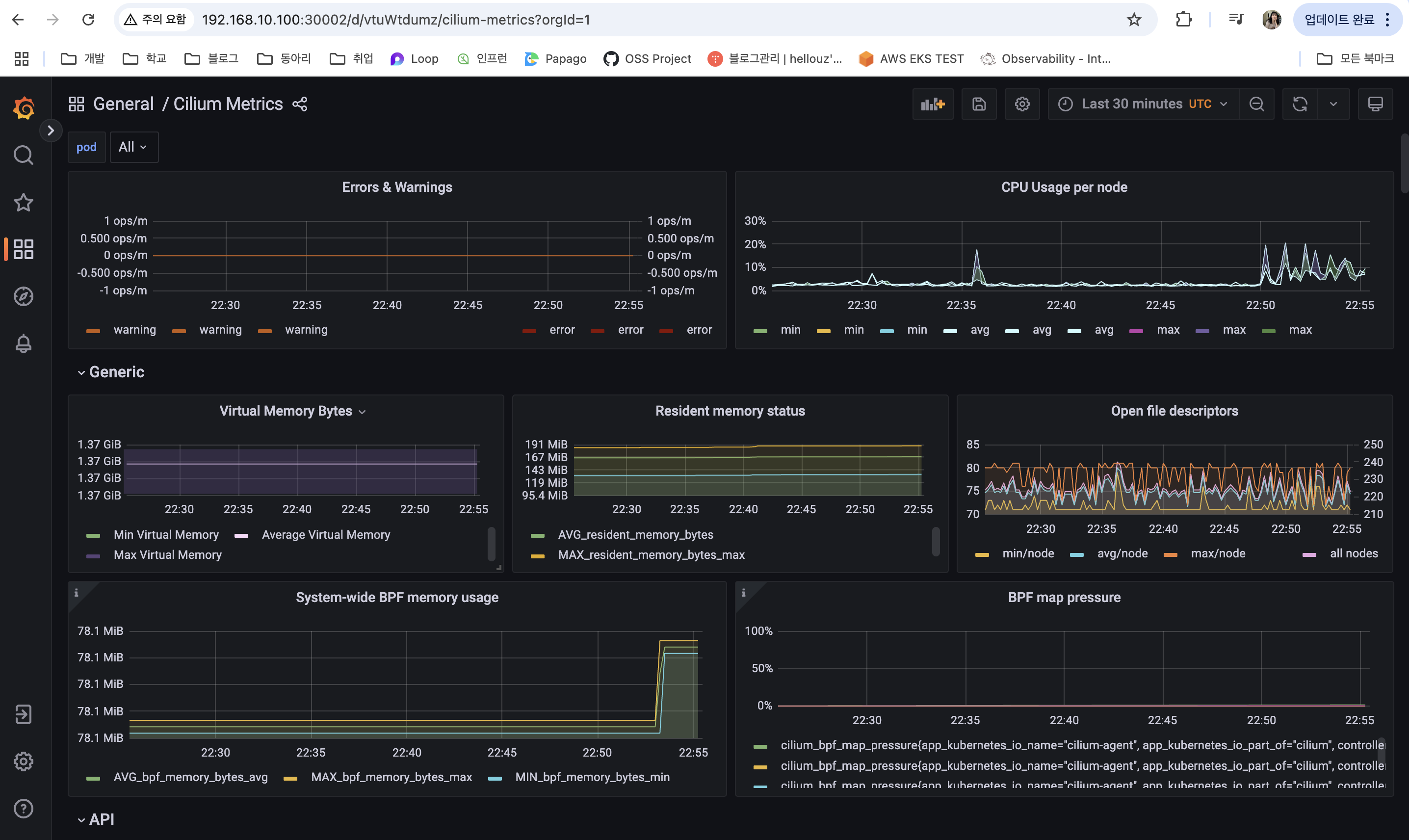
그라파나 화면에서 수집되는 메트릭을 확인해보겠습니다.
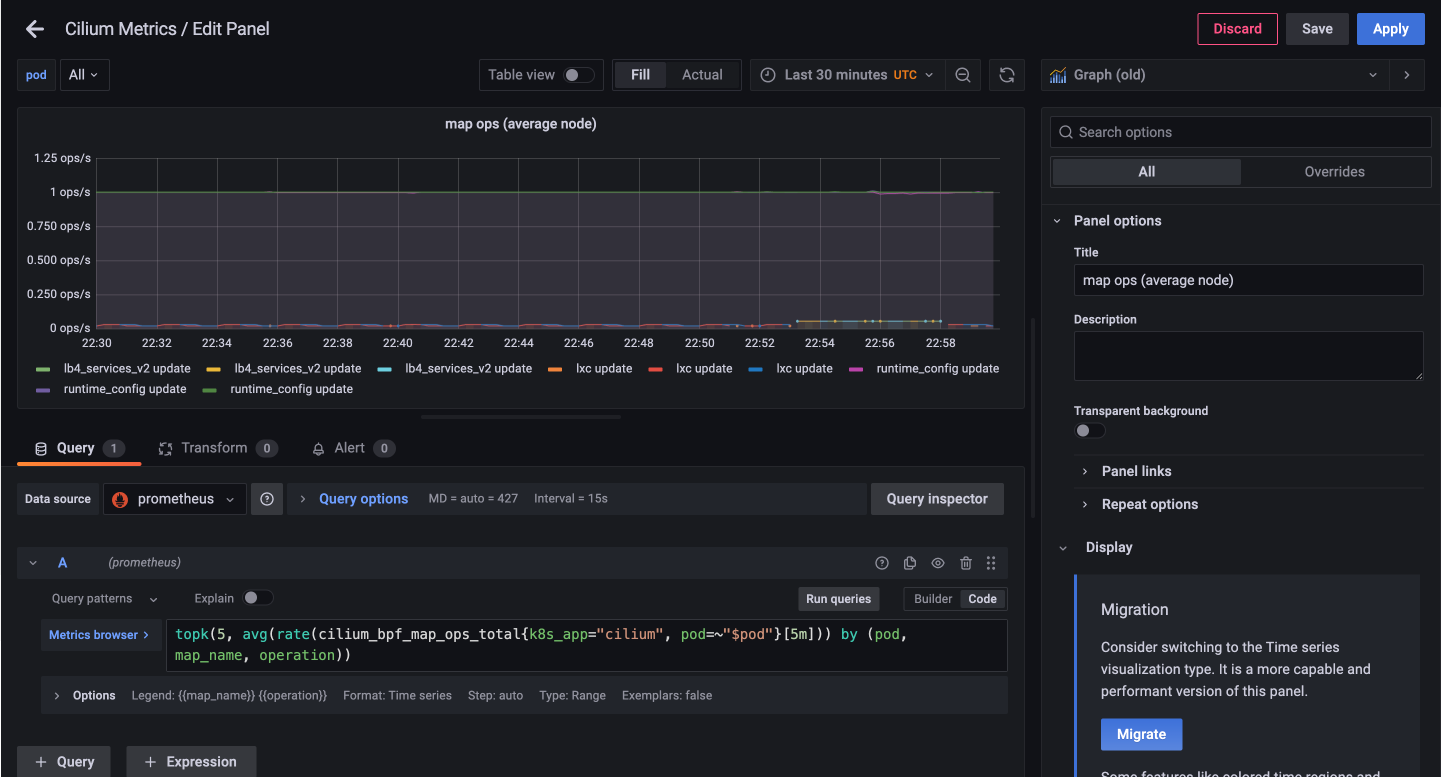
Cilium Metrics 대시보드에서 간단한 쿼리문을 확인해보겠습니다.
예를 들어, 아래 쿼리문을 이해하는 방법으로는 우선 대시보드에서 표현하고 있는 메트릭 쿼리문을 확인합니다.
topk(5, avg(rate(cilium_bpf_map_ops_total{k8s_app="cilium", pod=~"$pod"}[5m])) by (pod, map_name, operation))
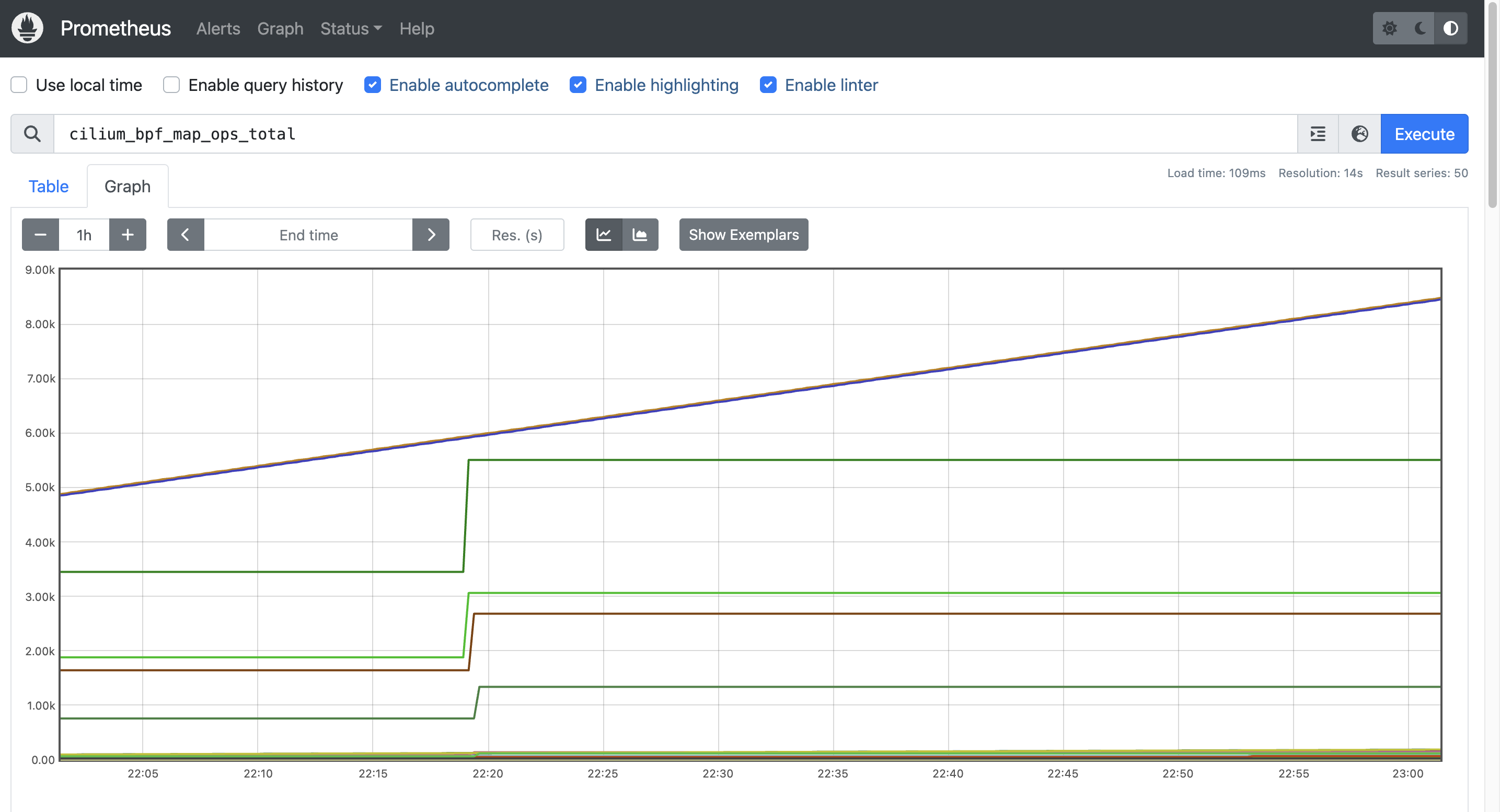
그 이후, 메트릭 명을 프로메테우스에서 검색하여, 필요한 값을 추가하여 필요한 쿼리문으로 수정해나갑니다.
#
cilium_bpf_map_ops_total
cilium_bpf_map_ops_total{k8s_app="cilium"}
cilium_bpf_map_ops_total{k8s_app="cilium", pod="cilium-4hghz"}

# 최근 5분 간의 데이터로 증가율 계산
rate(cilium_bpf_map_ops_total{k8s_app="cilium"}[5m]) # Graph 확인

# 여러 시계열(metric series)의 값의 평균
avg(rate(cilium_bpf_map_ops_total{k8s_app="cilium"}[5m]))

# 집계 함수(예: sum, avg, max, rate)와 함께 사용하여 어떤 레이블(label)을 기준으로 그룹화할지를 지정하는 그룹핑(grouping)
avg(rate(cilium_bpf_map_ops_total{k8s_app="cilium"}[5m])) by (pod)
avg(rate(cilium_bpf_map_ops_total{k8s_app="cilium"}[5m])) by (pod, map_name)
avg(rate(cilium_bpf_map_ops_total{k8s_app="cilium"}[5m])) by (pod, map_name, operation) # Graph 확인

# 시계열 중에서 가장 큰 k개를 선택
topk(5, avg(rate(cilium_bpf_map_ops_total{k8s_app="cilium"}[5m]))) by (pod, map_name, operation)
topk(5, avg(rate(cilium_bpf_map_ops_total{k8s_app="cilium", pod="cilium-4hghz"}[5m]))) by (pod, map_name, operation)
Cilium Metrics
Cilium 메트릭은 Cilium 자체의 동작 상태를 관찰할 수 있는 지표로, Cilium Agent, Envoy Proxy, Cilium Operator의 상태를 모니터링하는 데 사용됩니다.
이 메트릭을 활성화하려면 Helm 설치 시 다음 값을 설정하면 됩니다.
--set prometheus.enabled=true
이렇게 설정하면 Cilium이 Prometheus 포맷의 메트릭을 cilium_ prefix로 노출됩니다.
Envoy Proxy에서 수집되는 메트릭은 기본적으로 envoy_ 네임스페이스를 사용하며, Cilium이 정의한 항목은 envoy_cilium_으로 구분됩니다. Kubernetes 환경에서는 각 메트릭 항목에 pod 이름과 네임스페이스 라벨이 자동으로 붙기 때문에, 다양한 서비스 단위로 필터링 및 분석이 가능합니다.
메트릭이 활성화되면 모든 Cilium 구성 요소에는 다음과 같은 주석이 표시됩니다. 주석은 Prometheus에게 메트릭을 스크랩할지 여부를 알리는 데 사용합니다.
root@k8s-ctr:~# kubectl describe pod -n kube-system -l k8s-app=cilium | grep prometheus
                      prometheus.io/port: 9962
                      prometheus.io/scrape: true
                      prometheus.io/port: 9962
                      prometheus.io/scrape: true
                      prometheus.io/port: 9962
                      prometheus.io/scrape: true

root@k8s-ctr:~# kubectl describe pod -n kube-system -l name=cilium-operator | grep prometheus
Annotations:          prometheus.io/port: 9963
                      prometheus.io/scrape: true
Cilium 메트릭은 Cilium 상태 자체를 모니터링할 수 있게 해주지만, Hubble 메트릭은 Cilium이 관리하는 쿠버네티스 포드의 네트워크 동작을 연결 및 보안과 관련하여 모니터링할 수 있게 합니다.
# hubble-metrics 헤드리스 서비스
root@k8s-ctr:~# kubectl get svc -n kube-system hubble-metrics
NAME             TYPE        CLUSTER-IP   EXTERNAL-IP   PORT(S)    AGE
hubble-metrics   ClusterIP   None         <none>        9965/TCP   164m

root@k8s-ctr:~# kc describe cm -n cilium-monitoring prometheus
Name:         prometheus
Namespace:    cilium-monitoring
Labels:       <none>
Annotations:  <none>

Data
====
prometheus.yaml:
----
global:
  scrape_interval: 10s
  scrape_timeout: 10s
  evaluation_interval: 10s
rule_files:
  - "/etc/prometheus-rules/*.rules"
scrape_configs:
  # https://github.com/prometheus/prometheus/blob/master/documentation/examples/prometheus-kubernetes.yml#L79
  - job_name: 'kubernetes-endpoints'
    kubernetes_sd_configs:
      - role: endpoints
    relabel_configs:
      - source_labels: [__meta_kubernetes_pod_label_k8s_app]
        action: keep
        regex: cilium
      - source_labels: [__meta_kubernetes_service_annotation_prometheus_io_scrape]
        action: keep
        regex: true
      - source_labels: [__meta_kubernetes_service_annotation_prometheus_io_scheme]
        action: replace
        target_label: __scheme__
        regex: (https?)
      - source_labels: [__meta_kubernetes_service_annotation_prometheus_io_path]
        action: replace
        target_label: __metrics_path__
        regex: (.+)
      - source_labels: [__address__, __meta_kubernetes_service_annotation_prometheus_io_port]
        action: replace
        target_label: __address__
        regex: (.+)(?::\d+);(\d+)
        replacement: $1:$2
      - action: labelmap
        regex: __meta_kubernetes_service_label_(.+)
      - source_labels: [__meta_kubernetes_namespace]
        action: replace
        target_label: namespace
      - source_labels: [__meta_kubernetes_service_name]
        action: replace
        target_label: service

  # https://github.com/prometheus/prometheus/blob/master/documentation/examples/prometheus-kubernetes.yml#L156
  - job_name: 'kubernetes-pods'
    kubernetes_sd_configs:
      - role: pod
    relabel_configs:
      - source_labels: [__meta_kubernetes_pod_annotation_prometheus_io_scrape]
        action: keep
        regex: true
      - source_labels: [__meta_kubernetes_pod_annotation_prometheus_io_path]
        action: replace
        target_label: __metrics_path__
        regex: (.+)
      - source_labels: [__address__, __meta_kubernetes_pod_annotation_prometheus_io_port]
        action: replace
        regex: (.+):(?:\d+);(\d+)
        replacement: ${1}:${2}
        target_label: __address__
      - action: labelmap
        regex: __meta_kubernetes_pod_label_(.+)
      - source_labels: [__meta_kubernetes_namespace]
        action: replace
        target_label: namespace
      - source_labels: [__meta_kubernetes_pod_name]
        action: replace
        target_label: pod
      - source_labels: [__meta_kubernetes_pod_container_port_number]
        action: keep
        regex: \d+

  # https://github.com/prometheus/prometheus/blob/master/documentation/examples/prometheus-kubernetes.yml#L119
  - job_name: 'kubernetes-services'
    metrics_path: /metrics
    params:
      module: [http_2xx]
    kubernetes_sd_configs:
      - role: service
    relabel_configs:
      - source_labels: [__meta_kubernetes_service_annotation_prometheus_io_probe]
        action: keep
        regex: true
      - source_labels: [__address__, __meta_kubernetes_pod_annotation_prometheus_io_port]
        action: replace
        regex: ([^:]+)(?::\d+)?;(\d+)
        replacement: ${1}:${2}
        target_label: __address__
      - action: labelmap
        regex: __meta_kubernetes_service_label_(.+)
      - source_labels: [__meta_kubernetes_namespace]
        target_label: namespace
      - source_labels: [__meta_kubernetes_service_name]
        target_label: service

  - job_name: 'kubernetes-cadvisor'
    scheme: https
    tls_config:
      ca_file: /var/run/secrets/kubernetes.io/serviceaccount/ca.crt
    bearer_token_file: /var/run/secrets/kubernetes.io/serviceaccount/token
    kubernetes_sd_configs:
      - role: node
    relabel_configs:
      - action: labelmap
        regex: __meta_kubernetes_node_label_(.+)
      - target_label: __address__
        replacement: kubernetes.default.svc:443
      - source_labels: [__meta_kubernetes_node_name]
        regex: (.+)
        target_label: __metrics_path__
        replacement: /api/v1/nodes/${1}/proxy/metrics/cadvisor


BinaryData
====

Events:  <none>
Cilium 구성 요소별 메트릭
- cilium-agent
네트워크 정책, 데이터 경로, 노드 연결 상태 등 L3/L4 수준의 핵심 메트릭을 제공
주요 항목: endpoint, service, cluster_health, datapath, ebpf, ipsec, drops/forwards 등 - cilium-operator
IPAM, 클러스터 간 통신, Unmanaged Pod 관리 등 컨트롤 플레인 관련 메트릭을 제공
주요 항목: bgp, ipam, lb_ipam, controllers, ciliumendpointslices 등 - Hubble
트래픽 흐름 기반의 메트릭을 제공하며, --hubble-metrics 값에 세미콜론(;)으로 옵션을 지정해 메트릭별 세부 설정이 가능
L7 프로토콜 가시성
기본적으로 Cilium은 L3/L4 수준의 패킷 이벤트만 수집하지만, 애플리케이션 레벨(L7) 트래픽을 관찰하려면 L7 CiliumNetworkPolicy를 사용해야 합니다.
이 정책을 통해 HTTP와 같은 L7 프로토콜의 요청 경로, 메서드 등을 기준으로 가시성 확보와 함께 정책 제어까지 가능합니다.
L7 트래픽 가시성을 활성화하려면, CiliumNetworkPolicy에 명시적으로 L7 규칙을 정의해야 하며, 이렇게 설정된 트래픽만 Cilium에서 L7 이벤트로 인식합니다. 즉, L7 정책은 단순한 로깅 수단이 아니라 실제 트래픽 제한 효과도 함께 갖는다는 점을 고려해야 합니다.
다음 실습 예제는 기본 네임스페이스 내에서 DNS와 HTTP 트래픽을 관찰하고 제어할 수 있도록 설정하는 L7 네트워크 정책을 확인하기 위한 예제를 실습해보겠습니다.
이 정책은 두 가지 L7 규칙을 포함합니다.
- DNS 규칙: TCP/UDP 53번 포트의 DNS 트래픽을 허용
- HTTP 규칙: TCP 80번, 8080번 포트의 HTTP 트래픽을 허용
# default 네임스페이스에 있는 Pod들의 egress(출방향) 트래픽을 제어하며, L7 HTTP 및 DNS 트래픽에 대한 가시성과 제어를 설정
## method/path 기반 필터링은 안 하지만, HTTP 요청 정보는 Envoy를 통해 기록/관찰됨
## cilium-envoy를 경유하게 됨 (DNS + HTTP 모두 L7 처리 대상)
## 이 정책이 적용되면, 명시된 egress 외의 모든 egress 트래픽은 차단됩니다 (Cilium 정책은 default-deny 모델임)
cat <<EOF | kubectl apply -f -
apiVersion: "cilium.io/v2"
kind: CiliumNetworkPolicy
metadata:
  name: "l7-visibility"
spec:
  endpointSelector:
    matchLabels:
      "k8s:io.kubernetes.pod.namespace": default  # default 네임스페이스 안의 모든 Pod에 대해 egress 정책이 적용
  egress:
  - toPorts:
    - ports:
      - port: "53"
        protocol: ANY  # TCP, UDP 둘 다 허용
      rules:
        dns:
        - matchPattern: "*"  # 모든 도메인 조회 허용, L7 가시성 활성화
  - toEndpoints:
    - matchLabels:
        "k8s:io.kubernetes.pod.namespace": default
    toPorts:
    - ports:
      - port: "80"  # default 다른 파드의 HTTP TCP 80 요청 허용
        protocol: TCP
      - port: "8080"  # default 다른 파드의 HTTP TCP 8080 요청 허용
        protocol: TCP
      rules:
        http: [{}]  # 모든 HTTP 요청을 허용, L7 가시성 활성화
EOF
호출을 하여 통신 구간과 가시성을 확인해보겠습니다.
# 호출 확인 : cilium-envoy 경유 확인
root@k8s-ctr:~# kubectl exec -it curl-pod -- curl -s webpod

Hostname: webpod-697b545f57-9r5s9
IP: 127.0.0.1
IP: ::1
IP: 172.20.2.28
IP: fe80::d011:d3ff:fe5c:65d5
RemoteAddr: 172.20.0.217:34554
GET / HTTP/1.1
Host: webpod
User-Agent: curl/8.14.1
Accept: */*
X-Envoy-Expected-Rq-Timeout-Ms: 3600000
X-Envoy-Internal: true
X-Forwarded-Proto: http
X-Request-Id: 62a0c64c-0545-41d5-9def-3ee33833409b

# 가시성 확인
root@k8s-ctr:~# hubble observe -f -t l7 -o compact
Jul 26 23:35:54.576: default/curl-pod:39992 (ID:3975) -> kube-system/coredns-674b8bbfcf-56xkl:53 (ID:63813) dns-request proxy FORWARDED (DNS Query webpod.default.svc.cluster.local. AAAA)
Jul 26 23:35:54.576: default/curl-pod:39992 (ID:3975) -> kube-system/coredns-674b8bbfcf-56xkl:53 (ID:63813) dns-request proxy FORWARDED (DNS Query webpod.default.svc.cluster.local. A)
Jul 26 23:35:54.591: default/curl-pod:39992 (ID:3975) <- kube-system/coredns-674b8bbfcf-56xkl:53 (ID:63813) dns-response proxy FORWARDED (DNS Answer  TTL: 4294967295 (Proxy webpod.default.svc.cluster.local. AAAA))
Jul 26 23:35:54.593: default/curl-pod:39992 (ID:3975) <- kube-system/coredns-674b8bbfcf-56xkl:53 (ID:63813) dns-response proxy FORWARDED (DNS Answer "10.96.201.129" TTL: 30 (Proxy webpod.default.svc.cluster.local. A))
Jul 26 23:35:54.622: default/curl-pod:46722 (ID:3975) -> default/webpod-697b545f57-9r5s9:80 (ID:12432) http-request FORWARDED (HTTP/1.1 GET http://webpod/)
Jul 26 23:35:54.635: default/curl-pod:46722 (ID:3975) <- default/webpod-697b545f57-9r5s9:80 (ID:12432) http-response FORWARDED (HTTP/1.1 200 13ms (GET http://webpod/))
Jul 26 23:35:55.660: default/curl-pod:38092 (ID:3975) -> kube-system/coredns-674b8bbfcf-hgjll:53 (ID:63813) dns-request proxy FORWARDED (DNS Query webpod.default.svc.cluster.local. A)
Jul 26 23:35:55.664: default/curl-pod:38092 (ID:3975) -> kube-system/coredns-674b8bbfcf-hgjll:53 (ID:63813) dns-request proxy FORWARDED (DNS Query webpod.default.svc.cluster.local. AAAA)
Jul 26 23:35:55.671: default/curl-pod:38092 (ID:3975) <- kube-system/coredns-674b8bbfcf-hgjll:53 (ID:63813) dns-response proxy FORWARDED (DNS Answer "10.96.201.129" TTL: 30 (Proxy webpod.default.svc.cluster.local. A))
Jul 26 23:35:55.673: default/curl-pod:38092 (ID:3975) <- kube-system/coredns-674b8bbfcf-hgjll:53 (ID:63813) dns-response proxy FORWARDED (DNS Answer  TTL: 4294967295 (Proxy webpod.default.svc.cluster.local. AAAA))
Jul 26 23:35:55.680: default/curl-pod:46738 (ID:3975) -> default/webpod-697b545f57-9r5s9:80 (ID:12432) http-request FORWARDED (HTTP/1.1 GET http://webpod/)
Jul 26 23:35:55.688: default/curl-pod:46738 (ID:3975) <- default/webpod-697b545f57-9r5s9:80 (ID:12432) http-response FORWARDED (HTTP/1.1 200 9ms (GET http://webpod/))
Jul 26 23:35:56.706: default/curl-pod:39568 (ID:3975) -> kube-system/coredns-674b8bbfcf-56xkl:53 (ID:63813) dns-request proxy FORWARDED (DNS Query webpod.default.svc.cluster.local. A)
Jul 26 23:35:56.715: default/curl-pod:39568 (ID:3975) -> kube-system/coredns-674b8bbfcf-56xkl:53 (ID:63813) dns-request proxy FORWARDED (DNS Query webpod.default.svc.cluster.local. AAAA)
Jul 26 23:35:56.716: default/curl-pod:39568 (ID:3975) <- kube-system/coredns-674b8bbfcf-56xkl:53 (ID:63813) dns-response proxy FORWARDED (DNS Answer "10.96.201.129" TTL: 30 (Proxy webpod.default.svc.cluster.local. A))
Jul 26 23:35:56.716: default/curl-pod:39568 (ID:3975) <- kube-system/coredns-674b8bbfcf-56xkl:53 (ID:63813) dns-response proxy FORWARDED (DNS Answer  TTL: 4294967295 (Proxy webpod.default.svc.cluster.local. AAAA))
Jul 26 23:35:56.728: default/curl-pod:46750 (ID:3975) -> default/webpod-697b545f57-9r5s9:80 (ID:12432) http-request FORWARDED (HTTP/1.1 GET http://webpod/)
Jul 26 23:35:56.737: default/curl-pod:46750 (ID:3975) <- default/webpod-697b545f57-9r5s9:80 (ID:12432) http-response FORWARDED (HTTP/1.1 200 9ms (GET http://webpod/))
Jul 26 23:35:57.769: default/curl-pod:53828 (ID:3975) -> kube-system/coredns-674b8bbfcf-hgjll:53 (ID:63813) dns-request proxy FORWARDED (DNS Query webpod.default.svc.cluster.local. AAAA)
Jul 26 23:35:57.776: default/curl-pod:53828 (ID:3975) -> kube-system/coredns-674b8bbfcf-hgjll:53 (ID:63813) dns-request proxy FORWARDED (DNS Query webpod.default.svc.cluster.local. A)
Jul 26 23:35:57.776: default/curl-pod:53828 (ID:3975) <- kube-system/coredns-674b8bbfcf-hgjll:53 (ID:63813) dns-response proxy FORWARDED (DNS Answer  TTL: 4294967295 (Proxy webpod.default.svc.cluster.local. AAAA))
Jul 26 23:35:57.779: default/curl-pod:53828 (ID:3975) <- kube-system/coredns-674b8bbfcf-hgjll:53 (ID:63813) dns-response proxy FORWARDED (DNS Answer "10.96.201.129" TTL: 30 (Proxy webpod.default.svc.cluster.local. A))
Jul 26 23:35:57.792: default/curl-pod:46758 (ID:3975) -> default/webpod-697b545f57-9r5s9:80 (ID:12432) http-request FORWARDED (HTTP/1.1 GET http://webpod/)
Jul 26 23:35:57.797: default/curl-pod:46758 (ID:3975) <- default/webpod-697b545f57-9r5s9:80 (ID:12432) http-response FORWARDED (HTTP/1.1 200 4ms (GET http://webpod/))
Jul 26 23:35:58.815: default/curl-pod:42202 (ID:3975) -> kube-system/coredns-674b8bbfcf-56xkl:53 (ID:63813) dns-request proxy FORWARDED (DNS Query webpod.default.svc.cluster.local. A)
Jul 26 23:35:58.821: default/curl-pod:42202 (ID:3975) -> kube-system/coredns-674b8bbfcf-56xkl:53 (ID:63813) dns-request proxy FORWARDED (DNS Query webpod.default.svc.cluster.local. AAAA)
Jul 26 23:35:58.822: default/curl-pod:42202 (ID:3975) <- kube-system/coredns-674b8bbfcf-56xkl:53 (ID:63813) dns-response proxy FORWARDED (DNS Answer  TTL: 4294967295 (Proxy webpod.default.svc.cluster.local. AAAA))
Jul 26 23:35:58.822: default/curl-pod:42202 (ID:3975) <- kube-system/coredns-674b8bbfcf-56xkl:53 (ID:63813) dns-response proxy FORWARDED (DNS Answer "10.96.201.129" TTL: 30 (Proxy webpod.default.svc.cluster.local. A))
Jul 26 23:35:58.832: default/curl-pod:32898 (ID:3975) -> default/webpod-697b545f57-j8mqc:80 (ID:981) http-request FORWARDED (HTTP/1.1 GET http://webpod/)
Jul 26 23:35:58.843: default/curl-pod:32898 (ID:3975) <- default/webpod-697b545f57-j8mqc:80 (ID:981) http-response FORWARDED (HTTP/1.1 200 11ms (GET http://webpod/))
Jul 26 23:35:59.892: default/curl-pod:39688 (ID:3975) -> kube-system/coredns-674b8bbfcf-hgjll:53 (ID:63813) dns-request proxy FORWARDED (DNS Query webpod.default.svc.cluster.local. A)
Jul 26 23:35:59.892: default/curl-pod:39688 (ID:3975) -> kube-system/coredns-674b8bbfcf-hgjll:53 (ID:63813) dns-request proxy FORWARDED (DNS Query webpod.default.svc.cluster.local. AAAA)
Jul 26 23:35:59.895: default/curl-pod:39688 (ID:3975) <- kube-system/coredns-674b8bbfcf-hgjll:53 (ID:63813) dns-response proxy FORWARDED (DNS Answer  TTL: 4294967295 (Proxy webpod.default.svc.cluster.local. AAAA))
Jul 26 23:35:59.900: default/curl-pod:39688 (ID:3975) <- kube-system/coredns-674b8bbfcf-hgjll:53 (ID:63813) dns-response proxy FORWARDED (DNS Answer "10.96.201.129" TTL: 30 (Proxy webpod.default.svc.cluster.local. A))
Jul 26 23:35:59.914: default/curl-pod:51162 (ID:3975) -> default/webpod-697b545f57-9r5s9:80 (ID:12432) http-request FORWARDED (HTTP/1.1 GET http://webpod/)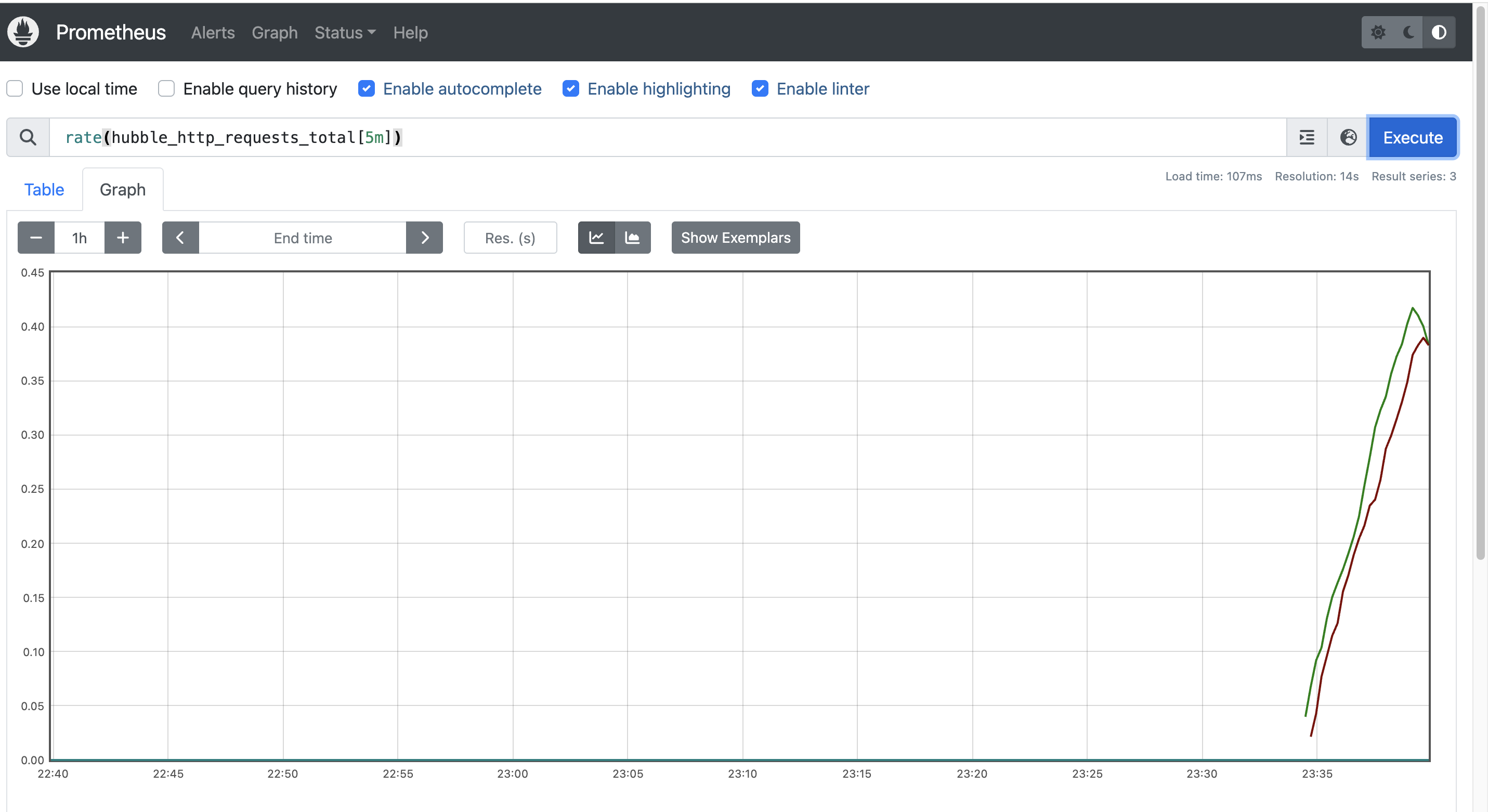

L7 트래픽에는 사용자 이름, 비밀번호, API 키, 쿼리 파라미터 등 민감한 정보가 포함될 수 있습니다.
하지만 Hubble은 기본적으로 이러한 민감 정보를 마스킹하거나 편집하지 않습니다.
root@k8s-ctr:~# kubectl exec -it curl-pod -- sh -c 'curl -s webpod/?user_id=1234'
Hostname: webpod-697b545f57-9r5s9
IP: 127.0.0.1
IP: ::1
IP: 172.20.2.28
IP: fe80::d011:d3ff:fe5c:65d5
RemoteAddr: 172.20.0.217:49968
GET /?user_id=1234 HTTP/1.1
Host: webpod
User-Agent: curl/8.14.1
Accept: */*
X-Envoy-Expected-Rq-Timeout-Ms: 3600000
X-Envoy-Internal: true
X-Forwarded-Proto: http
X-Request-Id: 6b955fec-3098-4ef8-a521-ac5ff6a5451d

# userid 출력
root@k8s-ctr:~# hubble observe -f -t l7 -o compact
Jul 26 23:43:18.313: default/curl-pod:58904 (ID:3975) -> kube-system/coredns-674b8bbfcf-hgjll:53 (ID:63813) dns-request proxy FORWARDED (DNS Query webpod.default.svc.cluster.local. AAAA)
Jul 26 23:43:18.315: default/curl-pod:58904 (ID:3975) -> kube-system/coredns-674b8bbfcf-hgjll:53 (ID:63813) dns-request proxy FORWARDED (DNS Query webpod.default.svc.cluster.local. A)
Jul 26 23:43:18.331: default/curl-pod:58904 (ID:3975) <- kube-system/coredns-674b8bbfcf-hgjll:53 (ID:63813) dns-response proxy FORWARDED (DNS Answer  TTL: 4294967295 (Proxy webpod.default.svc.cluster.local. AAAA))
Jul 26 23:43:18.350: default/curl-pod:58904 (ID:3975) <- kube-system/coredns-674b8bbfcf-hgjll:53 (ID:63813) dns-response proxy FORWARDED (DNS Answer "10.96.201.129" TTL: 30 (Proxy webpod.default.svc.cluster.local. A))
Jul 26 23:43:18.367: default/curl-pod:49968 (ID:3975) -> default/webpod-697b545f57-9r5s9:80 (ID:12432) http-request FORWARDED (HTTP/1.1 GET http://webpod/?user_id=1234)
Jul 26 23:43:18.377: default/curl-pod:49968 (ID:3975) <- default/webpod-697b545f57-9r5s9:80 (ID:12432) http-response FORWARDED (HTTP/1.1 200 10ms (GET http://webpod/?user_id=1234))

# 민감정보 미출력 설정
root@k8s-ctr:~# helm upgrade cilium cilium/cilium --namespace kube-system --reuse-values \
  --set extraArgs="{--hubble-redact-enabled,--hubble-redact-http-urlquery}"

root@k8s-ctr:~# kubectl exec -it curl-pod -- sh -c 'curl -s webpod/?user_id=1234'
Hostname: webpod-697b545f57-9r5s9
IP: 127.0.0.1
IP: ::1
IP: 172.20.2.28
IP: fe80::d011:d3ff:fe5c:65d5
RemoteAddr: 172.20.0.217:58486
GET /?user_id=1234 HTTP/1.1
Host: webpod
User-Agent: curl/8.14.1
Accept: */*
X-Envoy-Expected-Rq-Timeout-Ms: 3600000
X-Envoy-Internal: true
X-Forwarded-Proto: http
X-Request-Id: 2aafc11e-5b43-4645-8a2c-e9e6e7556f67


# userid 미출력
root@k8s-ctr:~# hubble observe -f -t l7 -o compact
Jul 26 23:45:21.614 [hubble-relay-5dcd46f5c-2lfmr]: 1 nodes are unavailable: k8s-w1
Jul 26 23:45:24.424: default/curl-pod:36637 (ID:3975) -> kube-system/coredns-674b8bbfcf-hgjll:53 (ID:63813) dns-request proxy FORWARDED (DNS Query webpod.default.svc.cluster.local. A)
Jul 26 23:45:24.425: default/curl-pod:36637 (ID:3975) -> kube-system/coredns-674b8bbfcf-hgjll:53 (ID:63813) dns-request proxy FORWARDED (DNS Query webpod.default.svc.cluster.local. AAAA)
Jul 26 23:45:24.431: default/curl-pod:36637 (ID:3975) <- kube-system/coredns-674b8bbfcf-hgjll:53 (ID:63813) dns-response proxy FORWARDED (DNS Answer  TTL: 4294967295 (Proxy webpod.default.svc.cluster.local. AAAA))
Jul 26 23:45:24.434: default/curl-pod:36637 (ID:3975) <- kube-system/coredns-674b8bbfcf-hgjll:53 (ID:63813) dns-response proxy FORWARDED (DNS Answer "10.96.201.129" TTL: 30 (Proxy webpod.default.svc.cluster.local. A))
Jul 26 23:45:24.442: default/curl-pod:58486 (ID:3975) -> default/webpod-697b545f57-9r5s9:80 (ID:981) http-request FORWARDED (HTTP/1.1 GET http://webpod/)
Jul 26 23:45:24.449: default/curl-pod:58486 (ID:3975) <- default/webpod-697b545f57-9r5s9:80 (ID:981) http-response FORWARDED (HTTP/1.1 200 9ms (GET http://webpod/))'스터디 > Cilium' 카테고리의 다른 글
| [Cilium] Cilium Native-Routing 모드로 Pod 통신 확인하기 (1) | 2025.08.03 |
|---|---|
| [Cilium] IPAM (3) | 2025.08.03 |
| [Cilium] Cilium Observability - Hubble 설치 및 CiliumNetworkPolicy 적용 (3) | 2025.07.27 |
| [Cilium] Cilium CNI 설치 및 통신 확인 (7) | 2025.07.20 |
| [Cilium] Cilium CNI과 eBPF 소개 (5) | 2025.07.20 |