Cloudnet Cilium 3주차 스터디를 진행하며 정리한 글입니다.
이번 포스팅에서는 IPAM에 대해 알아보겠습니다.
IPAM

Kubernetes 환경에서는 수백~수천 개의 컨테이너가 생성되고 사라지며 멀티 클러스터 또는 하이브리드 클라우드 환경에서 IP 충돌 위험이 존재합니다. 또한, 가상 네트워크, overlay, NAT 등이 복잡하게 얽혀 있는데 이런 상황에서 수동 IP 할당은 불가능하고, 네트워크 장애나 충돌도 자주 발생할 수 있습니다. IPAM은 이러한 문제를 해결하기 위해 사용되는 기술입니다.
IPAM(IP Address Management)은 IP 주소를 체계적으로 할당하고 관리하는 시스템 또는 기능입니다.
IPAM이 없다면 컨테이너마다 수동으로 IP 설정이 필요하여 비효율적이며 자동화 불가능하고, IP 충돌에 대해 통신 장애, 보안 문제, 디버깅 어려움이 발생할 수 있습니다.
IPAM의 주요 기능은 다음과 같습니다.
1. IP 풀 관리
- 특정 서브넷 또는 CIDR 블록에서 가용 IP를 관리
2. 자동 할당 및 해제
- 컨테이너/노드/Pod 생성 시 IP 자동 할당
- 리소스 제거 시 IP 반환
3. 중복/충돌 방지
- 할당 내역 추적을 통해 같은 IP 중복 방지
4.정책 기반 할당
- 예: 특정 네임스페이스에만 특정 IP 범위 할당
5. 이중 스택(IPv4/IPv6) 지원
Cilium에서 IPAM
https://docs.cilium.io/en/stable/network/concepts/ipam/
Cilium은 Kubernetes 환경에서 Pod에게 IP 주소를 할당하기 위해 다양한 IPAM 모드를 제공합니다.
| Feature | Kubernetes Host Scope | Cluster Scope (default) | Multi-Pool (Beta) | CRD-backend | AWS ENI | Azure IPAM | GKE |
| Tunnel routing | ✅ | ✅ | ✅ | ❌ | ❌ | ❌ | ❌ |
| Direct routing | ✅ | ✅ | ✅ | ✅ | ✅ | ✅ | ✅ |
| CIDR Configuration | Kubernetes | Cilium | Cilium | External | External (AWS) | External (Azure) | External (GCP) |
| Multiple CIDRs per cluster | ❌ | ✅ | ✅ | N/A | N/A | N/A | N/A |
| Multiple CIDRs per node | ❌ | ❌ | ✅ | N/A | N/A | N/A | N/A |
| Dynamic CIDR/IP allocation | ❌ | ❌ | ✅ | ✅ | ✅ | ✅ | ❌ |
Feature 설명
- Tunnel routing : VxLAN이나 Geneve 같은 encapsulation을 사용한 overlay 네트워킹 지원 여부
- Direct routing : 클러스터의 네이티브 L3 라우팅 기반 통신 지원 여부 (eBPF 기반)
- CIDR Configuration : IP 풀을 정의하는 방식 (K8s 리소스, Cilium ConfigMap, 외부 리소스 등)
- Multiple CIDRs per cluster : 클러스터 전체에 여러 CIDR 블록 사용 가능 여부
- Multiple CIDRs per node : 하나의 노드에 여러 IP 블록 할당 가능 여부
- Dynamic CIDR/IP allocation : Pod 요청 시 IP 풀 동적 확장, 자동 할당 가능 여부
그 중에서도 많이 사용되는 두 가지는 Kubernetes Host Scope 모드와 Cluster Scope 모드입니다.
Kubernetes Host Scope
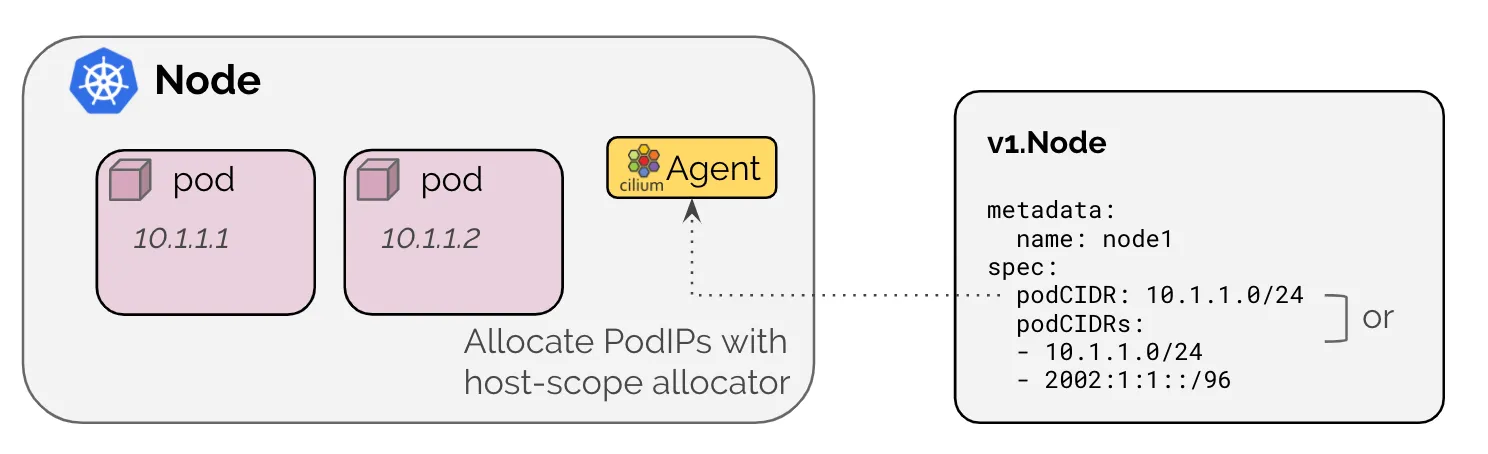
이 모드는 Kubernetes 자체가 각 노드에 PodCIDR을 지정해주고, Cilium은 해당 범위 안에서 Pod IP를 할당합니다.
각 노드는 Kubernetes에 의해 할당된 IP 범위(PodCIDR)를 갖습니다. Cilium은 해당 노드의 IP 범위에서 IP를 하나씩 Pod에 할당합니다. Cilium은 노드의 v1.Node 리소스에 PodCIDR 정보가 나타날 때까지 대기합니다.
장점: Kubernetes 네이티브 방식, 별도 설정이 필요 없음
단점: 클러스터 구성 시 PodCIDR을 미리 정확히 설정해야 하고, 유연성이 떨어짐
Cilium Cluster Scope
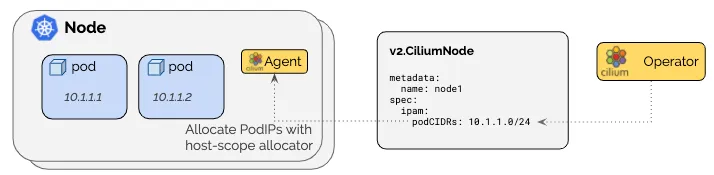
이 모드는 Cilium이 직접 각 노드에 IP 범위를 나눠주는 방식입니다. Kubernetes에 의존하지 않고, Cilium이 클러스터 전체에서 CIDR을 관리합니다.
운영자가 설정한 대역을 기반으로, Cilium이 자동으로 각 노드에 서브넷 단위로 IP 풀을 분배합니다. 이 정보는 Kubernetes의 v1.Node가 아닌, Cilium 전용 리소스인 CiliumNode(CRD)를 통해 관리됩니다. 최소 서브넷 마스크는 /30, 권장 마스크는 /29 이상입니다. (예약된 2개 IP 제외)
장점: Kubernetes 설정에 의존하지 않고, 더 유연하게 IP 풀을 구성 가능, 클러스터 내 IP 사용량을 Cilium이 직접 제어함
단점: CRD(CiliumNode)가 필요하므로 Cilium Operator가 필수
IPAM 마이그레이션 실습
샘플 어플리케이션을 배포하여 IPAM 모드를 Kubernetes Host Scope에서 Cilium Cluster Scope로 마이그레이션 하는 실습을 진행해보겠습니다.
먼저 샘플 어플리케이션을 배포하고 기존 상태를 확인하겠습니다.
# 샘플 어플리케이션 배포
deployment.apps/webpod created
service/webpod created
pod/curl-pod created

# 반복 요청
root@k8s-ctr:~# kubectl exec -it curl-pod -- sh -c 'while true; do curl -s webpod | grep Hostname; sleep 1; done'
Hostname: webpod-697b545f57-c8lj5
Hostname: webpod-697b545f57-4pdl7
Hostname: webpod-697b545f57-4pdl7

# 기존 배포 확인
root@k8s-ctr:~# kubectl get deploy,svc,ep webpod -owide
Warning: v1 Endpoints is deprecated in v1.33+; use discovery.k8s.io/v1 EndpointSlice
NAME                     READY   UP-TO-DATE   AVAILABLE   AGE   CONTAINERS   IMAGES           SELECTOR
deployment.apps/webpod   2/2     2            2           19m   webpod       traefik/whoami   app=webpod

NAME             TYPE        CLUSTER-IP     EXTERNAL-IP   PORT(S)   AGE   SELECTOR
service/webpod   ClusterIP   10.96.212.80   <none>        80/TCP    19m   app=webpod

NAME               ENDPOINTS                         AGE
endpoints/webpod   10.244.0.242:80,10.244.1.141:80   19m

root@k8s-ctr:~# kubectl get endpointslices -l app=webpod
NAME           ADDRESSTYPE   PORTS   ENDPOINTS                   AGE
webpod-pgk98   IPv4          80      10.244.0.242,10.244.1.141   19m

root@k8s-ctr:~# kubectl get ciliumendpoints
NAME                      SECURITY IDENTITY   ENDPOINT STATE   IPV4           IPV6
curl-pod                  9908                ready            10.244.0.56
webpod-697b545f57-4pdl7   18962               ready            10.244.1.141
webpod-697b545f57-c8lj5   39964               ready            10.244.0.242

root@k8s-ctr:~# kubectl exec -it curl-pod -- curl webpod | grep Hostname
Hostname: webpod-697b545f57-4pdl7

# hubble 확인
root@k8s-ctr:~# hubble status
Healthcheck (via localhost:4245): Ok
Current/Max Flows: 6,188/8,190 (75.56%)
Flows/s: 75.01
Connected Nodes: 2/2

root@k8s-ctr:~# hubble observe -f --protocol tcp --to-pod curl-pod
Aug  2 16:11:50.290: default/curl-pod:33426 (ID:9908) <- default/webpod-697b545f57-4pdl7:80 (ID:18962) to-endpoint FORWARDED (TCP Flags: SYN, ACK)
Aug  2 16:11:50.296: default/curl-pod:33426 (ID:9908) <- default/webpod-697b545f57-4pdl7:80 (ID:18962) to-endpoint FORWARDED (TCP Flags: ACK, PSH)
Aug  2 16:11:50.297: default/curl-pod:33426 (ID:9908) <- default/webpod-697b545f57-4pdl7:80 (ID:18962) to-endpoint FORWARDED (TCP Flags: ACK, FIN)

# tcpdump 확인 : 파드 ip 확인
root@k8s-ctr:~# tcpdump -i eth1 tcp port 80 -nn
tcpdump: verbose output suppressed, use -v[v]... for full protocol decode
listening on eth1, link-type EN10MB (Ethernet), snapshot length 262144 bytes
01:13:31.427488 IP 10.244.0.56.56972 > 10.244.1.141.80: Flags [S], seq 1151233317, win 64240, options [mss 1460,sackOK,TS val 582511699 ecr 0,nop,wscale 7], length 0
01:13:31.428488 IP 10.244.1.141.80 > 10.244.0.56.56972: Flags [S.], seq 4267362346, ack 1151233318, win 65160, options [mss 1460,sackOK,TS val 2482024792 ecr 582511699,nop,wscale 7], length 0
01:13:31.428613 IP 10.244.0.56.56972 > 10.244.1.141.80: Flags [.], ack 1, win 502, options [nop,nop,TS val 582511700 ecr 2482024792], length 0
01:13:31.429590 IP 10.244.0.56.56972 > 10.244.1.141.80: Flags [P.], seq 1:71, ack 1, win 502, options [nop,nop,TS val 582511701 ecr 2482024792], length 70: HTTP: GET / HTTP/1.1
01:13:31.429906 IP 10.244.1.141.80 > 10.244.0.56.56972: Flags [.], ack 71, win 509, options [nop,nop,TS val 2482024794 ecr 582511701], length 0
01:13:31.435504 IP 10.244.1.141.80 > 10.244.0.56.56972: Flags [P.], seq 1:322, ack 71, win 509, options [nop,nop,TS val 2482024799 ecr 582511701], length 321: HTTP: HTTP/1.1 200 OK
01:13:31.435578 IP 10.244.0.56.56972 > 10.244.1.141.80: Flags [.], ack 322, win 501, options [nop,nop,TS val 582511707 ecr 2482024799], length 0
01:13:31.435771 IP 10.244.0.56.56972 > 10.244.1.141.80: Flags [F.], seq 71, ack 322, win 501, options [nop,nop,TS val 582511707 ecr 2482024799], length 0
01:13:31.436492 IP 10.244.1.141.80 > 10.244.0.56.56972: Flags [F.], seq 322, ack 72, win 509, options [nop,nop,TS val 2482024800 ecr 582511707], length 0
01:13:31.436570 IP 10.244.0.56.56972 > 10.244.1.141.80: Flags [.], ack 323, win 501, options [nop,nop,TS val 582511708 ecr 2482024800], length 0
이 후 Cluster Scopre 로 설정 변경을 진행하겠습니다.
# Cluster Scopre 로 설정 변경
root@k8s-ctr:~# helm upgrade cilium cilium/cilium --namespace kube-system --version 1.17.6 --reuse-values \
--set ipam.mode="cluster-pool" \
--set ipam.operator.clusterPoolIPv4PodCIDRList={"172.20.0.0/16"} \
--set ipv4NativeRoutingCIDR=172.20.0.0/16
Release "cilium" has been upgraded. Happy Helming!
NAME: cilium
LAST DEPLOYED: Sun Aug  3 01:16:37 2025
NAMESPACE: kube-system
STATUS: deployed
REVISION: 2
TEST SUITE: None
NOTES:
You have successfully installed Cilium with Hubble Relay and Hubble UI.

Your release version is 1.17.6.

For any further help, visit https://docs.cilium.io/en/v1.17/gettinghelp

# 오퍼레이터 재시작
root@k8s-ctr:~# kubectl -n kube-system rollout restart deploy/cilium-operator
deployment.apps/cilium-operator restarted

# cilium 재시작
root@k8s-ctr:~# kubectl -n kube-system rollout restart ds/cilium
daemonset.apps/cilium restarted

# Node 정보 확인
root@k8s-ctr:~# kubectl get nodes -o jsonpath='{range .items[*]}{.metadata.name}{"\t"}{.spec.podCIDR}{"\n"}{end}'
k8s-ctr	10.244.0.0/24
k8s-w1	10.244.1.0/24

root@k8s-ctr:~# cilium config view | grep ^ipam
ipam                                              cluster-pool

root@k8s-ctr:~# kubectl get ciliumendpoints.cilium.io -A
NAMESPACE            NAME                                      SECURITY IDENTITY   ENDPOINT STATE   IPV4           IPV6
cilium-monitoring    grafana-5c69859d9-hrpg9                   35192               ready            10.244.0.94
cilium-monitoring    prometheus-6fc896bc5d-q7wzs               19284               ready            10.244.0.108
default              curl-pod                                  9908                ready            10.244.0.56
default              webpod-697b545f57-4pdl7                   39964               ready            10.244.1.141
default              webpod-697b545f57-c8lj5                   39964               ready            10.244.0.242
kube-system          coredns-674b8bbfcf-szjq5                  2604                ready            10.244.0.136
kube-system          coredns-674b8bbfcf-w86w4                  2604                ready            10.244.0.159
kube-system          hubble-relay-5dcd46f5c-qxcqz              1162                ready            10.244.0.87
kube-system          hubble-ui-76d4965bb6-dh8rk                47309               ready            10.244.0.198
local-path-storage   local-path-provisioner-74f9666bc9-8jqx8   30682               ready            10.244.0.254

root@k8s-ctr:~# kubectl delete ciliumnode k8s-w1
kubectl -n kube-system rollout restart ds/cilium
kubectl get ciliumnode -o json | grep podCIDRs -A2
kubectl get ciliumendpoints.cilium.io -A
                    "podCIDRs": [
                        "10.244.0.0/24"
                    ],
NAMESPACE            NAME                                      SECURITY IDENTITY   ENDPOINT STATE   IPV4           IPV6
cilium-monitoring    grafana-5c69859d9-hrpg9                   35192               ready            10.244.0.94
cilium-monitoring    prometheus-6fc896bc5d-q7wzs               19284               ready            10.244.0.108
default              curl-pod                                  9908                ready            10.244.0.56
default              webpod-697b545f57-c8lj5                   39964               ready            10.244.0.242
kube-system          coredns-674b8bbfcf-szjq5                  2604                ready            10.244.0.136
kube-system          coredns-674b8bbfcf-w86w4                  2604                ready            10.244.0.159
kube-system          hubble-relay-5dcd46f5c-qxcqz              1162                ready            10.244.0.87
kube-system          hubble-ui-76d4965bb6-dh8rk                47309               ready            10.244.0.198
local-path-storage   local-path-provisioner-74f9666bc9-8jqx8   30682               ready            10.244.0.254
root@k8s-ctr:~# kubectl delete ciliumnode k8s-ctr
kubectl -n kube-system rollout restart ds/cilium
kubectl get ciliumnode -o json | grep podCIDRs -A2
kubectl get ciliumendpoints.cilium.io -A
                    "podCIDRs": [
                        "172.20.0.0/24"
                    ],
NAMESPACE            NAME                                      SECURITY IDENTITY   ENDPOINT STATE   IPV4           IPV6
cilium-monitoring    grafana-5c69859d9-hrpg9                   35192               ready            10.244.0.94
cilium-monitoring    prometheus-6fc896bc5d-q7wzs               19284               ready            10.244.0.108
default              curl-pod                                  9908                ready            10.244.0.56
default              webpod-697b545f57-c8lj5                   39964               ready            10.244.0.242
kube-system          coredns-674b8bbfcf-szjq5                  2604                ready            10.244.0.136
kube-system          coredns-674b8bbfcf-w86w4                  2604                ready            10.244.0.159
kube-system          hubble-relay-5dcd46f5c-qxcqz              1162                ready            10.244.0.87
kube-system          hubble-ui-76d4965bb6-dh8rk                47309               ready            10.244.0.198
local-path-storage   local-path-provisioner-74f9666bc9-8jqx8   30682               ready            10.244.0.254

# 노드의 Podcidr static routing 자동 변경 확인
root@k8s-ctr:~# ip -c route
default via 10.0.2.2 dev eth0 proto dhcp src 10.0.2.15 metric 100
10.0.2.0/24 dev eth0 proto kernel scope link src 10.0.2.15 metric 100
10.0.2.2 dev eth0 proto dhcp scope link src 10.0.2.15 metric 100
10.0.2.3 dev eth0 proto dhcp scope link src 10.0.2.15 metric 100
10.10.0.0/16 via 192.168.10.200 dev eth1 proto static
172.20.0.0/24 via 192.168.10.101 dev eth1 proto kernel
172.20.1.99 dev lxc8b7378a068a9 proto kernel scope link
192.168.10.0/24 dev eth1 proto kernel scope link src 192.168.10.100

root@k8s-ctr:~# sshpass -p 'vagrant' ssh vagrant@k8s-w1 ip -c route
default via 10.0.2.2 dev eth0 proto dhcp src 10.0.2.15 metric 100
10.0.2.0/24 dev eth0 proto kernel scope link src 10.0.2.15 metric 100
10.0.2.2 dev eth0 proto dhcp scope link src 10.0.2.15 metric 100
10.0.2.3 dev eth0 proto dhcp scope link src 10.0.2.15 metric 100
10.10.0.0/16 via 192.168.10.200 dev eth1 proto static
172.20.0.23 dev lxc609f25f72da3 proto kernel scope link
172.20.1.0/24 via 192.168.10.100 dev eth1 proto kernel
192.168.10.0/24 dev eth1 proto kernel scope link src 192.168.10.101

root@k8s-ctr:~# kubectl get pod -A -owide | grep 10.244.
cilium-monitoring    grafana-5c69859d9-hrpg9                   0/1     Running            0             61m     10.244.0.94      k8s-ctr   <none>           <none>
cilium-monitoring    prometheus-6fc896bc5d-q7wzs               1/1     Running            0             61m     10.244.0.108     k8s-ctr   <none>           <none>
default              curl-pod                                  1/1     Running            0             35m     10.244.0.56      k8s-ctr   <none>           <none>
default              webpod-697b545f57-4pdl7                   1/1     Running            0             35m     10.244.1.141     k8s-w1    <none>           <none>
default              webpod-697b545f57-c8lj5                   1/1     Running            0             35m     10.244.0.242     k8s-ctr   <none>           <none>
kube-system          hubble-relay-5dcd46f5c-qxcqz              0/1     Running            2 (6s ago)    61m     10.244.0.87      k8s-ctr   <none>           <none>
kube-system          hubble-ui-76d4965bb6-dh8rk                1/2     CrashLoopBackOff   4 (39s ago)   61m     10.244.0.198     k8s-ctr   <none>           <none>
local-path-storage   local-path-provisioner-74f9666bc9-8jqx8   1/1     Running            0             61m     10.244.0.254     k8s-ctr   <none>           <none>


# 롤아웃하여 restart 확인
root@k8s-ctr:~# kubectl -n kube-system rollout restart deploy/hubble-relay deploy/hubble-ui
kubectl -n cilium-monitoring rollout restart deploy/prometheus deploy/grafana
kubectl rollout restart deploy/webpod
kubectl delete pod curl-pod
deployment.apps/hubble-relay restarted
deployment.apps/hubble-ui restarted
deployment.apps/prometheus restarted
deployment.apps/grafana restarted
deployment.apps/webpod restarted
pod "curl-pod" deleted

# k8s-ctr 노드에 curl-pod 파드 배포
cat <<EOF | kubectl apply -f -
apiVersion: v1
kind: Pod
metadata:
  name: curl-pod
  labels:
    app: curl
spec:
  nodeName: k8s-ctr
  containers:
  - name: curl
    image: nicolaka/netshoot
    command: ["tail"]
    args: ["-f", "/dev/null"]
  terminationGracePeriodSeconds: 0
EOF


root@k8s-ctr:~# kubectl get ciliumendpoints.cilium.io -A
NAMESPACE           NAME                            SECURITY IDENTITY   ENDPOINT STATE   IPV4           IPV6
cilium-monitoring   grafana-69f88f6f54-2m7tg        35192               ready            172.20.0.175
cilium-monitoring   prometheus-688d4794df-5jmkl     19284               ready            172.20.0.217
default             curl-pod                        9908                ready            172.20.1.137
default             webpod-7f475cbd84-w6dgr         39964               ready            172.20.1.220
default             webpod-7f475cbd84-z8qhj         39964               ready            172.20.0.116
kube-system         coredns-674b8bbfcf-p6s2b        2604                ready            172.20.1.99
kube-system         coredns-674b8bbfcf-x9m2c        2604                ready            172.20.0.23
kube-system         hubble-relay-588dc95ff9-mmvzh   1162                ready            172.20.0.197
kube-system         hubble-ui-75b8f5587b-xmth5      47309               ready            172.20.0.167

# 반복 요청
root@k8s-ctr:~# kubectl exec -it curl-pod -- sh -c 'while true; do curl -s webpod | grep Hostname; sleep 1; done'
Hostname: webpod-7f475cbd84-w6dgr
Hostname: webpod-7f475cbd84-w6dgr
Hostname: webpod-7f475cbd84-w6dgr
이번 실습에서는 Cilium의 IPAM 모드를 기존 Kubernetes 호스트 기반에서 Cilium 자체 IP 풀 기반인 cluster-pool 모드로 전환하고, 변경된 구조가 정상적으로 적용되는지 검증했습니다.
Helm을 사용해 Cilium을 업그레이드하며 IPAM 모드를 cluster-pool로 지정하고, 클러스터 전체에 사용할 Pod CIDR 대역을 172.20.0.0/16으로 설정했습니다. 이후 Cilium Operator와 Cilium 에이전트를 재시작하여 변경 사항을 반영했습니다.
기존에는 Kubernetes가 각 노드에 10.244.x.0/24 형식의 PodCIDR을 할당하고, 그 범위 내에서 Pod에 IP가 부여되었지만, 전환 후에는 Cilium이 직접 노드별로 172.20.x.0/24 대역을 자동 분배하고 관리하도록 구성되었습니다.
CiliumNode 리소스를 삭제하고 다시 생성되도록 유도하면서 각 노드가 새로운 IP 풀을 할당받았고, 이때 생성된 Pod들이 새로운 CIDR 대역의 IP를 부여받는 것을 확인할 수 있었습니다. 또한 각 노드의 라우팅 테이블에 Cilium이 자동으로 static route를 구성함으로써, 노드 간 통신이 정상적으로 이루어지는지, curl을 통해 다른 노드의 Pod에 지속적으로 요청을 보내보면서 통신이 문제없이 작동하는 것도 확인했습니다.
'스터디 > Cilium' 카테고리의 다른 글
| [Cilium] eBPF 기반 NAT Masquerading 동작 및 ip-masq-agent를 통한 SNAT 제외 확인하기 (3) | 2025.08.03 |
|---|---|
| [Cilium] Cilium Native-Routing 모드로 Pod 통신 확인하기 (1) | 2025.08.03 |
| [Cilium] Prometheus, Grafana을 활용한 Cilium 모니터링 (6) | 2025.07.27 |
| [Cilium] Cilium Observability - Hubble 설치 및 CiliumNetworkPolicy 적용 (3) | 2025.07.27 |
| [Cilium] Cilium CNI 설치 및 통신 확인 (7) | 2025.07.20 |