Cloudnet Cilium 5주차 스터디를 진행하며 정리한 글입니다.
이번 포스팅에서는 Cilium Custom Resource(CR)를 통해 BGP를 구성하고, 실제 통신까지 확인하는 과정을 확인하겠습니다.
BGP
BGP(Border Gateway Protocol)란, 인터넷에서 서로 다른 네트워크(AS, Autonomous System) 간에 어떤 경로로 데이터를 보내야 하는지 알려주는 길 안내자 같은 역할을 합니다. 집에서 길을 찾아갈 때 네비게이션이 여러 경로를 비교해 최적의 길을 알려주듯이, BGP는 전 세계 수많은 네트워크가 연결된 인터넷에서 최적의 경로를 찾아주는 프로토콜입니다.
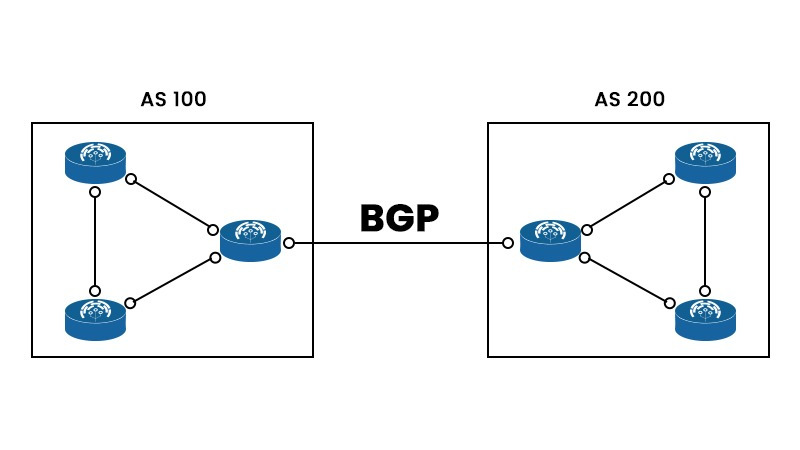
Cilium BGP Control Plane
쿠버네티스 환경에서 서비스 네트워크를 외부 라우터와 연동하려면 BGP가 필요합니다. 기존에는 MetalLB가 Service External IP를 BGP로 광고하고, 확장된 기능은 FRR을 붙여서 처리하는 경우가 많았습니다.
하지만 Cilium은 자체적으로 BGP Control Plane을 내장하고 있어, 별도 구성 없이 CR 기반으로 BGP를 설정하고 운영할 수 있습니다.
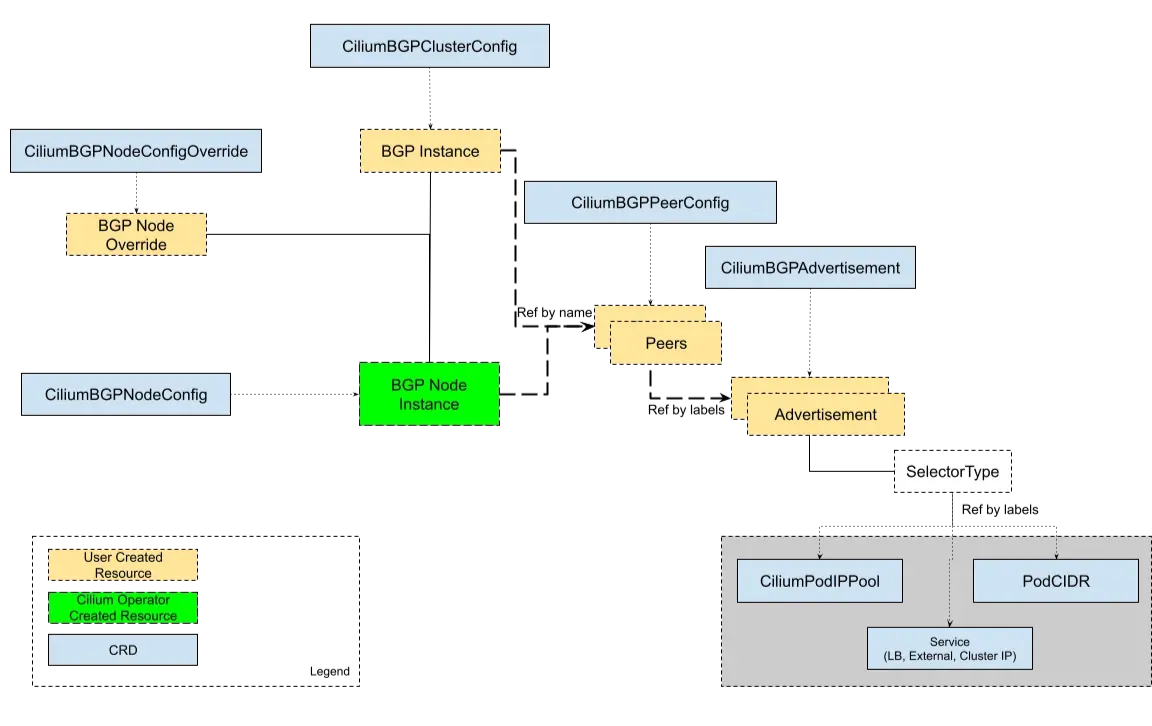
Cilium은 BGP 구성 CRD(Custom Resource Definition)
- CiliumBGPClusterConfig
- 클러스터 전체 차원에서 BGP 인스턴스와 피어(peers) 정의를 묶어서 적용하는 리소스
- 즉, 어떤 노드들이 BGP를 할지(nodeSelector), 로컬 AS 번호(local ASN), 연결할 피어(예: 라우터) 등을 정의
- 여러 노드가 공통으로 가져야 할 설정을 한 번에 관리 가능
- CiliumBGPPeerConfig
- BGP 피어링 시 필요한 공통 설정 세트
- ex: KeepAlive/hold 타이머, graceful restart 옵션, eBGP multihop 여부, 지원 주소 패밀리(ipv4/unicast)
- 이걸 미리 정의해두고 CiliumBGPClusterConfig에서 참조해서 사용 → 템플릿 같은 역할
- CiliumBGPAdvertisement
- 실제로 외부에 어떤 경로(prefix)를 광고할지 정의하는 리소스
- PodCIDR, Service LoadBalancer IP 같은 prefix를 선택적으로 BGP에 넣을 수 있음
- 즉, “내가 외부에 알릴 주소는 이것이다”를 선언하는 부분
- CiliumBGPNodeConfigOverride
- 특정 노드에 대해서만 별도의 BGP 설정을 하고 싶을 때 사용
- 예를 들어 대부분 노드는 동일한 설정을 쓰되, 한 노드만 다른 ASN을 쓰거나 특정 광고만 끄고 싶을 때 이 리소스로 fine-grained control
Cilium BGP 설정과 통신 검증
실습 환경
현재 실습을 진행할 환경은 다음과 같습니다.
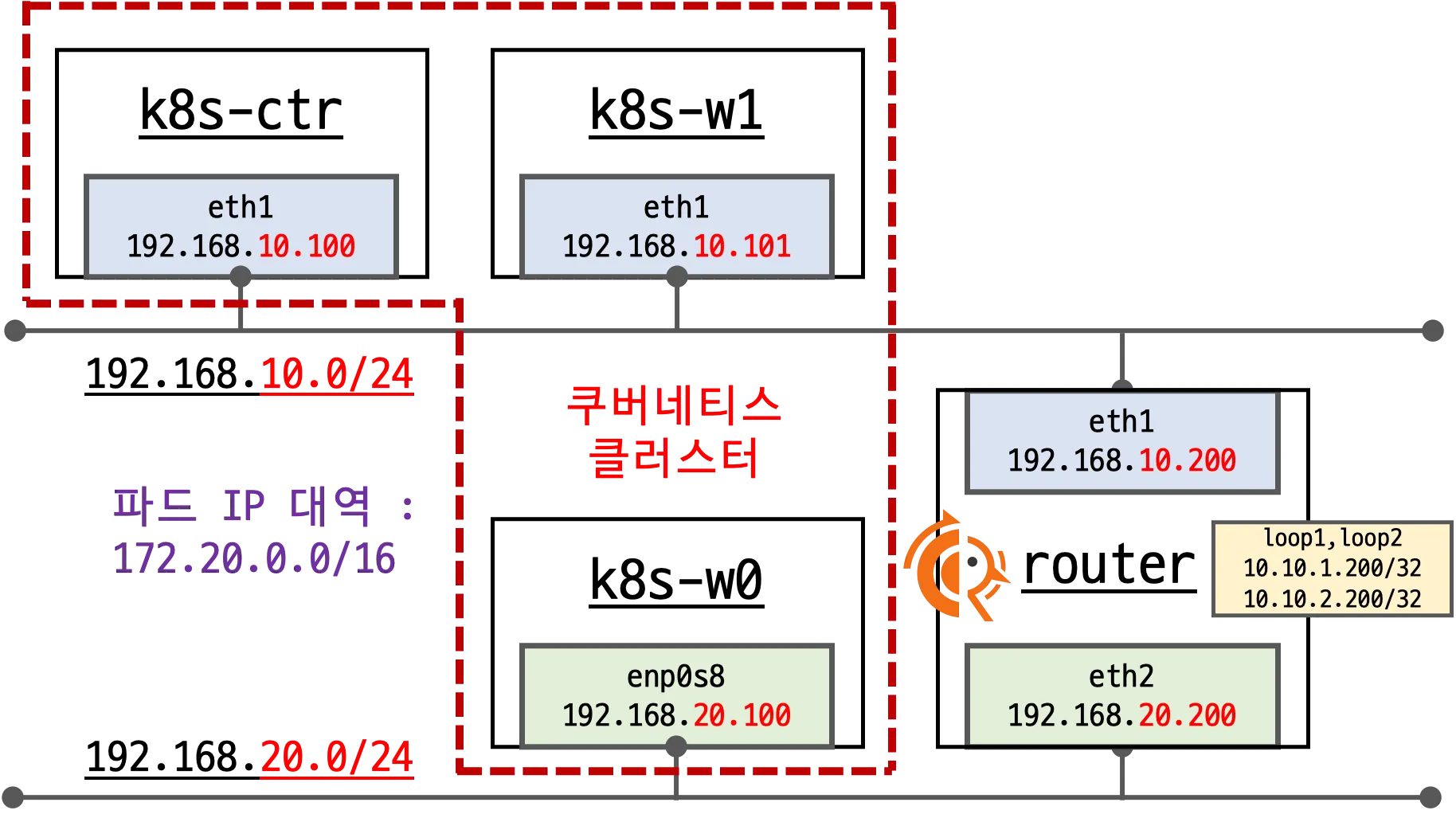
- 기본 배포 가상 머신 : k8s-ctr, k8s-w1, k8s-w0, router (frr 라우팅)
- router : 192.168.10.0/24 ↔ 192.168.20.0/24 대역 라우팅 역할, k8s 에 join 되지 않은 서버, BGP 동작을 위한 frr 툴 설치됨
- k8s-w0 : k8s-ctr/w1 노드와 다른 네트워크 대역에 배치
현재는 노드 내 파드들끼리만 통신 되는 것을 확인할 수 있습니다.
root@k8s-ctr:~# kubectl get pod -o wide
NAME                      READY   STATUS    RESTARTS   AGE   IP             NODE      NOMINATED NODE   READINESS GATES
curl-pod                  1/1     Running   0          93s   172.20.0.193   k8s-ctr   <none>           <none>
webpod-697b545f57-2nq82   1/1     Running   0          94s   172.20.0.113   k8s-ctr   <none>           <none>
webpod-697b545f57-pfps6   1/1     Running   0          94s   172.20.1.185   k8s-w1    <none>           <none>
webpod-697b545f57-rwpss   1/1     Running   0          94s   172.20.2.13    k8s-w0    <none>           <none>

root@k8s-ctr:~# kubectl exec -it curl-pod -- sh -c 'while true; do curl -s --connect-timeout 1 webpod | grep Hostname; echo "---" ; sleep 1; done'
---

---
Hostname: webpod-697b545f57-2nq82
---
---
---
Hostname: webpod-697b545f57-2nq82
---
---
Hostname: webpod-697b545f57-2nq82
---
Hostname: webpod-697b545f57-2nq82
---
Cilium에 BGP 설정 적용
# FRR 데몬들이 정상 실행 중인지 확인
root@router:~# ss -tnlp | grep -iE 'zebra|bgpd'
LISTEN 0      3          127.0.0.1:2601      0.0.0.0:*    users:(("zebra",pid=4136,fd=23))
LISTEN 0      3          127.0.0.1:2605      0.0.0.0:*    users:(("bgpd",pid=4141,fd=18))
LISTEN 0      4096         0.0.0.0:179       0.0.0.0:*    users:(("bgpd",pid=4141,fd=22))
LISTEN 0      4096            [::]:179          [::]:*    users:(("bgpd",pid=4141,fd=23))

root@router:~# ps -ef |grep frr
root        4123       1  0 04:35 ?        00:00:03 /usr/lib/frr/watchfrr -d -F traditional zebra bgpd staticd
frr         4136       1  0 04:35 ?        00:00:02 /usr/lib/frr/zebra -d -F traditional -A 127.0.0.1 -s 90000000
frr         4141       1  0 04:35 ?        00:00:01 /usr/lib/frr/bgpd -d -F traditional -A 127.0.0.1
frr         4148       1  0 04:35 ?        00:00:01 /usr/lib/frr/staticd -d -F traditional -A 127.0.0.1
root        4534    4509  0 06:15 pts/1    00:00:00 grep --color=auto frr

# 라우터 자체 BGP 설정 확인
# AS 65000으로 동작 중이고, router-id는 192.168.10.200으로 지정되어 있음
# network 10.10.1.0/24 같은 로컬 네트워크 광고도 설정
root@router:~# vtysh -c 'show running'
Building configuration...

Current configuration:
!
frr version 8.4.4
frr defaults traditional
hostname router
log syslog informational
no ipv6 forwarding
service integrated-vtysh-config
!
router bgp 65000
 bgp router-id 192.168.10.200
 no bgp ebgp-requires-policy
 bgp graceful-restart
 bgp bestpath as-path multipath-relax
 !
 address-family ipv4 unicast
  network 10.10.1.0/24
  maximum-paths 4
 exit-address-family
exit
!
end


# BGP 상태 확인 → 아직 피어링 세션을 맺은 노드가 없음
root@router:~# vtysh -c 'show ip bgp summary'
% No BGP neighbors found in VRF default

root@router:~# vtysh -c 'show ip bgp'
BGP table version is 1, local router ID is 192.168.10.200, vrf id 0
Default local pref 100, local AS 65000
Status codes:  s suppressed, d damped, h history, * valid, > best, = multipath,
               i internal, r RIB-failure, S Stale, R Removed
Nexthop codes: @NNN nexthop's vrf id, < announce-nh-self
Origin codes:  i - IGP, e - EGP, ? - incomplete
RPKI validation codes: V valid, I invalid, N Not found

   Network          Next Hop            Metric LocPrf Weight Path
*> 10.10.1.0/24     0.0.0.0                  0         32768 i

Displayed  1 routes and 1 total paths

# 커널 라우팅 테이블 확인
# Loopback(10.10.1.0/24, 10.10.2.0/24), 192.168.10.0/24, 192.168.20.0/24 같은 직접 연결된 네트워크만 커널에 존재
root@router:~# ip -c route
default via 10.0.2.2 dev eth0 proto dhcp src 10.0.2.15 metric 100
10.0.2.0/24 dev eth0 proto kernel scope link src 10.0.2.15 metric 100
10.0.2.2 dev eth0 proto dhcp scope link src 10.0.2.15 metric 100
10.0.2.3 dev eth0 proto dhcp scope link src 10.0.2.15 metric 100
10.10.1.0/24 dev loop1 proto kernel scope link src 10.10.1.200
10.10.2.0/24 dev loop2 proto kernel scope link src 10.10.2.200
192.168.10.0/24 dev eth1 proto kernel scope link src 192.168.10.200
192.168.20.0/24 dev eth2 proto kernel scope link src 192.168.20.200

root@router:~# vtysh -c 'show ip route'
Codes: K - kernel route, C - connected, S - static, R - RIP,
       O - OSPF, I - IS-IS, B - BGP, E - EIGRP, N - NHRP,
       T - Table, v - VNC, V - VNC-Direct, A - Babel, F - PBR,
       f - OpenFabric,
       > - selected route, * - FIB route, q - queued, r - rejected, b - backup
       t - trapped, o - offload failure

K>* 0.0.0.0/0 [0/100] via 10.0.2.2, eth0, src 10.0.2.15, 01:40:53
C>* 10.0.2.0/24 [0/100] is directly connected, eth0, 01:40:53
K>* 10.0.2.2/32 [0/100] is directly connected, eth0, 01:40:53
K>* 10.0.2.3/32 [0/100] is directly connected, eth0, 01:40:53
C>* 10.10.1.0/24 is directly connected, loop1, 01:40:53
C>* 10.10.2.0/24 is directly connected, loop2, 01:40:53
C>* 192.168.10.0/24 is directly connected, eth1, 01:40:53
C>* 192.168.20.0/24 is directly connected, eth2, 01:40:53
/etc/frr/frr.conf에 peer-group(CILIUM) 과 세 노드(192.168.10.100/101, 192.168.20.100)를 이웃으로 추가하였습니다. systemctl restart frr 이후 watchfrr, zebra, bgpd 전부 정상 기동 확인했습니다.
enable-bgp=true 라벨이 붙은 3개 노드가 타깃으로 지정하였습니다.
CiliumBGPClusterConfig, PeerConfig, Advertisement 정상 생성되었습니다.
root@router:~# cat << EOF >> /etc/frr/frr.conf
  neighbor CILIUM peer-group
  neighbor CILIUM remote-as external
  neighbor 192.168.10.100 peer-group CILIUM
  neighbor 192.168.10.101 peer-group CILIUM
  neighbor 192.168.20.100 peer-group CILIUM
EOF
root@router:~# cat /etc/frr/frr.conf
# default to using syslog. /etc/rsyslog.d/45-frr.conf places the log in
# /var/log/frr/frr.log
#
# Note:
# FRR's configuration shell, vtysh, dynamically edits the live, in-memory
# configuration while FRR is running. When instructed, vtysh will persist the
# live configuration to this file, overwriting its contents. If you want to
# avoid this, you can edit this file manually before starting FRR, or instruct
# vtysh to write configuration to a different file.
log syslog informational
!
router bgp 65000
  bgp router-id 192.168.10.200
  bgp graceful-restart
  no bgp ebgp-requires-policy
  bgp bestpath as-path multipath-relax
  maximum-paths 4
  network 10.10.1.0/24
  neighbor CILIUM peer-group
  neighbor CILIUM remote-as external
  neighbor 192.168.10.100 peer-group CILIUM
  neighbor 192.168.10.101 peer-group CILIUM
  neighbor 192.168.20.100 peer-group CILIUM
  root@router:~# systemctl daemon-reexec && systemctl restart frr
root@router:~# systemctl status frr --no-pager --full
● frr.service - FRRouting
     Loaded: loaded (/usr/lib/systemd/system/frr.service; enabled; preset: enabled)
     Active: active (running) since Sun 2025-08-17 06:18:17 KST; 7s ago
       Docs: https://frrouting.readthedocs.io/en/latest/setup.html
    Process: 4630 ExecStart=/usr/lib/frr/frrinit.sh start (code=exited, status=0/SUCCESS)
   Main PID: 4641 (watchfrr)
     Status: "FRR Operational"
      Tasks: 13 (limit: 553)
     Memory: 19.5M (peak: 27.1M)
        CPU: 367ms
     CGroup: /system.slice/frr.service
             ├─4641 /usr/lib/frr/watchfrr -d -F traditional zebra bgpd staticd
             ├─4654 /usr/lib/frr/zebra -d -F traditional -A 127.0.0.1 -s 90000000
             ├─4659 /usr/lib/frr/bgpd -d -F traditional -A 127.0.0.1
             └─4666 /usr/lib/frr/staticd -d -F traditional -A 127.0.0.1

Aug 17 06:18:17 router watchfrr[4641]: [YFT0P-5Q5YX] Forked background command [pid 4642]: /usr/lib/frr/watchfrr.sh restart all
Aug 17 06:18:17 router zebra[4654]: [VTVCM-Y2NW3] Configuration Read in Took: 00:00:00
Aug 17 06:18:17 router bgpd[4659]: [VTVCM-Y2NW3] Configuration Read in Took: 00:00:00
Aug 17 06:18:17 router staticd[4666]: [VTVCM-Y2NW3] Configuration Read in Took: 00:00:00
Aug 17 06:18:17 router watchfrr[4641]: [QDG3Y-BY5TN] zebra state -> up : connect succeeded
Aug 17 06:18:17 router systemd[1]: Started frr.service - FRRouting.
Aug 17 06:18:17 router frrinit.sh[4630]:  * Started watchfrr
Aug 17 06:18:17 router watchfrr[4641]: [QDG3Y-BY5TN] bgpd state -> up : connect succeeded
Aug 17 06:18:17 router watchfrr[4641]: [QDG3Y-BY5TN] staticd state -> up : connect succeeded
Aug 17 06:18:17 router watchfrr[4641]: [KWE5Q-QNGFC] all daemons up, doing startup-complete notify


# BGP 동작할 노드를 위한 label 설정
root@k8s-ctr:~# kubectl label nodes k8s-ctr k8s-w0 k8s-w1 enable-bgp=true
node/k8s-ctr labeled
node/k8s-w0 labeled
node/k8s-w1 labeled

root@k8s-ctr:~# kubectl get node -l enable-bgp=true
NAME      STATUS   ROLES           AGE     VERSION
k8s-ctr   Ready    control-plane   5h33m   v1.33.2
k8s-w0    Ready    <none>          5h26m   v1.33.2
k8s-w1    Ready    <none>          5h31m   v1.33.2


# Config Cilium BGP

cat << EOF | kubectl apply -f -
apiVersion: cilium.io/v2
kind: CiliumBGPAdvertisement
metadata:
  name: bgp-advertisements
  labels:
    advertise: bgp
spec:
  advertisements:
    - advertisementType: "PodCIDR"
---
apiVersion: cilium.io/v2
kind: CiliumBGPPeerConfig
metadata:
  name: cilium-peer
spec:
  timers:
    holdTimeSeconds: 9
    keepAliveTimeSeconds: 3
  ebgpMultihop: 2
  gracefulRestart:
    enabled: true
    restartTimeSeconds: 15
  families:
    - afi: ipv4
      safi: unicast
      advertisements:
        matchLabels:
          advertise: "bgp"
---
apiVersion: cilium.io/v2
kind: CiliumBGPClusterConfig
metadata:
  name: cilium-bgp
spec:
  nodeSelector:
    matchLabels:
      "enable-bgp": "true"
  bgpInstances:
  - name: "instance-65001"
    localASN: 65001
    peers:
    - name: "tor-switch"
      peerASN: 65000
      peerAddress: 192.168.10.200  # router ip address
      peerConfigRef:
        name: "cilium-peer"
EOF
ciliumbgpadvertisement.cilium.io/bgp-advertisements created
ciliumbgppeerconfig.cilium.io/cilium-peer created
ciliumbgpclusterconfig.cilium.io/cilium-bgp created
위 cilium CiliumBGPClusterConfig, PeerConfig, Advertisement 생성하기 전 router에 모니터링 걸어 놓았는데요.
마지막 줄에
journalctl -u frr -f 에 "rcvd End-of-RIB for IPv4 Unicast from …" 3건 출력 된 것을 보아 양방향 업데이트 끝났다는 정상 BGP 세션 신호를 응답 받은 것을 알 수 있습니다.
root@router:~# journalctl -u frr -f
Aug 17 06:18:17 router watchfrr[4641]: [YFT0P-5Q5YX] Forked background command [pid 4642]: /usr/lib/frr/watchfrr.sh restart all
Aug 17 06:18:17 router zebra[4654]: [VTVCM-Y2NW3] Configuration Read in Took: 00:00:00
Aug 17 06:18:17 router bgpd[4659]: [VTVCM-Y2NW3] Configuration Read in Took: 00:00:00
Aug 17 06:18:17 router staticd[4666]: [VTVCM-Y2NW3] Configuration Read in Took: 00:00:00
Aug 17 06:18:17 router watchfrr[4641]: [QDG3Y-BY5TN] zebra state -> up : connect succeeded
Aug 17 06:18:17 router systemd[1]: Started frr.service - FRRouting.
Aug 17 06:18:17 router frrinit.sh[4630]:  * Started watchfrr
Aug 17 06:18:17 router watchfrr[4641]: [QDG3Y-BY5TN] bgpd state -> up : connect succeeded
Aug 17 06:18:17 router watchfrr[4641]: [QDG3Y-BY5TN] staticd state -> up : connect succeeded
Aug 17 06:18:17 router watchfrr[4641]: [KWE5Q-QNGFC] all daemons up, doing startup-complete notify
Aug 17 06:34:20 router bgpd[4659]: [M59KS-A3ZXZ] bgp_update_receive: rcvd End-of-RIB for IPv4 Unicast from 192.168.10.101 in vrf default
Aug 17 06:34:20 router bgpd[4659]: [M59KS-A3ZXZ] bgp_update_receive: rcvd End-of-RIB for IPv4 Unicast from 192.168.20.100 in vrf default
Aug 17 06:34:20 router bgpd[4659]: [M59KS-A3ZXZ] bgp_update_receive: rcvd End-of-RIB for IPv4 Unicast from 192.168.10.100 in vrf default
BGP 연결 확인을 통해 cilium-agent ↔ 192.168.10.200:179 ESTABLISHED 확인할 수 있습니다.
cilium bgp peers를 통해 3노드 모두 established된 것을 알 수 있습니다.
# BGP 연결 확인
root@k8s-ctr:~# ss -tnp | grep 179
ESTAB 0      0               192.168.10.100:47495          192.168.10.200:179   users:(("cilium-agent",pid=5390,fd=201))


# cilium bgp 정보 확인
root@k8s-ctr:~# cilium bgp peers
Node      Local AS   Peer AS   Peer Address     Session State   Uptime   Family         Received   Advertised
k8s-ctr   65001      65000     192.168.10.200   established     1m45s    ipv4/unicast   4          2
k8s-w0    65001      65000     192.168.10.200   established     1m45s    ipv4/unicast   4          2
k8s-w1    65001      65000     192.168.10.200   established     1m45s    ipv4/unicast   4          2

root@k8s-ctr:~# cilium bgp routes available ipv4 unicast
Node      VRouter   Prefix          NextHop   Age     Attrs
k8s-ctr   65001     172.20.0.0/24   0.0.0.0   2m15s   [{Origin: i} {Nexthop: 0.0.0.0}]
k8s-w0    65001     172.20.2.0/24   0.0.0.0   2m15s   [{Origin: i} {Nexthop: 0.0.0.0}]
k8s-w1    65001     172.20.1.0/24   0.0.0.0   2m15s   [{Origin: i} {Nexthop: 0.0.0.0}]

root@k8s-ctr:~# kubectl get ciliumbgpadvertisements,ciliumbgppeerconfigs,ciliumbgpclusterconfigs
NAME                                                  AGE
ciliumbgpadvertisement.cilium.io/bgp-advertisements   3m6s

NAME                                        AGE
ciliumbgppeerconfig.cilium.io/cilium-peer   3m6s

NAME                                          AGE
ciliumbgpclusterconfig.cilium.io/cilium-bgp   3m5s
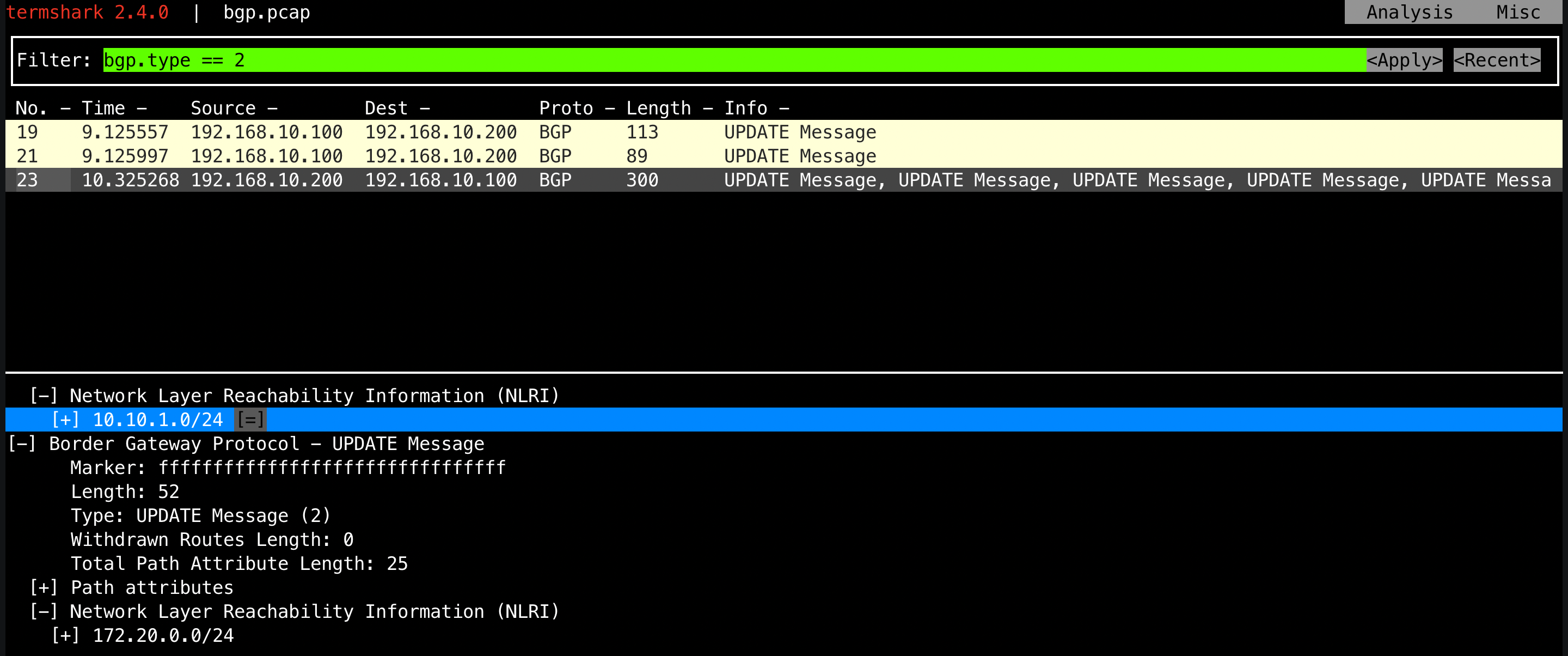
아래 결과를 통해 확인할 수 있듯이, 라우터(FRR)는 Cilium 노드들이 광고한 PodCIDR(172.20.x.0/24)을 수신해 라우팅 테이블에 반영했습니다.
root@router:~# ip -c route | grep bgp
172.20.0.0/24 nhid 32 via 192.168.10.100 dev eth1 proto bgp metric 20
172.20.1.0/24 nhid 30 via 192.168.10.101 dev eth1 proto bgp metric 20
172.20.2.0/24 nhid 31 via 192.168.20.100 dev eth2 proto bgp metric 20

root@router:~# vtysh -c 'show ip bgp summary'

IPv4 Unicast Summary (VRF default):
BGP router identifier 192.168.10.200, local AS number 65000 vrf-id 0
BGP table version 4
RIB entries 7, using 1344 bytes of memory
Peers 3, using 2172 KiB of memory
Peer groups 1, using 64 bytes of memory

Neighbor        V         AS   MsgRcvd   MsgSent   TblVer  InQ OutQ  Up/Down State/PfxRcd   PfxSnt Desc
192.168.10.100  4      65001        87        90        0    0    0 00:04:10            1        4 N/A
192.168.10.101  4      65001        87        90        0    0    0 00:04:10            1        4 N/A
192.168.20.100  4      65001        87        90        0    0    0 00:04:10            1        4 N/A

Total number of neighbors 3

root@router:~# vtysh -c 'show ip bgp'
BGP table version is 4, local router ID is 192.168.10.200, vrf id 0
Default local pref 100, local AS 65000
Status codes:  s suppressed, d damped, h history, * valid, > best, = multipath,
               i internal, r RIB-failure, S Stale, R Removed
Nexthop codes: @NNN nexthop's vrf id, < announce-nh-self
Origin codes:  i - IGP, e - EGP, ? - incomplete
RPKI validation codes: V valid, I invalid, N Not found

   Network          Next Hop            Metric LocPrf Weight Path
*> 10.10.1.0/24     0.0.0.0                  0         32768 i
*> 172.20.0.0/24    192.168.10.100                         0 65001 i
*> 172.20.1.0/24    192.168.10.101                         0 65001 i
*> 172.20.2.0/24    192.168.20.100                         0 65001 i

Displayed  4 routes and 4 total paths
하지만, 통신이 되지 않습니다!
하지만 Cilium은 수신한 외부 BGP 경로를 노드 커널 라우팅 테이블에는 설치하지 않습니다. 이는 Cilium이 BGP를 Control Plane 전용으로 동작시키기 때문이며, 내부적으로는 cilium-agent가 GoBGP를 통해 세션을 관리합니다.
root@k8s-ctr:~# kubectl exec -it curl-pod -- sh -c 'while true; do curl -s --connect-timeout 1 webpod | grep Hostname; echo "---" ; sleep 1; done'
---
---
---
---
---
---
---
---
---
---
---
Hostname: webpod-697b545f57-2nq82
---
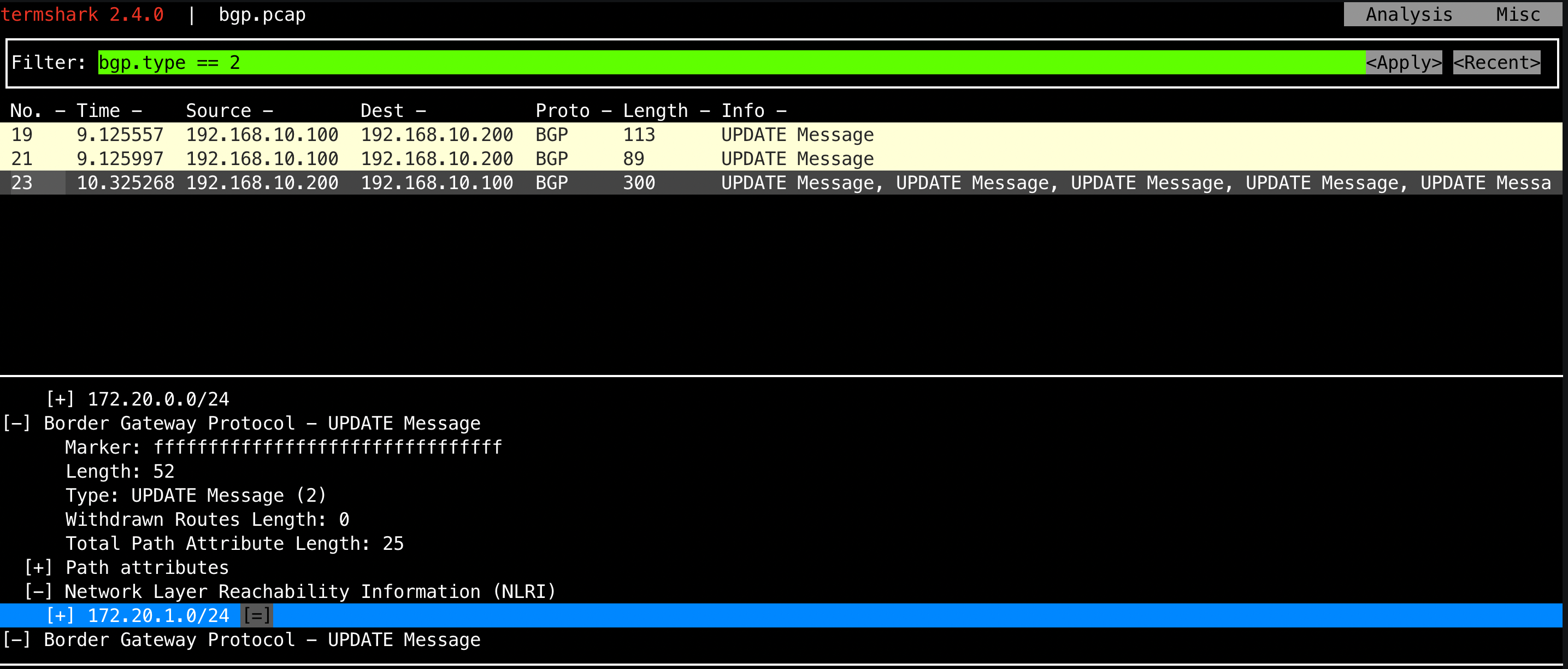
이번 실습 환경처럼 노드에 NIC가 두 개 이상 존재하는 경우, Cilium의 BGP만으로는 충분하지 않습니다.
기본 게이트웨이가 eth0에 잡혀 있다면, 실제로 Kubernetes 파드 네트워크 대역(172.20.0.0/16)은 eth1을 통해 나가야 합니다. 따라서 노드 OS에 별도로 라우팅을 지정해줘야 트래픽이 올바르게 전달됩니다.
이렇게 설정된 라우팅은 상단의 네트워크 장비(라우터)가 받아서 처리하며, 라우터는 이미 Cilium을 통해 각 노드의 PodCIDR 정보를 알고 있으므로 목적지 파드까지 패킷을 전달할 수 있습니다.
# k8s 파드 사용 대역 통신 전체는 eth1을 통해서 라우팅 설정
root@k8s-ctr:~# ip route add 172.20.0.0/16 via 192.168.10.200
root@k8s-ctr:~# sshpass -p 'vagrant' ssh vagrant@k8s-w1 sudo ip route add 172.20.0.0/16 via 192.168.10.200
root@k8s-ctr:~# sshpass -p 'vagrant' ssh vagrant@k8s-w0 sudo ip route add 172.20.0.0/16 via 192.168.20.200

# 정상 통신 확인
root@k8s-ctr:~# kubectl exec -it curl-pod -- sh -c 'while true; do curl -s --connect-timeout 1 webpod | grep Hostname; echo "---" ; sleep 1; done'
---
Hostname: webpod-697b545f57-pfps6
---
Hostname: webpod-697b545f57-rwpss
---
Hostname: webpod-697b545f57-pfps6
---
Hostname: webpod-697b545f57-pfps6
---
Hostname: webpod-697b545f57-2nq82
---
Hostname: webpod-697b545f57-pfps6
---
Hostname: webpod-697b545f57-rwpss
---
Hostname: webpod-697b545f57-pfps6
---
Hostname: webpod-697b545f57-2nq82
---
Hostname: webpod-697b54'스터디 > Cilium' 카테고리의 다른 글
| [Cilium] Cilium Ingress (4) | 2025.08.23 |
|---|---|
| [Cilium] Cluster Mesh (2) | 2025.08.17 |
| [Cilium] L2 Announcements (4) | 2025.08.10 |
| [Cilium] Service LB-IPAM (4) | 2025.08.10 |
| [Cilium] Overlay Network (Encapsulation) mode (0) | 2025.08.10 |