Cloudnet Cilium 5주차 스터디를 진행하며 정리한 글입니다.
이번 포스팅에서는 kind 환경에서 2개의 Kubernetes 클러스터(west, east) 를 구축하고, Cilium ClusterMesh를 설정하여 멀티 클러스터 네트워킹에 대해 알아보겠습니다.
실습 환경 준비
# west 클러스터 설치
> kind create cluster --name west --image kindest/node:v1.33.2 --config - <<EOF
kind: Cluster
apiVersion: kind.x-k8s.io/v1alpha4
nodes:
- role: control-plane
  extraPortMappings:
  - containerPort: 30000 # sample apps
    hostPort: 30000
  - containerPort: 30001 # hubble ui
    hostPort: 30001
- role: worker
  extraPortMappings:
  - containerPort: 30002 # sample apps
    hostPort: 30002
networking:
  podSubnet: "10.0.0.0/16"
  serviceSubnet: "10.2.0.0/16"
  disableDefaultCNI: true
  kubeProxyMode: none
EOF

# east 클러스터 설치
> kind create cluster --name east --image kindest/node:v1.33.2 --config - <<EOF
kind: Cluster
apiVersion: kind.x-k8s.io/v1alpha4
nodes:
- role: control-plane
  extraPortMappings:
  - containerPort: 31000 # sample apps
    hostPort: 31000
  - containerPort: 31001 # hubble ui
    hostPort: 31001
- role: worker
  extraPortMappings:
  - containerPort: 31002 # sample apps
    hostPort: 31002
networking:
  podSubnet: "10.1.0.0/16"
  serviceSubnet: "10.3.0.0/16"
  disableDefaultCNI: true
  kubeProxyMode: none
EOF


# alias 설정
alias kwest='kubectl --context kind-west'
alias keast='kubectl --context kind-east'

# 확인
kwest get node -owide
keast get node -owide
현재는, kubeproxymode도 none이고, defaultcni로 false이기 때문에 pod들이 pending 상태인 것을 확인할 수 있습니다.
cilium-cni를 cilium-cli를 통해 설치한 후 모든 파드들의 상태가 Running이 되었습니다.
> kubectl get pod -A
NAMESPACE            NAME                                         READY   STATUS    RESTARTS   AGE
kube-system          coredns-674b8bbfcf-cqbxx                     0/1     Pending   0          5m17s
kube-system          coredns-674b8bbfcf-xt4nn                     0/1     Pending   0          5m17s
kube-system          etcd-west-control-plane                      1/1     Running   0          5m26s
kube-system          kube-apiserver-west-control-plane            1/1     Running   0          5m22s
kube-system          kube-controller-manager-west-control-plane   1/1     Running   0          5m26s
kube-system          kube-scheduler-west-control-plane            1/1     Running   0          5m24s
local-path-storage   local-path-provisioner-7dc846544d-9bw4l      0/1     Pending   0          5m17s

# cilium-cli 설치
> brew install cilium-cli

# cilium-cli로 cilium cni 설치
> cilium install --version 1.17.6 --set ipam.mode=kubernetes \
--set kubeProxyReplacement=true --set bpf.masquerade=true \
--set endpointHealthChecking.enabled=false --set healthChecking=false \
--set operator.replicas=1 --set debug.enabled=true \
--set routingMode=native --set autoDirectNodeRoutes=true --set ipv4NativeRoutingCIDR=10.0.0.0/16 \
--set ipMasqAgent.enabled=true --set ipMasqAgent.config.nonMasqueradeCIDRs='{10.1.0.0/16}' \
--set cluster.name=west --set cluster.id=1 \
--context kind-west
🔮 Auto-detected Kubernetes kind: kind
ℹ️  Using Cilium version 1.17.6
ℹ️  Using cluster name "west"
ℹ️  Detecting real Kubernetes API server addr and port on Kind
🔮 Auto-detected kube-proxy has not been installed
ℹ️  Cilium will fully replace all functionalities of kube-proxy

> cilium install --version 1.17.6 --set ipam.mode=kubernetes \
--set kubeProxyReplacement=true --set bpf.masquerade=true \
--set endpointHealthChecking.enabled=false --set healthChecking=false \
--set operator.replicas=1 --set debug.enabled=true \
--set routingMode=native --set autoDirectNodeRoutes=true --set ipv4NativeRoutingCIDR=10.1.0.0/16 \
--set ipMasqAgent.enabled=true --set ipMasqAgent.config.nonMasqueradeCIDRs='{10.0.0.0/16}' \
--set cluster.name=east --set cluster.id=2 \
--context kind-east
🔮 Auto-detected Kubernetes kind: kind
ℹ️  Using Cilium version 1.17.6
ℹ️  Using cluster name "east"
ℹ️  Detecting real Kubernetes API server addr and port on Kind
🔮 Auto-detected kube-proxy has not been installed
ℹ️  Cilium will fully replace all functionalities of kube-proxy

# 파드 상태 확인
> kwest get pod -A && keast get pod -A
NAMESPACE            NAME                                         READY   STATUS    RESTARTS   AGE
kube-system          cilium-bzbrb                                 1/1     Running   0          2m12s
kube-system          cilium-envoy-pt647                           1/1     Running   0          2m12s
kube-system          cilium-envoy-w9tz7                           1/1     Running   0          2m12s
kube-system          cilium-htxpb                                 1/1     Running   0          2m12s
kube-system          cilium-operator-d474545c9-74dnm              1/1     Running   0          2m12s
kube-system          coredns-674b8bbfcf-cqbxx                     1/1     Running   0          9m13s
kube-system          coredns-674b8bbfcf-xt4nn                     1/1     Running   0          9m13s
kube-system          etcd-west-control-plane                      1/1     Running   0          9m22s
kube-system          kube-apiserver-west-control-plane            1/1     Running   0          9m18s
kube-system          kube-controller-manager-west-control-plane   1/1     Running   0          9m22s
kube-system          kube-scheduler-west-control-plane            1/1     Running   0          9m20s
local-path-storage   local-path-provisioner-7dc846544d-9bw4l      1/1     Running   0          9m13s
NAMESPACE            NAME                                         READY   STATUS    RESTARTS   AGE
kube-system          cilium-envoy-4zvqg                           1/1     Running   0          106s
kube-system          cilium-envoy-wlqpc                           1/1     Running   0          106s
kube-system          cilium-operator-f6456bcd8-jfcgj              1/1     Running   0          106s
kube-system          cilium-rzb7w                                 1/1     Running   0          106s
kube-system          cilium-vlfhw                                 1/1     Running   0          106s
kube-system          coredns-674b8bbfcf-8cdvh                     1/1     Running   0          9m16s
kube-system          coredns-674b8bbfcf-wpxsl                     1/1     Running   0          9m15s
kube-system          etcd-east-control-plane                      1/1     Running   0          9m23s
kube-system          kube-apiserver-east-control-plane            1/1     Running   0          9m21s
kube-system          kube-controller-manager-east-control-plane   1/1     Running   0          9m21s
kube-system          kube-scheduler-east-control-plane            1/1     Running   0          9m21s
local-path-storage   local-path-provisioner-7dc846544d-v47dr      1/1     Running   0          9m15s
상태 확인
상태 확인을 하겠습니다.
# 상태 확인
> cilium status --context kind-west

    /¯¯\
 /¯¯\__/¯¯\    Cilium:             OK
 \__/¯¯\__/    Operator:           OK
 /¯¯\__/¯¯\    Envoy DaemonSet:    OK
 \__/¯¯\__/    Hubble Relay:       disabled
    \__/       ClusterMesh:        disabled

DaemonSet              cilium                   Desired: 2, Ready: 2/2, Available: 2/2
DaemonSet              cilium-envoy             Desired: 2, Ready: 2/2, Available: 2/2
Deployment             cilium-operator          Desired: 1, Ready: 1/1, Available: 1/1
Containers:            cilium                   Running: 2
                       cilium-envoy             Running: 2
                       cilium-operator          Running: 1
                       clustermesh-apiserver
                       hubble-relay
Cluster Pods:          3/3 managed by Cilium
Helm chart version:    1.17.6
Image versions         cilium             quay.io/cilium/cilium:v1.17.6@sha256:544de3d4fed7acba72758413812780a4972d47c39035f2a06d6145d8644a3353: 2
                       cilium-envoy       quay.io/cilium/cilium-envoy:v1.33.4-1752151664-7c2edb0b44cf95f326d628b837fcdd845102ba68@sha256:318eff387835ca2717baab42a84f35a83a5f9e7d519253df87269f80b9ff0171: 2
                       cilium-operator    quay.io/cilium/operator-generic:v1.17.6@sha256:91ac3bf7be7bed30e90218f219d4f3062a63377689ee7246062fa0cc3839d096: 1


> cilium status --context kind-east                                                   08:21:42

    /¯¯\
 /¯¯\__/¯¯\    Cilium:             OK
 \__/¯¯\__/    Operator:           OK
 /¯¯\__/¯¯\    Envoy DaemonSet:    OK
 \__/¯¯\__/    Hubble Relay:       disabled
    \__/       ClusterMesh:        disabled

DaemonSet              cilium                   Desired: 2, Ready: 2/2, Available: 2/2
DaemonSet              cilium-envoy             Desired: 2, Ready: 2/2, Available: 2/2
Deployment             cilium-operator          Desired: 1, Ready: 1/1, Available: 1/1
Containers:            cilium                   Running: 2
                       cilium-envoy             Running: 2
                       cilium-operator          Running: 1
                       clustermesh-apiserver
                       hubble-relay
Cluster Pods:          3/3 managed by Cilium
Helm chart version:    1.17.6
Image versions         cilium             quay.io/cilium/cilium:v1.17.6@sha256:544de3d4fed7acba72758413812780a4972d47c39035f2a06d6145d8644a3353: 2
                       cilium-envoy       quay.io/cilium/cilium-envoy:v1.33.4-1752151664-7c2edb0b44cf95f326d628b837fcdd845102ba68@sha256:318eff387835ca2717baab42a84f35a83a5f9e7d519253df87269f80b9ff0171: 2
                       cilium-operator    quay.io/cilium/operator-generic:v1.17.6@sha256:91ac3bf7be7bed30e90218f219d4f3062a63377689ee7246062fa0cc3839d096: 1


> kwest -n kube-system exec ds/cilium -c cilium-agent -- cilium-dbg bpf ipmasq list
IP PREFIX/ADDRESS
10.1.0.0/16
169.254.0.0/16

> keast -n kube-system exec ds/cilium -c cilium-agent -- cilium-dbg bpf ipmasq list
IP PREFIX/ADDRESS
10.0.0.0/16
169.254.0.0/16

# coredns 확인 : 둘 다, cluster.local 기본 도메인 네임 사용 중
> kubectl describe cm -n kube-system coredns --context kind-west | grep kubernetes

    kubernetes cluster.local in-addr.arpa ip6.arpa {

> kubectl describe cm -n kube-system coredns --context kind-east | grep kubernetes

    kubernetes cluster.local in-addr.arpa ip6.arpa {
> docker exec -it west-control-plane ip -c route
default via 192.168.228.1 dev eth0
10.0.0.0/24 via 10.0.0.80 dev cilium_host proto kernel src 10.0.0.80
10.0.0.80 dev cilium_host proto kernel scope link
10.0.1.0/24 via 192.168.228.2 dev eth0 proto kernel
192.168.228.0/24 dev eth0 proto kernel scope link src 192.168.228.3

> docker exec -it west-worker ip -c route
default via 192.168.228.1 dev eth0
10.0.0.0/24 via 192.168.228.3 dev eth0 proto kernel
10.0.1.0/24 via 10.0.1.142 dev cilium_host proto kernel src 10.0.1.142
10.0.1.142 dev cilium_host proto kernel scope link
192.168.228.0/24 dev eth0 proto kernel scope link src 192.168.228.2

> docker exec -it east-control-plane ip -c route
default via 192.168.228.1 dev eth0
10.1.0.0/24 via 10.1.0.199 dev cilium_host proto kernel src 10.1.0.199
10.1.0.199 dev cilium_host proto kernel scope link
10.1.1.0/24 via 192.168.228.6 dev eth0 proto kernel
192.168.228.0/24 dev eth0 proto kernel scope link src 192.168.228.4

> docker exec -it east-worker ip -c route
default via 192.168.228.1 dev eth0
10.1.0.0/24 via 192.168.228.4 dev eth0 proto kernel
10.1.1.0/24 via 10.1.1.29 dev cilium_host proto kernel src 10.1.1.29
10.1.1.29 dev cilium_host proto kernel scope link
192.168.228.0/24 dev eth0 proto kernel scope link src 192.168.228.6
Cluster Mesh 설정
Cluster Mesh를 연결하겠습니다.
# 기존 ca 삭제
> keast get secret -n kube-system cilium-ca
NAME        TYPE     DATA   AGE
cilium-ca   Opaque   2      7m54s

> keast delete secret -n kube-system cilium-ca
secret "cilium-ca" deleted

# 신규 ca 등록
> kubectl --context kind-west get secret -n kube-system cilium-ca -o yaml | \

pipe> kubectl --context kind-east create -f -

secret/cilium-ca created

# 확인
> keast get secret -n kube-system cilium-ca
NAME        TYPE     DATA   AGE
cilium-ca   Opaque   2      31s


# cluster mesh 활성화 (east 실행 결과는 생략했지만 west, east 동일하게 진행)
# clustermesh-apiserver 생성
> cilium clustermesh enable --service-type NodePort --enable-kvstoremesh=false --context kind-west
⚠️  Using service type NodePort may fail when nodes are removed from the cluster!

> kwest get svc,ep -n kube-system clustermesh-apiserver --context kind-west

Warning: v1 Endpoints is deprecated in v1.33+; use discovery.k8s.io/v1 EndpointSlice
NAME                            TYPE       CLUSTER-IP     EXTERNAL-IP   PORT(S)          AGE
service/clustermesh-apiserver   NodePort   10.2.228.222   <none>        2379:32379/TCP   85s

NAME                              ENDPOINTS         AGE
endpoints/clustermesh-apiserver   10.0.1.137:2379   85s


# 참고
# 모니터링 걸어놓았을 떄
> cilium clustermesh status --context kind-west --wait

⌛ Waiting (0s) for access information: unable to get clustermesh service "clustermesh-apiserver": services "clustermesh-apiserver" not found
⌛ Waiting (10s) for access information: unable to get clustermesh service "clustermesh-apiserver": services "clustermesh-apiserver" not found
⌛ Waiting (20s) for access information: unable to get clustermesh service "clustermesh-apiserver": services "clustermesh-apiserver" not found
⌛ Waiting (30s) for access information: unable to get clustermesh service "clustermesh-apiserver": services "clustermesh-apiserver" not found
⌛ Waiting (40s) for access information: unable to get clustermesh service "clustermesh-apiserver": services "clustermesh-apiserver" not found
⌛ Waiting (50s) for access information: unable to get clustermesh service "clustermesh-apiserver": services "clustermesh-apiserver" not found
⌛ Waiting (1m2s) for access information: unable to get clustermesh service "clustermesh-apiserver": services "clustermesh-apiserver" not found
⌛ Waiting (1m14s) for access information: unable to get clustermesh service "clustermesh-apiserver": services "clustermesh-apiserver" not found
Trying to get secret clustermesh-apiserver-remote-cert by deprecated name clustermesh-apiserver-client-cert
Trying to get secret clustermesh-apiserver-client-cert by deprecated name clustermesh-apiserver-client-certs
Trying to get secret clustermesh-apiserver-remote-cert by deprecated name clustermesh-apiserver-client-cert
Trying to get secret clustermesh-apiserver-client-cert by deprecated name clustermesh-apiserver-client-certs
Trying to get secret clustermesh-apiserver-remote-cert by deprecated name clustermesh-apiserver-client-cert
Trying to get secret clustermesh-apiserver-client-cert by deprecated name clustermesh-apiserver-client-certs
Trying to get secret clustermesh-apiserver-remote-cert by deprecated name clustermesh-apiserver-client-cert
Trying to get secret clustermesh-apiserver-client-cert by deprecated name clustermesh-apiserver-client-certs
⌛ Waiting (1m25s) for access information: unable to get client secret to access clustermesh service: unable to get secret "clustermesh-apiserver-client-certs" and no deprecated names to try
⚠️  Service type NodePort detected! Service may fail when nodes are removed from the cluster!
✅ Service "clustermesh-apiserver" of type "NodePort" found
✅ Cluster access information is available:
  - 192.168.228.3:32379
⌛ Waiting (0s) for deployment clustermesh-apiserver to become ready: only 0 of 1 replicas are available
⌛ Waiting (10s) for deployment clustermesh-apiserver to become ready: only 0 of 1 replicas are available
⌛ Waiting (20s) for deployment clustermesh-apiserver to become ready: only 0 of 1 replicas are available
✅ Deployment clustermesh-apiserver is ready
ℹ️  KVStoreMesh is disabled


🔌 No cluster connected

🔀 Global services: [ min:0 / avg:0.0 / max:0 ]


# 클러스터 연결
> cilium clustermesh connect --context kind-west --destination-context kind-east

✨ Extracting access information of cluster west...
🔑 Extracting secrets from cluster west...
⚠️  Service type NodePort detected! Service may fail when nodes are removed from the cluster!
ℹ️  Found ClusterMesh service IPs: [192.168.228.3]
✨ Extracting access information of cluster east...
🔑 Extracting secrets from cluster east...
⚠️  Service type NodePort detected! Service may fail when nodes are removed from the cluster!
ℹ️  Found ClusterMesh service IPs: [192.168.228.4]
ℹ️ Configuring Cilium in cluster kind-west to connect to cluster kind-east
ℹ️ Configuring Cilium in cluster kind-east to connect to cluster kind-west
✅ Connected cluster kind-west <=> kind-east!


# 참고
# 모니터링 시
Every 2.0s: cilium c… yujiyeon-ui-MacBookPro.local:

 ️  Service type NodePort detected! Service may fail when nod
es are removed from the cluster!
 Service "clustermesh-apiserver" of type "NodePort" found
 Cluster access information is available:
  - 192.168.228.3:32379
 Deployment clustermesh-apiserver is ready
ℹ️  KVStoreMesh is disabled

 All 2 nodes are connected to all clusters [min:1 / avg:1.0
/ max:1]

🔌 Cluster Connections:
  - east: 2/2 configured, 2/2 connected

🔀 Global services: [ min:0 / avg:0.0 / max:0 ]


# 확인
> cilium clustermesh status --context kind-west --wait

⚠️  Service type NodePort detected! Service may fail when nodes are removed from the cluster!
✅ Service "clustermesh-apiserver" of type "NodePort" found
✅ Cluster access information is available:
  - 192.168.228.3:32379
✅ Deployment clustermesh-apiserver is ready
ℹ️  KVStoreMesh is disabled

✅ All 2 nodes are connected to all clusters [min:1 / avg:1.0 / max:1]

🔌 Cluster Connections:
  - east: 2/2 configured, 2/2 connected

🔀 Global services: [ min:0 / avg:0.0 / max:0 ]


> cilium clustermesh status --context kind-east --wait

⚠️  Service type NodePort detected! Service may fail when nodes are removed from the cluster!
✅ Service "clustermesh-apiserver" of type "NodePort" found
✅ Cluster access information is available:
  - 192.168.228.4:32379
✅ Deployment clustermesh-apiserver is ready
ℹ️  KVStoreMesh is disabled

✅ All 2 nodes are connected to all clusters [min:1 / avg:1.0 / max:1]

🔌 Cluster Connections:
  - west: 2/2 configured, 2/2 connected

🔀 Global services: [ min:0 / avg:0.0 / max:0 ]


> helm get values -n kube-system cilium --kube-context kind-west

USER-SUPPLIED VALUES:
autoDirectNodeRoutes: true
bpf:
  masquerade: true
##### 요기가 업데이트 됨 #####
cluster:
  id: 1
  name: west
clustermesh:
  apiserver:
    kvstoremesh:
      enabled: false
    service:
      type: NodePort
    tls:
      auto:
        enabled: true
        method: cronJob
        schedule: 0 0 1 */4 *
  config:
    clusters:
    - ips:
      - 192.168.228.4
      name: east
      port: 32379
    enabled: true
  useAPIServer: true
debug:
  enabled: true
endpointHealthChecking:
  enabled: false
healthChecking: false
ipMasqAgent:
  config:
    nonMasqueradeCIDRs:
    - 10.1.0.0/16
  enabled: true
ipam:
  mode: kubernetes
ipv4NativeRoutingCIDR: 10.0.0.0/16
k8sServiceHost: 192.168.228.3
k8sServicePort: 6443
kubeProxyReplacement: true
operator:
  replicas: 1
routingMode: native

> helm get values -n kube-system cilium --kube-context kind-east

USER-SUPPLIED VALUES:
autoDirectNodeRoutes: true
bpf:
  masquerade: true
##### 요기가 업데이트 됨 #####
cluster:
  id: 2
  name: east
clustermesh:
  apiserver:
    kvstoremesh:
      enabled: false
    service:
      type: NodePort
    tls:
      auto:
        enabled: true
        method: cronJob
        schedule: 0 0 1 */4 *
  config:
    clusters:
    - ips:
      - 192.168.228.3
      name: west
      port: 32379
    enabled: true
  useAPIServer: true
debug:
  enabled: true
endpointHealthChecking:
  enabled: false
healthChecking: false
ipMasqAgent:
  config:
    nonMasqueradeCIDRs:
    - 10.0.0.0/16
  enabled: true
ipam:
  mode: kubernetes
ipv4NativeRoutingCIDR: 10.1.0.0/16
k8sServiceHost: 192.168.228.4
k8sServicePort: 6443
kubeProxyReplacement: true
operator:
  replicas: 1
routingMode: native


# 라우팅 주입 확인
> docker exec -it west-control-plane ip -c route
> docker exec -it west-worker ip -c route
> docker exec -it east-control-plane ip -c route
> docker exec -it east-worker ip -c route
default via 192.168.228.1 dev eth0
10.0.0.0/24 via 10.0.0.80 dev cilium_host proto kernel src 10.0.0.80
10.0.0.80 dev cilium_host proto kernel scope link
10.0.1.0/24 via 192.168.228.2 dev eth0 proto kernel
10.1.0.0/24 via 192.168.228.4 dev eth0 proto kernel
10.1.1.0/24 via 192.168.228.6 dev eth0 proto kernel
192.168.228.0/24 dev eth0 proto kernel scope link src 192.168.228.3
default via 192.168.228.1 dev eth0
10.0.0.0/24 via 192.168.228.3 dev eth0 proto kernel
10.0.1.0/24 via 10.0.1.142 dev cilium_host proto kernel src 10.0.1.142
10.0.1.142 dev cilium_host proto kernel scope link
10.1.0.0/24 via 192.168.228.4 dev eth0 proto kernel
10.1.1.0/24 via 192.168.228.6 dev eth0 proto kernel
192.168.228.0/24 dev eth0 proto kernel scope link src 192.168.228.2
default via 192.168.228.1 dev eth0
10.0.0.0/24 via 192.168.228.3 dev eth0 proto kernel
10.0.1.0/24 via 192.168.228.2 dev eth0 proto kernel
10.1.0.0/24 via 10.1.0.199 dev cilium_host proto kernel src 10.1.0.199
10.1.0.199 dev cilium_host proto kernel scope link
10.1.1.0/24 via 192.168.228.6 dev eth0 proto kernel
192.168.228.0/24 dev eth0 proto kernel scope link src 192.168.228.4
default via 192.168.228.1 dev eth0
10.0.0.0/24 via 192.168.228.3 dev eth0 proto kernel
10.0.1.0/24 via 192.168.228.2 dev eth0 proto kernel
10.1.0.0/24 via 192.168.228.4 dev eth0 proto kernel
10.1.1.0/24 via 10.1.1.29 dev cilium_host proto kernel src 10.1.1.29
10.1.1.29 dev cilium_host proto kernel scope link
192.168.228.0/24 dev eth0 proto kernel scope link src 192.168.228.6
통신 확인
Hubble을 활성화하여 확인해보겠습니다.
# Hubble 설치
> helm upgrade cilium cilium/cilium --version 1.17.6 --namespace kube-system --reuse-values \
--set hubble.enabled=true --set hubble.relay.enabled=true --set hubble.ui.enabled=true \
--set hubble.ui.service.type=NodePort --set hubble.ui.service.nodePort=30001 --kube-context kind-west

> kwest -n kube-system rollout restart ds/cilium

> helm upgrade cilium cilium/cilium --version 1.17.6 --namespace kube-system --reuse-values \
--set hubble.enabled=true --set hubble.relay.enabled=true --set hubble.ui.enabled=true \
--set hubble.ui.service.type=NodePort --set hubble.ui.service.nodePort=31001 --kube-context kind-east

> kwest -n kube-system rollout restart ds/cilium


# 확인
> kwest get svc,ep -n kube-system hubble-ui --context kind-west
Warning: v1 Endpoints is deprecated in v1.33+; use discovery.k8s.io/v1 EndpointSlice
NAME                TYPE       CLUSTER-IP     EXTERNAL-IP   PORT(S)        AGE
service/hubble-ui   NodePort   10.2.126.244   <none>        80:30001/TCP   65s

NAME                  ENDPOINTS         AGE
endpoints/hubble-ui   10.0.1.248:8081   64s

> keast get svc,ep -n kube-system hubble-ui --context kind-east

Warning: v1 Endpoints is deprecated in v1.33+; use discovery.k8s.io/v1 EndpointSlice
NAME                TYPE       CLUSTER-IP   EXTERNAL-IP   PORT(S)        AGE
service/hubble-ui   NodePort   10.3.39.48   <none>        80:31001/TCP   57s

NAME                  ENDPOINTS        AGE
endpoints/hubble-ui   10.1.1.46:8081   57s
static routing을 설정하여 west 파드 ↔ east 파드간 직접 통신을 tcpdump를 통해 확인해보겠습니다.
> kwest get pod -owide && keast get pod -owide            ○ kind-west 08:46:26
NAME       READY   STATUS    RESTARTS   AGE   IP           NODE          NOMINATED NODE   READINESS GATES
curl-pod   1/1     Running   0          37s   10.0.1.120   west-worker   <none>           <none>
NAME       READY   STATUS    RESTARTS   AGE   IP         NODE          NOMINATED NODE   READINESS GATES
curl-pod   1/1     Running   0          37s   10.1.1.7   east-worker   <none>           <none>

# west -> east로 curl 확인
> kubectl exec -it curl-pod --context kind-west -- ping  10.1.1.7

PING 10.1.1.7 (10.1.1.7) 56(84) bytes of data.
64 bytes from 10.1.1.7: icmp_seq=1 ttl=62 time=0.369 ms
64 bytes from 10.1.1.7: icmp_seq=2 ttl=62 time=0.213 ms
^C
--- 10.1.1.7 ping statistics ---
2 packets transmitted, 2 received, 0% packet loss, time 1001ms
rtt min/avg/max/mdev = 0.213/0.291/0.369/0.078 ms


# 목적지 파드에서 tcpdump 로 확인 : NAT 없이 직접 라우팅
> kubectl exec -it curl-pod --context kind-east -- tcpdump -i eth0 -nn
tcpdump: verbose output suppressed, use -v[v]... for full protocol decode
listening on eth0, link-type EN10MB (Ethernet), snapshot length 262144 bytes
23:48:05.355716 IP6 fe80::7861:3eff:fe76:992a > ff02::2: ICMP6, router solicitation, length 16
23:48:11.426336 IP 10.0.1.120 > 10.1.1.7: ICMP echo request, id 5, seq 1, length 64
23:48:11.426499 IP 10.1.1.7 > 10.0.1.120: ICMP echo reply, id 5, seq 1, length 64
23:48:12.427171 IP 10.0.1.120 > 10.1.1.7: ICMP echo request, id 5, seq 2, length 64
23:48:12.427230 IP 10.1.1.7 > 10.0.1.120: ICMP echo reply, id 5, seq 2, length 64
23:48:16.619197 ARP, Request who-has 10.1.1.29 tell 10.1.1.7, length 28
23:48:16.619348 ARP, Reply 10.1.1.29 is-at a2:61:83:f0:18:22, length 28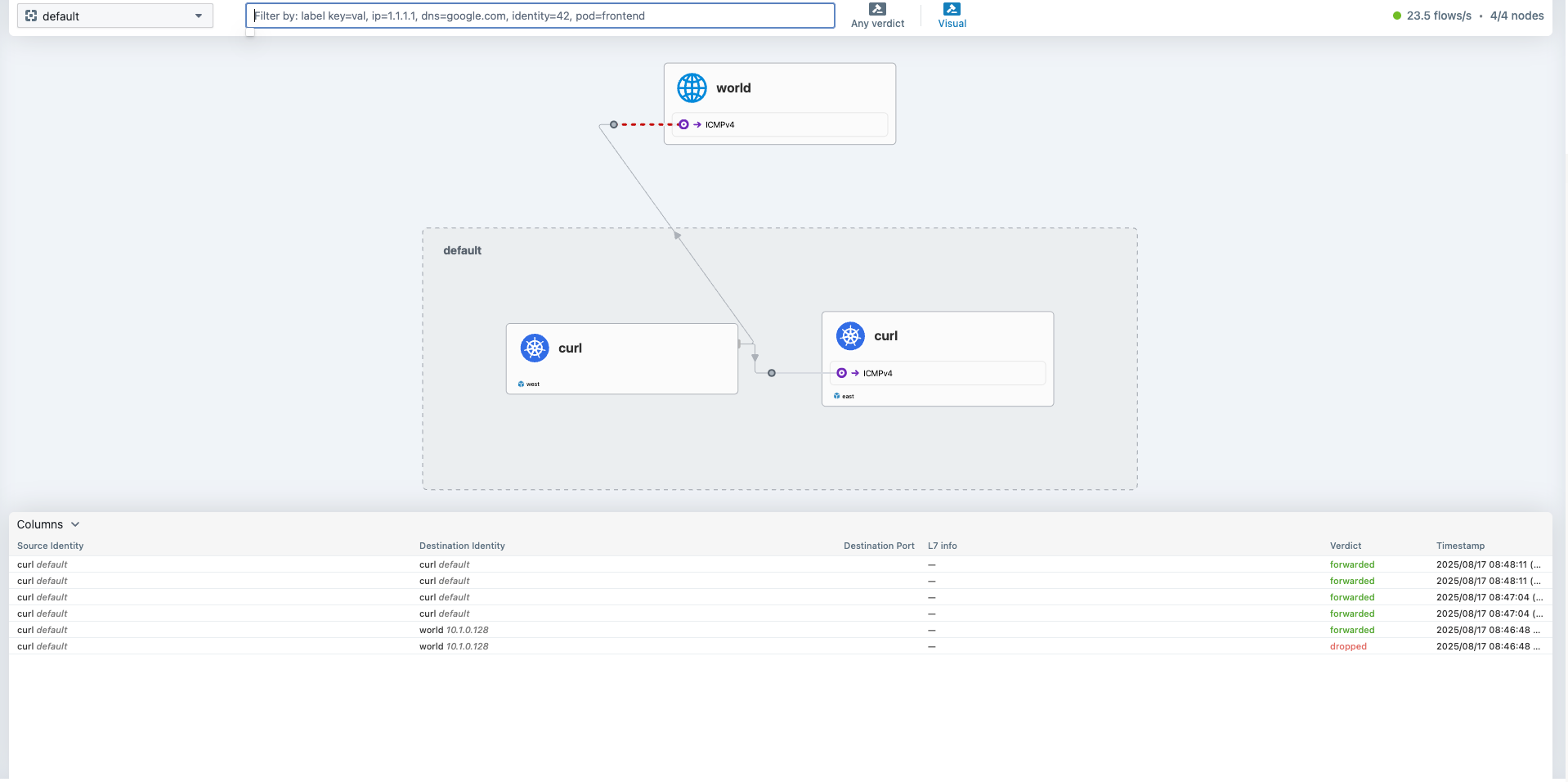
Load balancing, & Affinity
파드 호출에서 global annotation 추가하여 로드밸런싱 되는 것을 확인해보겠습니다.
> cat << EOF | kubectl apply --context kind-west -f -
apiVersion: apps/v1
kind: Deployment
metadata:
  name: webpod
spec:
  replicas: 2
  selector:
    matchLabels:
      app: webpod
  template:
    metadata:
      labels:
        app: webpod
    spec:
      affinity:
        podAntiAffinity:
          requiredDuringSchedulingIgnoredDuringExecution:
          - labelSelector:
              matchExpressions:
              - key: app
                operator: In
                values:
                - sample-app
            topologyKey: "kubernetes.io/hostname"
      containers:
      - name: webpod
        image: traefik/whoami
        ports:
        - containerPort: 80
---
apiVersion: v1
kind: Service
metadata:
  name: webpod
  labels:
    app: webpod
  annotations:
    service.cilium.io/global: "true"
spec:
  selector:
    app: webpod
  ports:
  - protocol: TCP
    port: 80
    targetPort: 80
  type: ClusterIP
EOF

> cat << EOF | kubectl apply --context kind-east -f -
apiVersion: apps/v1
kind: Deployment
metadata:
  name: webpod
spec:
  replicas: 2
  selector:
    matchLabels:
      app: webpod
  template:
    metadata:
      labels:
        app: webpod
    spec:
      affinity:
        podAntiAffinity:
          requiredDuringSchedulingIgnoredDuringExecution:
          - labelSelector:
              matchExpressions:
              - key: app
                operator: In
                values:
                - sample-app
            topologyKey: "kubernetes.io/hostname"
      containers:
      - name: webpod
        image: traefik/whoami
        ports:
        - containerPort: 80
---
apiVersion: v1
kind: Service
metadata:
  name: webpod
  labels:
    app: webpod
  annotations:
    service.cilium.io/global: "true"
spec:
  selector:
    app: webpod
  ports:
  - protocol: TCP
    port: 80
    targetPort: 80
  type: ClusterIP
EOF

> kwest get svc,ep webpod && keast get svc,ep webpod

Warning: v1 Endpoints is deprecated in v1.33+; use discovery.k8s.io/v1 EndpointSlice
NAME             TYPE        CLUSTER-IP    EXTERNAL-IP   PORT(S)   AGE
service/webpod   ClusterIP   10.2.246.45   <none>        80/TCP    26s

NAME               ENDPOINTS                    AGE
endpoints/webpod   10.0.1.226:80,10.0.1.54:80   26s
Warning: v1 Endpoints is deprecated in v1.33+; use discovery.k8s.io/v1 EndpointSlice
NAME             TYPE        CLUSTER-IP     EXTERNAL-IP   PORT(S)   AGE
service/webpod   ClusterIP   10.3.130.106   <none>        80/TCP    9s

NAME               ENDPOINTS   AGE
endpoints/webpod   <none>      9s

# kwest에서 webpod라는 서비스의 L4 VIP로 호출하면 엔드포인트가 본인 외에 상대방의 대상 파드들로도 보낼 수 있음 (east도 동일)
> kwest exec -it -n kube-system ds/cilium -c cilium-agent -- cilium service list --clustermesh-affinity

ID   Frontend                  Service Type   Backend
1    10.2.0.1:443/TCP          ClusterIP      1 => 192.168.228.3:6443/TCP (active)
2    10.2.198.250:443/TCP      ClusterIP      1 => 192.168.228.2:4244/TCP (active)
3    10.2.0.10:53/UDP          ClusterIP      1 => 10.0.1.141:53/UDP (active)
                                              2 => 10.0.1.76:53/UDP (active)
4    10.2.0.10:53/TCP          ClusterIP      1 => 10.0.1.141:53/TCP (active)
                                              2 => 10.0.1.76:53/TCP (active)
5    10.2.0.10:9153/TCP        ClusterIP      1 => 10.0.1.141:9153/TCP (active)
                                              2 => 10.0.1.76:9153/TCP (active)
6    10.2.228.222:2379/TCP     ClusterIP      1 => 10.0.1.137:2379/TCP (active)
7    192.168.228.2:32379/TCP   NodePort       1 => 10.0.1.137:2379/TCP (active)
8    0.0.0.0:32379/TCP         NodePort       1 => 10.0.1.137:2379/TCP (active)
9    10.2.242.6:80/TCP         ClusterIP      1 => 10.0.1.206:4245/TCP (active)
10   10.2.126.244:80/TCP       ClusterIP      1 => 10.0.1.248:8081/TCP (active)
11   0.0.0.0:30001/TCP         NodePort       1 => 10.0.1.248:8081/TCP (active)
12   192.168.228.2:30001/TCP   NodePort       1 => 10.0.1.248:8081/TCP (active)
13   10.2.246.45:80/TCP        ClusterIP      1 => 10.0.1.54:80/TCP (active)
                                              2 => 10.0.1.226:80/TCP (active)
                                              3 => 10.1.1.140:80/TCP (active)
                                              4 => 10.1.1.36:80/TCP (active)


# 호출 테스트
> kubectl exec -it curl-pod --context kind-west -- sh -c 'while true; do curl -s --connect-timeout 1 webpod ; sleep 1; echo "---"; done;'
> kubectl exec -it curl-pod --context kind-east -- sh -c 'while true; do curl -s --connect-timeout 1 webpod ; sleep 1; echo "---"; done;'
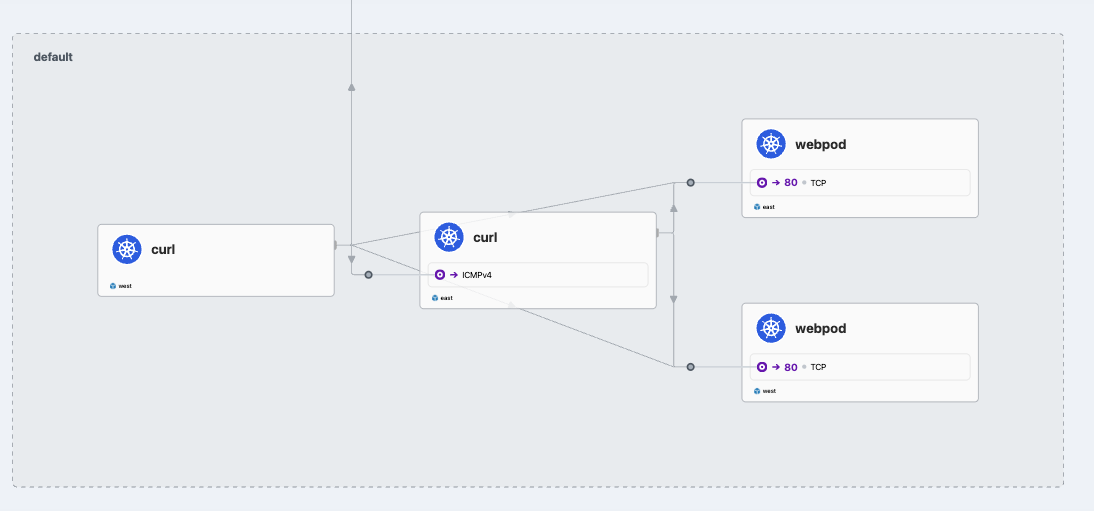
Hubble에서 확인했을 때 분산해서 호출하는 것을 확인할 수 있습니다.
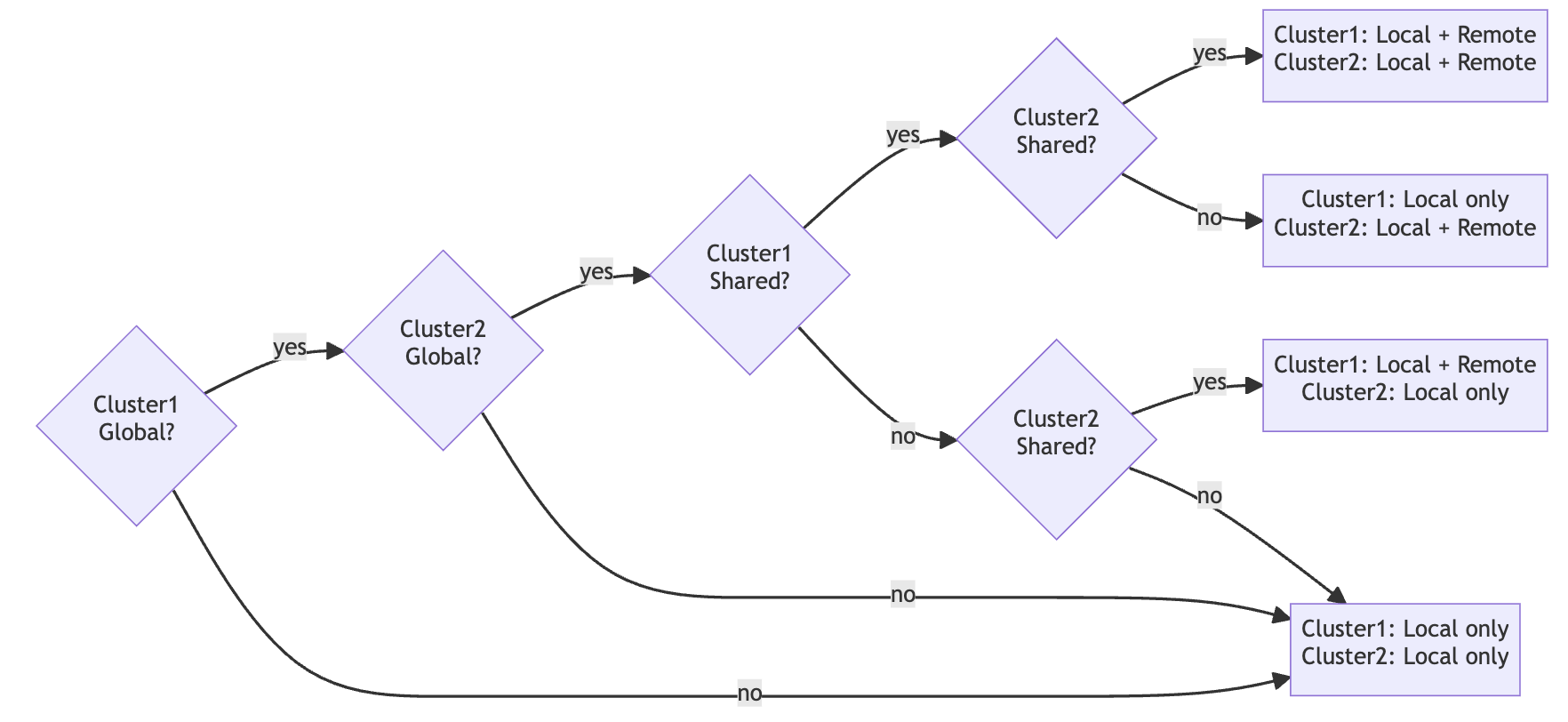
이 때, 로컬을 우선하여 라우팅하고 싶을 경우 Affinity Local을 설정합니다.
# local affinity annotation 설정
> kwest annotate service webpod service.cilium.io/affinity=local --overwrite
kwest describe svc webpod | grep Annotations -A3
service/webpod annotated
Annotations:              service.cilium.io/affinity: local
                          service.cilium.io/global: true
Selector:                 app=webpod
Type:                     ClusterIP

> keast annotate service webpod service.cilium.io/affinity=local --overwrite
keast describe svc webpod | grep Annotations -A3
service/webpod annotated
Annotations:              service.cilium.io/affinity: local
                          service.cilium.io/global: true
Selector:                 app=webpod
Type:                     ClusterIP


# 확인
> kwest exec -it -n kube-system ds/cilium -c cilium-agent -- cilium service list --clustermesh-affinity

ID   Frontend                  Service Type   Backend
1    10.2.0.1:443/TCP          ClusterIP      1 => 192.168.228.3:6443/TCP (active)
2    10.2.198.250:443/TCP      ClusterIP      1 => 192.168.228.2:4244/TCP (active)
3    10.2.0.10:53/UDP          ClusterIP      1 => 10.0.1.141:53/UDP (active)
                                              2 => 10.0.1.76:53/UDP (active)
4    10.2.0.10:53/TCP          ClusterIP      1 => 10.0.1.141:53/TCP (active)
                                              2 => 10.0.1.76:53/TCP (active)
5    10.2.0.10:9153/TCP        ClusterIP      1 => 10.0.1.141:9153/TCP (active)
                                              2 => 10.0.1.76:9153/TCP (active)
6    10.2.228.222:2379/TCP     ClusterIP      1 => 10.0.1.137:2379/TCP (active)
7    192.168.228.2:32379/TCP   NodePort       1 => 10.0.1.137:2379/TCP (active)
8    0.0.0.0:32379/TCP         NodePort       1 => 10.0.1.137:2379/TCP (active)
9    10.2.242.6:80/TCP         ClusterIP      1 => 10.0.1.206:4245/TCP (active)
10   10.2.126.244:80/TCP       ClusterIP      1 => 10.0.1.248:8081/TCP (active)
11   0.0.0.0:30001/TCP         NodePort       1 => 10.0.1.248:8081/TCP (active)
12   192.168.228.2:30001/TCP   NodePort       1 => 10.0.1.248:8081/TCP (active)
13   10.2.246.45:80/TCP        ClusterIP      1 => 10.0.1.54:80/TCP (active) (preferred)
                                              2 => 10.0.1.226:80/TCP (active) (preferred)
                                              3 => 10.1.1.140:80/TCP (active)
                                              4 => 10.1.1.36:80/TCP (active)

> keast exec -it -n kube-system ds/cilium -c cilium-agent -- cilium service list --clustermesh-affinity

ID   Frontend                  Service Type   Backend
1    10.3.0.1:443/TCP          ClusterIP      1 => 192.168.228.4:6443/TCP (active)
2    10.3.246.150:443/TCP      ClusterIP      1 => 192.168.228.6:4244/TCP (active)
3    10.3.0.10:9153/TCP        ClusterIP      1 => 10.1.1.240:9153/TCP (active)
                                              2 => 10.1.1.143:9153/TCP (active)
4    10.3.0.10:53/UDP          ClusterIP      1 => 10.1.1.240:53/UDP (active)
                                              2 => 10.1.1.143:53/UDP (active)
5    10.3.0.10:53/TCP          ClusterIP      1 => 10.1.1.240:53/TCP (active)
                                              2 => 10.1.1.143:53/TCP (active)
6    10.3.251.20:2379/TCP      ClusterIP      1 => 10.1.1.202:2379/TCP (active)
7    192.168.228.6:32379/TCP   NodePort       1 => 10.1.1.202:2379/TCP (active)
8    0.0.0.0:32379/TCP         NodePort       1 => 10.1.1.202:2379/TCP (active)
9    10.3.64.170:80/TCP        ClusterIP      1 => 10.1.1.156:4245/TCP (active)
10   10.3.39.48:80/TCP         ClusterIP      1 => 10.1.1.46:8081/TCP (active)
11   192.168.228.6:31001/TCP   NodePort       1 => 10.1.1.46:8081/TCP (active)
12   0.0.0.0:31001/TCP         NodePort       1 => 10.1.1.46:8081/TCP (active)
13   10.3.130.106:80/TCP       ClusterIP      1 => 10.0.1.54:80/TCP (active)
                                              2 => 10.0.1.226:80/TCP (active)
                                              3 => 10.1.1.140:80/TCP (active) (preferred)
                                              4 => 10.1.1.36:80/TCP (active) (preferred)
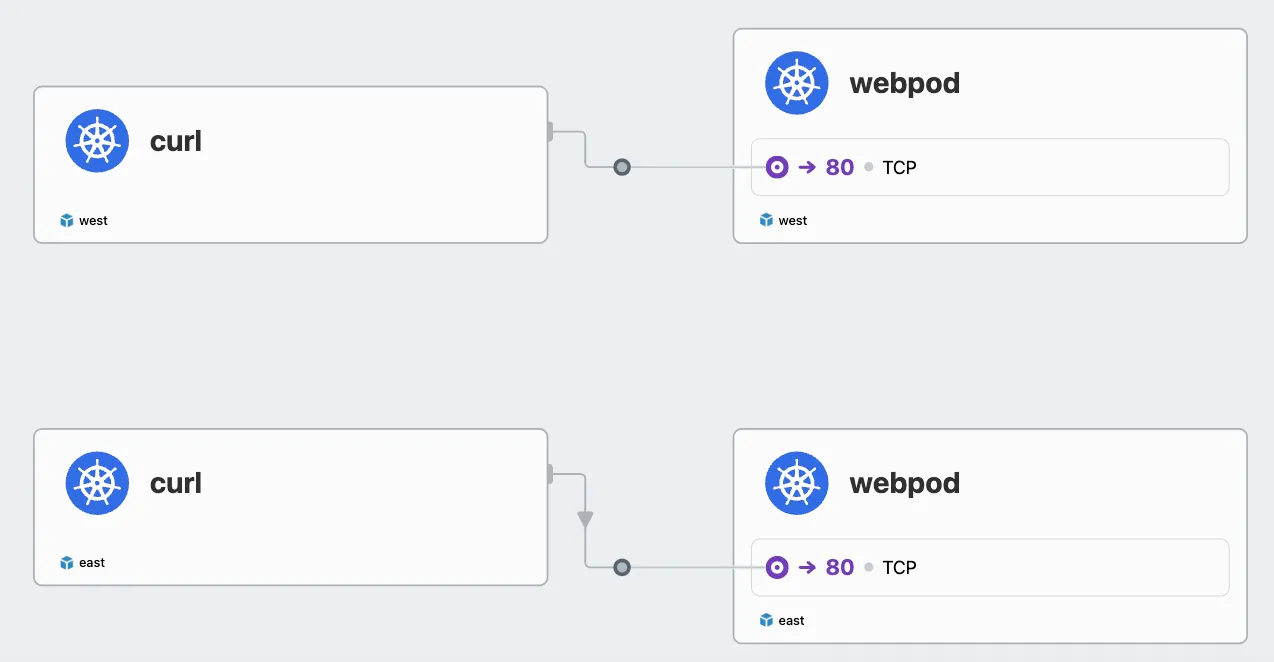
pod의 replica 수를 0으로 줄여 Preferred 동작을 확인해보겠습니다.
> kwest scale deployment webpod --replicas 0
deployment.apps/webpod scaled

> kwest exec -it -n kube-system ds/cilium -c cilium-agent -- cilium service list --clustermesh-affinity

ID   Frontend                  Service Type   Backend
1    10.2.0.1:443/TCP          ClusterIP      1 => 192.168.228.3:6443/TCP (active)
2    10.2.198.250:443/TCP      ClusterIP      1 => 192.168.228.2:4244/TCP (active)
3    10.2.0.10:53/UDP          ClusterIP      1 => 10.0.1.141:53/UDP (active)
                                              2 => 10.0.1.76:53/UDP (active)
4    10.2.0.10:53/TCP          ClusterIP      1 => 10.0.1.141:53/TCP (active)
                                              2 => 10.0.1.76:53/TCP (active)
5    10.2.0.10:9153/TCP        ClusterIP      1 => 10.0.1.141:9153/TCP (active)
                                              2 => 10.0.1.76:9153/TCP (active)
6    10.2.228.222:2379/TCP     ClusterIP      1 => 10.0.1.137:2379/TCP (active)
7    192.168.228.2:32379/TCP   NodePort       1 => 10.0.1.137:2379/TCP (active)
8    0.0.0.0:32379/TCP         NodePort       1 => 10.0.1.137:2379/TCP (active)
9    10.2.242.6:80/TCP         ClusterIP      1 => 10.0.1.206:4245/TCP (active)
10   10.2.126.244:80/TCP       ClusterIP      1 => 10.0.1.248:8081/TCP (active)
11   0.0.0.0:30001/TCP         NodePort       1 => 10.0.1.248:8081/TCP (active)
12   192.168.228.2:30001/TCP   NodePort       1 => 10.0.1.248:8081/TCP (active)
13   10.2.246.45:80/TCP        ClusterIP      1 => 10.1.1.140:80/TCP (active)
                                              2 => 10.1.1.36:80/TCP (active)
'스터디 > Cilium' 카테고리의 다른 글
| [Cilium] Gateway API (2) | 2025.08.24 |
|---|---|
| [Cilium] Cilium Ingress (4) | 2025.08.23 |
| [Cilium] BGP Control Plane (5) | 2025.08.17 |
| [Cilium] L2 Announcements (4) | 2025.08.10 |
| [Cilium] Service LB-IPAM (4) | 2025.08.10 |