Cloudnet Cilium 6주차 스터디를 진행하며 정리한 글입니다.
이번 포스팅에서는 Cilium Ingress가 외부 트래픽을 어떻게 처리하고, IngressClass·LoadBalancer·NetworkPolicy·Path Type(Exact/Prefix/Regex)까지 실제로 어떻게 동작하는지 예제를 통한 실습을 통해 알아보겠습니다.
Cilium Ingress
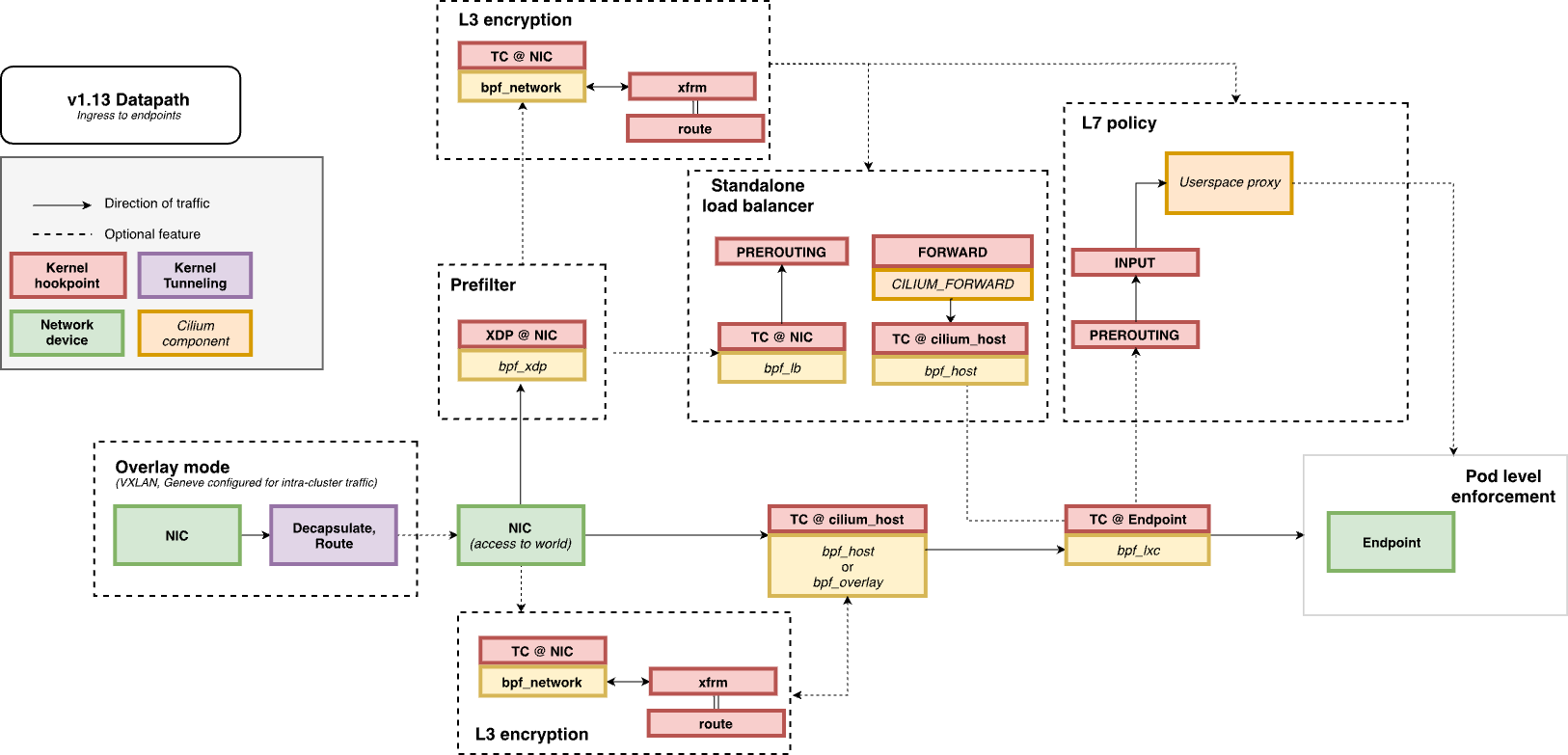
Kubernetes 환경에서 Ingress는 클러스터 외부에서 내부 서비스로 트래픽을 라우팅하는 대표적인 방법입니다.
Cilium은 표준 Kubernetes Ingress 리소스를 지원하며, ingressClassName: cilium을 지정하여 사용할 수 있습니다.
주요 특징은 다음과 같습니다:
- Path 기반 라우팅 지원
- TLS 종료(TLS Termination) 지원
- LoadBalancer Service 기반 Ingress 노출
- LoadBalancer 모드:
- shared : 하나의 LB를 여러 Ingress에서 공유 (리소스 절약)
- dedicated : Ingress마다 개별 LB 할당 (경로 충돌 방지)
- 모드를 변경하면 LB IP가 바뀌어 기존 연결이 끊어질 수 있습니다.
Cilium Ingress를 사용하기 위해서는 아래 설정이 필요합니다.
- NodePort 활성화
- nodePort.enabled=true 또는 kubeProxyReplacement=true
- L7 Proxy 활성화
- l7Proxy=true (기본값)
- LoadBalancer 지원
- 기본적으로 Service는 LoadBalancer 타입으로 생성됩니다.
LB가 없는 환경에서는 NodePort 또는 HostNetwork 모드(1.16+) 사용 가능
- 기본적으로 Service는 LoadBalancer 타입으로 생성됩니다.
Cilium Ingress 동작 방식
일반적인 Ingress Controller(Nginx, HAProxy 등)는 Deployment/DaemonSet으로 배포되고 Service로 노출됩니다.
반면 Cilium은 CNI 레벨과 깊게 통합되어 있으며, Ingress 트래픽은 다음 흐름으로 처리됩니다.
- 외부 트래픽이 Ingress LB Service로 진입
- eBPF datapath가 패킷을 가로채 Envoy Proxy로 전달 (커널 TPROXY 활용)
- Envoy가 L7 레벨에서 라우팅/정책 적용
- eBPF가 다시 트래픽을 백엔드 Pod로 전달
즉, TProxy(Transparent Proxy) 방식으로 동작해 클라이언트는 원래 목적지와 직접 통신한다고 생각하지만 실제로는 Envoy가 중간에서 처리합니다.
Network Policy와 Ingress
Cilium Ingress는 Network Policy와 연동됩니다.
Ingress 또는 Gateway API를 통해 유입된 트래픽은 각 노드에 배치된 Envoy Proxy를 반드시 거치게 되는데, 이 Envoy는 Cilium의 eBPF 정책 엔진과 직접 상호작용할 수 있도록 확장되어 있습니다.
즉, Envoy 자체가 네트워크 정책 enforcement point으로 동작하며, 인입 트래픽뿐만 아니라 동서(East-West) 트래픽 관리(GAMMA, L7 Traffic Management)에도 동일하게 활용될 수 있습니다.
특히 Ingress의 경우, Envoy에 도착한 트래픽은 Cilium 정책 엔진에서 특수한 ingress identity가 부여됩니다.
반면, 일반적으로 클러스터 외부에서 들어오는 트래픽은 world identity로 간주됩니다. 이 덕분에 실리움 Ingress 환경에서는 트래픽이 두 번 정책 검증을 거치게 됩니다.
- 외부 트래픽이 ingress identity로 들어올 때
- Envoy를 통과한 후, 백엔드 Pod로 나가기 직전
따라서 네트워크 정책을 작성할 때는 world → ingress, ingress → 내부 Pod 두 경로 모두 허용해야 합니다.
Source IP Visibility
기본적으로 Cilium의 Envoy는 들어오는 HTTP 요청의 클라이언트 주소를 X-Forwarded-For 헤더에 추가합니다.
이때 신뢰할 hop 수(trusted hops)는 기본값이 0으로 설정되어 있어, Envoy는 실제 연결을 맺은 클라이언트 주소를 그대로 사용합니다.
만약 hop 수를 늘리면 X-Forwarded-For 리스트의 n번째 값을 신뢰하도록 동작을 변경할 수 있습니다.
TLS Passthrough와 Source IP
Cilium Ingress와 Gateway API는 모두 TLS Passthrough를 지원합니다. Envoy는 TLS 핸드셰이크 과정에서 클라이언트 Hello 메시지를 검사하여 SNI(Server Name Indication) 필드에 담긴 도메인 정보를 확인하고, 이를 기반으로 적절한 백엔드로 TLS 스트림을 전달합니다.
하지만 이 과정에서 한 가지 주의해야 할 점이 있습니다. Envoy는 TCP 스트림을 종료한 후 새로운 스트림을 열어 백엔드로 전달하기 때문에, 백엔드 입장에서는 클라이언트의 원래 IP가 아니라 Envoy의 IP(Cilium 노드 IP인 경우가 많음)가 소스로 보이게 됩니다.
따라서 TLS Passthrough 환경에서는 소스 IP 가시성이 제한될 수 있습니다.
Ingress Path Type과 Precedence
Kubernetes Ingress 스펙은 세 가지 경로 매칭 방식을 지원합니다:
- Exact : 지정한 경로와 정확히 일치해야 함
- Prefix : 지정한 경로 접두사(/ 단위)와 일치
- ImplementationSpecific : IngressClass에 따라 해석이 달라짐
Cilium은 세 번째 타입을 정규식(Regex)으로 정의합니다.
따라서 /foo/bar 같은 경로는 특별한 정규식 문자가 없을 경우 Exact 매칭처럼 동작하지만, /impl.*처럼 정규식을 포함하면 더 유연한 매칭이 가능합니다.
우선순위는 다음과 같습니다.
- Exact
- ImplementationSpecific(Regex)
- Prefix
- / (항상 맨 마지막)
Ingress 실습 예제
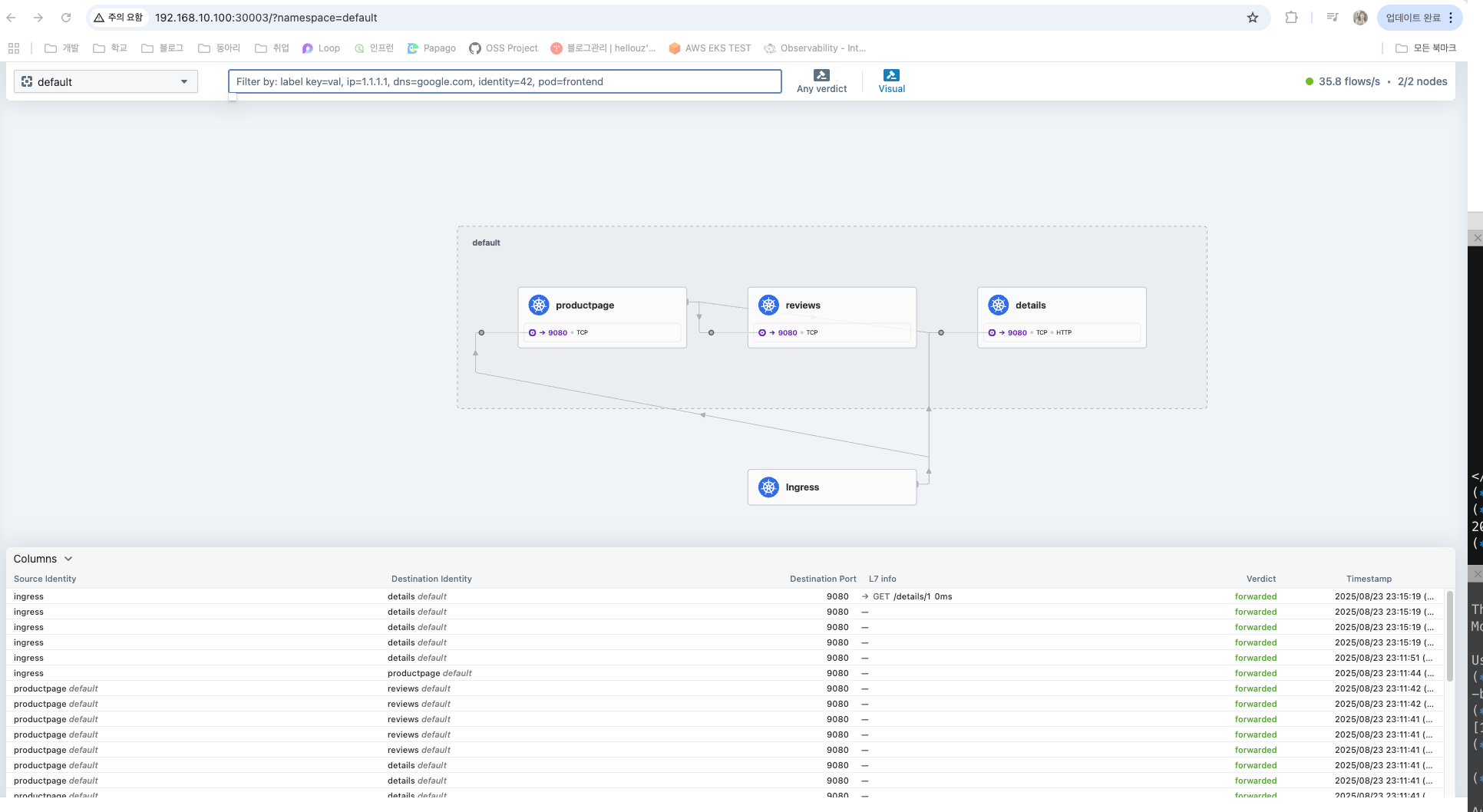
bookinfo 예제를 통해 micro 서비스 앱이 Ingress를 통해 통신되는 것을 확인해보겠습니다.
먼저, CiliumLoadBalancerIPPool 을 만들어 LoadBalancer 타입 서비스가 사용할 수 있는 IP 풀을 설정하고, CiliumL2AnnouncementPolicy를 적용해 할당된 LoadBalancer IP가 ARP 기반 L2 Announcement를 통해 외부 네트워크에 광고될 수 있도록 했습니다.
root@k8s-ctr:~# cilium config view | grep l2
enable-l2-announcements                           true
enable-l2-neigh-discovery                         false


root@k8s-ctr:~# cat << EOF | kubectl apply -f -
apiVersion: "cilium.io/v2"
kind: CiliumLoadBalancerIPPool
metadata:
  name: "cilium-lb-ippool"
spec:
  blocks:
  - start: "192.168.10.211"
    stop:  "192.168.10.215"
EOF
ciliumloadbalancerippool.cilium.io/cilium-lb-ippool created

root@k8s-ctr:~# kubectl get ippools -o jsonpath='{.items[*].status.conditions[?(@.type!="cilium.io/PoolConflict")]}' | jq
{
  "lastTransitionTime": "2025-08-23T14:07:17Z",
  "message": "5",
  "observedGeneration": 1,
  "reason": "noreason",
  "status": "Unknown",
  "type": "cilium.io/IPsTotal"
}
{
  "lastTransitionTime": "2025-08-23T14:07:17Z",
  "message": "4",
  "observedGeneration": 1,
  "reason": "noreason",
  "status": "Unknown",
  "type": "cilium.io/IPsAvailable"
}
{
  "lastTransitionTime": "2025-08-23T14:07:17Z",
  "message": "1",
  "observedGeneration": 1,
  "reason": "noreason",
  "status": "Unknown",
  "type": "cilium.io/IPsUsed"
}

root@k8s-ctr:~# cat << EOF | kubectl apply -f -
apiVersion: "cilium.io/v2alpha1"
kind: CiliumL2AnnouncementPolicy
metadata:
  name: policy1
spec:
  interfaces:
  - eth1
  externalIPs: true
  loadBalancerIPs: true
EOF
ciliuml2announcementpolicy.cilium.io/policy1 created
Istio에서 제공하는 여러 개의 microservice로 구성된 Bookinfo 예제를 배포했습니다.
IngressClass 목록을 확인하여 cilium 클래스가 준비되어 있는지 확인했습니다.
Ingress 객체를 생성하면서 ingressClassName: cilium을 지정했습니다.
- /details → details 서비스(9080)
- / → productpage 서비스(9080)
cilium-ingress 서비스가 LoadBalancer 타입으로 생성되었고, 앞서 정의한 IPPool에서 192.168.10.211이 할당되었습니다.
$LBIP 환경변수를 사용해 LoadBalancer IP(192.168.10.211)를 조회했습니다.
curl로 요청을 보내 /, /details/1, /ratings 경로를 호출했을 때
- / 와 /details/1 은 정상적으로 200 응답
- /ratings 는 Ingress 규칙이 없으므로 404
productpage Pod가 어느 노드(k8s-w1)에서 실행 중인지 확인했습니다.
해당 노드에서 ngrep으로 veth 인터페이스 트래픽을 캡처하여, 외부 요청이 Envoy → Pod 로 전달되는 것을 직접 확인했습니다.
# 예제 어플리케이션 배포
root@k8s-ctr:~# kubectl apply -f https://raw.githubusercontent.com/istio/istio/release-1.26/samples/bookinfo/platform/kube/bookinfo.yaml

# ingressclass 확인
root@k8s-ctr:~# kubectl get ingressclasses.networking.k8s.io

NAME     CONTROLLER                     PARAMETERS   AGE
cilium   cilium.io/ingress-controller   <none>       54m

root@k8s-ctr:~# cat << EOF | kubectl apply -f -
> apiVersion: networking.k8s.io/v1
> kind: Ingress
> metadata:
>   name: basic-ingress
>   namespace: default
> spec:
>   ingressClassName: cilium
>   rules:
>   - http:
>       paths:
>       - backend:
>           service:
>             name: details
>             port:
>               number: 9080
>         path: /details
>         pathType: Prefix
>       - backend:
>           service:
>             name: productpage
>             port:
>               number: 9080
>         path: /
>         pathType: Prefix
> EOF
ingress.networking.k8s.io/basic-ingress created

# Adress 는 cilium-ingress LoadBalancer 의 EX-IP
root@k8s-ctr:~# kubectl get svc -n kube-system cilium-ingress
NAME             TYPE           CLUSTER-IP      EXTERNAL-IP   PORT(S)                      AGE
cilium-ingress   LoadBalancer   10.96.202.201   <pending>     80:31433/TCP,443:30747/TCP   55m


root@k8s-ctr:~# kubectl get ingress
NAME            CLASS    HOSTS   ADDRESS   PORTS   AGE
basic-ingress   cilium   *                 80      38s


root@k8s-ctr:~# kc describe ingress
Name:             basic-ingress
Labels:           <none>
Namespace:        default
Address:
Ingress Class:    cilium
Default backend:  <default>
Rules:
  Host        Path  Backends
  ----        ----  --------
  *
              /details   details:9080 (172.20.1.91:9080)
              /          productpage:9080 (172.20.1.206:9080)
Annotations:  <none>
Events:       <none>

root@k8s-ctr:~# LBIP=$(kubectl get svc -n kube-system cilium-ingress -o jsonpath='{.status.loadBalancer.ingress[0].ip}')

root@k8s-ctr:~# echo $LBIP
192.168.10.211


# 호출 확인
root@k8s-ctr:~# curl -so /dev/null -w "%{http_code}\n" http://$LBIP/
200
root@k8s-ctr:~# curl -so /dev/null -w "%{http_code}\n" http://$LBIP/details/1
200
root@k8s-ctr:~# curl -so /dev/null -w "%{http_code}\n" http://$LBIP/ratings
404

root@k8s-ctr:~# curl "http://$LBIP/productpage?u=normal"

<meta charset="utf-8">
<meta http-equiv="X-UA-Compatible" content="IE=edge">
<meta name="viewport" content="width=device-width, initial-scale=1.0">


<title>Simple Bookstore App</title>
...


# 라우터에서 호출
root@k8s-ctr:~# curl -so /dev/null -w "%{http_code}\n" http://$LBIP/
200
root@k8s-ctr:~# curl -so /dev/null -w "%{http_code}\n" http://$LBIP/details/1
200


# productpage-v1 파드가 배포된 노드 확인
root@k8s-ctr:~# kubectl get pod -l app=productpage -owide
NAME                              READY   STATUS    RESTARTS   AGE   IP             NODE     NOMINATED NODE   READINESS GATES
productpage-v1-54bb874995-bkx56   1/1     Running   0          13m   172.20.1.206   k8s-w1   <none>           <none>

# 해당 노드(k8s-w1)에서 veth 인터페이스 정보 확인
root@k8s-w1:~# PROID=172.20.1.206
root@k8s-w1:~# ip route |grep $PROID
172.20.1.206 dev lxcf0f032af10e1 proto kernel scope link


# 외부에서 호출 시도
root@k8s-ctr:~# curl -s http://$LBIP


# k8s-w1에서 모니터링
# ngrep 로 veth 트래픽 캡쳐 : productpage 는 9080 TCP Port 사용
root@k8s-w1:~# ngrep -tW byline -d $PROVETH '' 'tcp port 9080'
lxcf0f032af10e1: no IPv4 address assigned: Cannot assign requested address
interface: lxcf0f032af10e1
filter: ( tcp port 9080 ) and ((ip || ip6) || (vlan && (ip || ip6)))
###
T 2025/08/23 23:21:59.824972 172.20.1.206:9080 -> 172.20.0.14:38795 [AP] #3
HTTP/1.1 200 OK.
Server: gunicorn.
Date: Sat, 23 Aug 2025 14:21:59 GMT.
Connection: keep-alive.
Content-Type: text/html; charset=utf-8.
Content-Length: 2080.
.

#
T 2025/08/23 23:21:59.825230 172.20.1.206:9080 -> 172.20.0.14:38795 [AP] #4
Helm으로 Ingress-Nginx 컨트롤러를 설치했습니다.
IngressClass를 확인하니 cilium, nginx 두 개가 공존하는데, nginx.webpod.local Host를 사용하는 Ingress를 Nginx로 생성하고, Host 헤더를 지정해 호출했을 때 정상적으로 webpod 응답을 확인했습니다.
즉, Cilium Ingress와 Ingress-Nginx가 동시에 사용할 수 있는 것을 알 수 있습니다.
# Ingress-Nginx 컨트롤러 설치
root@k8s-ctr:~# helm repo add ingress-nginx https://kubernetes.github.io/ingress-nginx

root@k8s-ctr:~# helm install ingress-nginx ingress-nginx/ingress-nginx --create-namespace -n ingress-nginx

# 확인
root@k8s-ctr:~# kubectl get ingressclasses.networking.k8s.io
NAME     CONTROLLER                     PARAMETERS   AGE
cilium   cilium.io/ingress-controller   <none>       77m
nginx    k8s.io/ingress-nginx           <none>       39s

root@k8s-ctr:~# cat << EOF | kubectl apply -f -
> apiVersion: networking.k8s.io/v1
> kind: Ingress
> metadata:
>   name: webpod-ingress-nginx
>   namespace: default
> spec:
>   ingressClassName: nginx
>   rules:
>   - host: nginx.webpod.local
>     http:
>       paths:
>       - backend:
>           service:
>             name: webpod
>             port:
>               number: 80
>         path: /
>         pathType: Prefix
> EOF
ingress.networking.k8s.io/webpod-ingress-nginx created

root@k8s-ctr:~# kubectl get ingress -w
NAME                   CLASS    HOSTS                ADDRESS          PORTS   AGE
basic-ingress          cilium   *                    192.168.10.211   80      22m
webpod-ingress-nginx   nginx    nginx.webpod.local   192.168.10.212   80      30s

root@k8s-ctr:~# LB2IP=$(kubectl get svc -n ingress-nginx ingress-nginx-controller -o jsonpath='{.status.loadBalancer.ingress[0].ip}')


root@k8s-ctr:~# curl $LB2IP
<html>
<head><title>404 Not Found</title></head>
<body>
<center><h1>404 Not Found</h1></center>
<hr><center>nginx</center>
</body>
</html>

root@k8s-ctr:~# curl -H "Host: nginx.webpod.local" $LB2IP
Hostname: webpod-697b545f57-nqjlg
IP: 127.0.0.1
IP: ::1
IP: 172.20.1.47
IP: fe80::c04a:f8ff:feb2:5737
RemoteAddr: 172.20.1.253:39570
GET / HTTP/1.1
Host: nginx.webpod.local
User-Agent: curl/8.5.0
Accept: */*
X-Forwarded-For: 192.168.10.100
X-Forwarded-Host: nginx.webpod.local
X-Forwarded-Port: 80
X-Forwarded-Proto: http
X-Forwarded-Scheme: http
X-Real-Ip: 192.168.10.100
X-Request-Id: e7e31123c5a938bbb8d8c15d4ab9c200
X-Scheme: http

# 외부에서 확인
root@router:~# curl -s -H 'Host: nginx.webpod.local' $LB2IP
Hostname: webpod-697b545f57-tlkrl
IP: 127.0.0.1
IP: ::1
IP: 172.20.0.140
IP: fe80::b0fe:5bff:fe02:b772
RemoteAddr: 172.20.1.253:34154
GET / HTTP/1.1
Host: nginx.webpod.local
User-Agent: curl/8.5.0
Accept: */*
X-Forwarded-For: 192.168.10.200
X-Forwarded-Host: nginx.webpod.local
X-Forwarded-Port: 80
X-Forwarded-Proto: http
X-Forwarded-Scheme: http
X-Real-Ip: 192.168.10.200
X-Request-Id: b186d889e3b6be92164559da4abf0f71
X-Scheme: http
Cilium Ingress에서 ingress.cilium.io/loadbalancer-mode: dedicated 애너테이션을 지정한 Ingress를 생성했습니다.
새로운 LoadBalancer IP(192.168.10.213)가 할당됨을 확인했습니다. 동시에 L2 Announcement 리더 선출을 확인하여 특정 노드가 IP를 광고하는 역할을 하고 있음을 알 수 있었습니다.
root@k8s-ctr:~# cat << EOF | kubectl apply -f -
> apiVersion: networking.k8s.io/v1
> kind: Ingress
> metadata:
>   name: webpod-ingress
>   namespace: default
>   annotations:
>     ingress.cilium.io/loadbalancer-mode: dedicated
> spec:
>   ingressClassName: cilium
>   rules:
>   - http:
>       paths:
>       - backend:
>           service:
>             name: webpod
>             port:
>               number: 80
>         path: /
>         pathType: Prefix
> EOF
ingress.networking.k8s.io/webpod-ingress created


root@k8s-ctr:~# kubectl get ingress
NAME                   CLASS    HOSTS                ADDRESS          PORTS   AGE
basic-ingress          cilium   *                    192.168.10.211   80      27m
webpod-ingress         cilium   *                    192.168.10.213   80      27s  # 생성
webpod-ingress-nginx   nginx    nginx.webpod.local   192.168.10.212   80      5m17s


# LB EX-IP에 대한 L2 Announcement 의 Leader 노드 확인
root@k8s-ctr:~# kubectl get lease -n kube-system | grep ingress
cilium-l2announce-default-cilium-ingress-webpod-ingress    k8s-w1                                                                      52s
cilium-l2announce-ingress-nginx-ingress-nginx-controller   k8s-w1                                                                      6m40s
cilium-l2announce-kube-system-cilium-ingress               k8s-w1                                                                      24m

# webpod 파드 IP 확인
root@k8s-ctr:~# kubectl get pod -l app=webpod -owide
NAME                      READY   STATUS    RESTARTS   AGE   IP             NODE      NOMINATED NODE   READINESS GATES
webpod-697b545f57-nqjlg   1/1     Running   0          52m   172.20.1.47    k8s-w1    <none>           <none>
webpod-697b545f57-tlkrl   1/1     Running   0          52m   172.20.0.140   k8s-ctr   <none>           <none>
CiliumClusterwideNetworkPolicy를 생성해 클러스터 외부(world)에서 들어오는 트래픽을 차단했습니다. 이때 Ingress 호출이 403 Forbidden으로 거절됨을 확인할 수 있습니다.
특정 CIDR(192.168.10.200/32, 127.0.0.1/32)에서 들어오는 트래픽만 허용하는 정책을 추가했습니다.
지정된 CIDR에서의 호출은 200 OK로 성공함을 확인했습니다. Ingress 트래픽에 대해 world → ingress → Pod 순서대로 흐르는 것을 알 수 있습니다.
추가적으로 모든 egress를 차단하는 Default Deny 정책을 적용했습니다.
DNS와 kube-dns Pod로 가는 요청만 허용하였고, 이 상태에서 Ingress 요청은 403 Forbidden 응답을 받았습니다.
이 때 기본 거부 정책이 적용되면 Ingress 트래픽도 막힌다는 것을 알 수 있습니다.
# 클러스터 전체(모든 네임스페이스)에 적용되는 정책 : 참고로 아래 정책 적용 후 Hubble-ui 로 접속 불가!
root@k8s-ctr:~# cat << EOF | kubectl apply -f -
> apiVersion: "cilium.io/v2"
> kind: CiliumClusterwideNetworkPolicy
> metadata:
>   name: "external-lockdown"
> spec:
>   description: "Block all the traffic originating from outside of the cluster"
>   endpointSelector: {}
>   ingress:
>   - fromEntities:
>     - cluster
> EOF
ciliumclusterwidenetworkpolicy.cilium.io/external-lockdown created

root@k8s-ctr:~# curl --fail -v http://"$LBIP"/details/1
*   Trying 192.168.10.211:80...
* Connected to 192.168.10.211 (192.168.10.211) port 80
> GET /details/1 HTTP/1.1
> Host: 192.168.10.211
> User-Agent: curl/8.5.0
> Accept: */*
>
< HTTP/1.1 403 Forbidden
< content-length: 15
< content-type: text/plain
< date: Sat, 23 Aug 2025 15:43:03 GMT
< server: envoy
* The requested URL returned error: 403
* Closing connection
curl: (22) The requested URL returned error: 403

root@k8s-ctr:~# hubble observe -f --identity ingress
Aug 23 15:43:24.080: 127.0.0.1:32848 (ingress) -> 127.0.0.1:12412 (world) http-request DROPPED (HTTP/1.1 GET http://192.168.10.211/details/1)
Aug 23 15:43:24.080: 127.0.0.1:32848 (ingress) <- 127.0.0.1:12412 (world) http-response FORWARDED (HTTP/1.1 403 2ms (GET http://192.168.10.211/details/1))


root@router:~# curl --fail -v http://"$LBIP"/details/1
*   Trying 192.168.10.211:80...
* Connected to 192.168.10.211 (192.168.10.211) port 80
> GET /details/1 HTTP/1.1
> Host: 192.168.10.211
> User-Agent: curl/8.5.0
> Accept: */*
>
< HTTP/1.1 403 Forbidden
< content-length: 15
< content-type: text/plain
< date: Sat, 23 Aug 2025 15:44:16 GMT
< server: envoy
* The requested URL returned error: 403
* Closing connection
curl: (22) The requested URL returned error: 403


Aug 23 15:44:16.526: 192.168.10.200:54426 (ingress) -> kube-system/cilium-ingress:80 (world) http-request DROPPED (HTTP/1.1 GET http://192.168.10.211/details/1)
Aug 23 15:44:16.526: 192.168.10.200:54426 (ingress) <- kube-system/cilium-ingress:80 (world) http-response FORWARDED (HTTP/1.1 403 3ms (GET http://192.168.10.211/details/1))


root@k8s-ctr:~# cat << EOF | kubectl apply -f -
> apiVersion: "cilium.io/v2"
> kind: CiliumClusterwideNetworkPolicy
> metadata:
>   name: "allow-cidr"
> spec:
>   description: "Allow all the traffic originating from a specific CIDR"
>   endpointSelector:
>     matchExpressions:
>     - key: reserved:ingress
>       operator: Exists
>   ingress:
>   - fromCIDRSet:
>     # Please update the CIDR to match your environment
>     - cidr: 192.168.10.200/32
>     - cidr: 127.0.0.1/32
> EOF

ciliumclusterwidenetworkpolicy.cilium.io/allow-cidr created

# 요청 성공
root@k8s-ctr:~# curl --fail -v http://"$LBIP"/details/1
*   Trying 192.168.10.211:80...
* Connected to 192.168.10.211 (192.168.10.211) port 80
> GET /details/1 HTTP/1.1
> Host: 192.168.10.211
> User-Agent: curl/8.5.0
> Accept: */*
>
< HTTP/1.1 200 OK
< content-type: application/json
< server: envoy
< date: Sat, 23 Aug 2025 15:45:03 GMT
< content-length: 178
< x-envoy-upstream-service-time: 69
<
* Connection #0 to host 192.168.10.211 left intact
{"id":1,"author":"William Shakespeare","year":1595,"type":"paperback","pages":200,"publisher":"PublisherA","language":"English","ISBN-10":"1234567890","ISBN-13":"123-1234567890"}

Aug 23 15:45:03.755: 172.20.0.14:46297 (ingress) <> default/details-v1-766844796b-4fk67 (ID:56258) pre-xlate-rev TRACED (TCP)
Aug 23 15:45:03.770: 172.20.0.14:46297 (ingress) <> default/details-v1-766844796b-4fk67 (ID:56258) pre-xlate-rev TRACED (TCP)
Aug 23 15:45:03.770: 172.20.0.14:46297 (ingress) <> default/details-v1-766844796b-4fk67 (ID:56258) pre-xlate-rev TRACED (TCP)
Aug 23 15:45:03.770: 172.20.0.14:46297 (ingress) <> default/details-v1-766844796b-4fk67 (ID:56258) pre-xlate-rev TRACED (TCP)
Aug 23 15:45:03.794: 172.20.0.14:46297 (ingress) <> default/details-v1-766844796b-4fk67 (ID:56258) pre-xlate-rev TRACED (TCP)
Aug 23 15:45:03.794: 172.20.0.14:46297 (ingress) <> default/details-v1-766844796b-4fk67 (ID:56258) pre-xlate-rev TRACED (TCP)
Aug 23 15:45:03.818: 127.0.0.1:56510 (ingress) <- default/details-v1-766844796b-4fk67:9080 (ID:56258) http-response FORWARDED (HTTP/1.1 200 72ms (GET http://192.168.10.211/details/1))
Aug 23 15:45:03.794: 172.20.0.14:46297 (ingress) <- default/details-v1-766844796b-4fk67:9080 (ID:56258) to-network FORWARDED (TCP Flags: ACK, PSH)


root@router:~# curl --fail -v http://"$LBIP"/details/1
*   Trying 192.168.10.211:80...
* Connected to 192.168.10.211 (192.168.10.211) port 80
> GET /details/1 HTTP/1.1
> Host: 192.168.10.211
> User-Agent: curl/8.5.0
> Accept: */*
>
< HTTP/1.1 200 OK
< content-type: application/json
< server: envoy
< date: Sat, 23 Aug 2025 15:45:34 GMT
< content-length: 178
< x-envoy-upstream-service-time: 10
<
* Connection #0 to host 192.168.10.211 left intact
{"id":1,"author":"William Shakespeare","year":1595,"type":"paperback","pages":200,"publisher":"PublisherA","language":"English","ISBN-10":"1234567890","ISBN-13":"123-1234567890"}


Aug 23 15:45:34.463: 172.20.0.14:46297 (ingress) <- default/details-v1-766844796b-4fk67:9080 (ID:56258) to-network FORWARDED (TCP Flags: ACK, FIN)
Aug 23 15:45:34.466: 172.20.0.14:46297 (ingress) -> default/details-v1-766844796b-4fk67:9080 (ID:56258) to-endpoint FORWARDED (TCP Flags: ACK, FIN)
Aug 23 15:45:34.492: 10.0.2.15:43884 (ingress) -> default/details-v1-766844796b-4fk67:9080 (ID:56258) policy-verdict:L3-Only INGRESS ALLOWED (TCP Flags: SYN)
Aug 23 15:45:34.492: 10.0.2.15:43884 (ingress) -> default/details-v1-766844796b-4fk67:9080 (ID:56258) to-endpoint FORWARDED (TCP Flags: SYN)
Aug 23 15:45:34.492: 10.0.2.15:43884 (ingress) -> default/details-v1-766844796b-4fk67:9080 (ID:56258) to-endpoint FORWARDED (TCP Flags: ACK)
Aug 23 15:45:34.493: 192.168.10.200:42662 (ingress) -> default/details-v1-766844796b-4fk67:9080 (ID:56258) http-request FORWARDED (HTTP/1.1 GET http://192.168.10.211/details/1)
Aug 23 15:45:34.495: 10.0.2.15:43884 (ingress) -> default/details-v1-766844796b-4fk67:9080 (ID:56258) to-endpoint FORWARDED (TCP Flags: ACK, PSH)
Aug 23 15:45:34.504: 192.168.10.200:42662 (ingress) <- default/details-v1-766844796b-4fk67:9080 (ID:56258) http-response FORWARDED (HTTP/1.1 200 13ms (GET http://192.168.10.211/details/1))

# Default Deny Ingress Policy : DNS쿼리와 kube-system내의 파드 제외 to deny all traffic by default
root@k8s-ctr:~# cat << EOF | kubectl apply -f -
apiVersion: cilium.io/v2
kind: CiliumClusterwideNetworkPolicy
metadata:
  name: "default-deny"
spec:
  description: "Block all the traffic (except DNS) by default"
  egress:
  - toEndpoints:
    - matchLabels:
        io.kubernetes.pod.namespace: kube-system
        k8s-app: kube-dns
    toPorts:
    - ports:
      - port: '53'
        protocol: UDP
      rules:
        dns:
EOF   - kube-systemIntes.pod.namespace
ciliumclusterwidenetworkpolicy.cilium.io/default-deny created

root@k8s-ctr:~# curl --fail -v http://"$LBIP"/details/1
*   Trying 192.168.10.211:80...
* Connected to 192.168.10.211 (192.168.10.211) port 80
> GET /details/1 HTTP/1.1
> Host: 192.168.10.211
> User-Agent: curl/8.5.0
> Accept: */*
>
< HTTP/1.1 403 Forbidden
< content-length: 15
< content-type: text/plain
< date: Sat, 23 Aug 2025 15:47:01 GMT
< server: envoy
* The requested URL returned error: 403
* Closing connection
curl: (22) The requested URL returned error: 403


Aug 23 15:46:04.715: 10.0.2.15:43884 (ingress) -> default/details-v1-766844796b-4fk67:9080 (ID:56258) to-endpoint FORWARDED (TCP Flags: ACK, FIN)
Aug 23 15:47:01.506: 127.0.0.1:59344 (ingress) -> 127.0.0.1:12412 (ID:16777218) http-request DROPPED (HTTP/1.1 GET http://192.168.10.211/details/1)
Aug 23 15:47:01.506: 127.0.0.1:59344 (ingress) <- 127.0.0.1:12412 (ID:16777218) http-response FORWARDED (HTTP/1.1 403 3ms (GET http://192.168.10.211/details/1))

# ingress 를 통해서 인입 시 허용
root@k8s-ctr:~# cat << EOF | kubectl apply -f -
> apiVersion: cilium.io/v2
> kind: CiliumClusterwideNetworkPolicy
> metadata:
>   name: allow-ingress-egress
> spec:
>   description: "Allow all the egress traffic from reserved ingress identity to any endpoints in the cluster"
>   endpointSelector:
>     matchExpressions:
>     - key: reserved:ingress
>       operator: Exists
>   egress:
>   - toEntities:
>     - cluster
> EOF
ciliumclusterwidenetworkpolicy.cilium.io/allow-ingress-egress created

root@k8s-ctr:~# curl --fail -v http://"$LBIP"/details/1
*   Trying 192.168.10.211:80...
* Connected to 192.168.10.211 (192.168.10.211) port 80
> GET /details/1 HTTP/1.1
> Host: 192.168.10.211
> User-Agent: curl/8.5.0
> Accept: */*
>
< HTTP/1.1 200 OK
< content-type: application/json
< server: envoy
< date: Sat, 23 Aug 2025 15:47:48 GMT
< content-length: 178
< x-envoy-upstream-service-time: 20
<
* Connection #0 to host 192.168.10.211 left intact
{"id":1,"author":"William Shakespeare","year":1595,"type":"paperback","pages":200,"publisher":"PublisherA","language":"English","ISBN-10":"1234567890","ISBN-13":"123-1234567890"}

root@router:~# curl --fail -v http://"$LBIP"/details/1
*   Trying 192.168.10.211:80...
* Connected to 192.168.10.211 (192.168.10.211) port 80
> GET /details/1 HTTP/1.1
> Host: 192.168.10.211
> User-Agent: curl/8.5.0
> Accept: */*
>
< HTTP/1.1 200 OK
< content-type: application/json
< server: envoy
< date: Sat, 23 Aug 2025 15:48:05 GMT
< content-length: 178
< x-envoy-upstream-service-time: 16
<
* Connection #0 to host 192.168.10.211 left intact
{"id":1,"author":"William Shakespeare","year":1595,"type":"paperback","pages":200,"publisher":"PublisherA","language":"English","ISBN-10":"1234567890","ISBN-13":"123-1234567890"}
Ingress Path Type에 따른 매칭 검증을 확인해보겠습니다.
exactpath, prefixpath, prefixpath2, implpath, implpath2 서비스를 배포하고, 하나의 Ingress 리소스에 다양한 Path Type 규칙을 정의했습니다.
- / 요청 시 prefixpath Pod로 라우팅 → 기본 Prefix Path 매칭 동작 확인
- /exact 요청 시 exactpath Pod로 라우팅 → Exact 매칭이 가장 높은 우선순위 적용
- /prefix 요청 시 prefixpath2 Pod로 라우팅 → 구체적인 Prefix 규칙 적용 확인
- /impl 요청 시 implpath Pod로 라우팅 → ImplementationSpecific(Regex) 매칭 확인
- /implementation 요청 시 implpath2 Pod로 라우팅 → 정규식(/impl.+) 매칭으로 동작 확인
root@k8s-ctr:~# kubectl apply -f https://raw.githubusercontent.com/cilium/cilium/main/examples/kubernetes/servicemesh/ingress-path-types.yaml
deployment.apps/exactpath created
deployment.apps/prefixpath created
deployment.apps/prefixpath2 created
deployment.apps/implpath created
deployment.apps/implpath2 created
service/prefixpath created
service/prefixpath2 created
service/exactpath created
service/implpath created
service/implpath2 created

root@k8s-ctr:~# kubectl get -f https://raw.githubusercontent.com/cilium/cilium/main/examples/kubernetes/servicemesh/ingress-path-types.yaml
NAME                          READY   UP-TO-DATE   AVAILABLE   AGE
deployment.apps/exactpath     1/1     1            1           24s
deployment.apps/prefixpath    1/1     1            1           24s
deployment.apps/prefixpath2   1/1     1            1           24s
deployment.apps/implpath      1/1     1            1           24s
deployment.apps/implpath2     1/1     1            1           24s

NAME                  TYPE        CLUSTER-IP     EXTERNAL-IP   PORT(S)   AGE
service/prefixpath    ClusterIP   10.96.185.51   <none>        80/TCP    24s
service/prefixpath2   ClusterIP   10.96.75.43    <none>        80/TCP    24s
service/exactpath     ClusterIP   10.96.140.41   <none>        80/TCP    24s
service/implpath      ClusterIP   10.96.12.175   <none>        80/TCP    23s
service/implpath2     ClusterIP   10.96.14.130   <none>        80/TCP    23s


root@k8s-ctr:~# kubectl apply -f https://raw.githubusercontent.com/cilium/cilium/main/examples/kubernetes/servicemesh/ingress-path-types-ingress.yaml
ingress.networking.k8s.io/multiple-path-types created


root@k8s-ctr:~# kc get ingress multiple-path-types -o yaml
apiVersion: networking.k8s.io/v1
kind: Ingress
metadata:
  annotations:
    kubectl.kubernetes.io/last-applied-configuration: |
      {"apiVersion":"networking.k8s.io/v1","kind":"Ingress","metadata":{"annotations":{},"name":"multiple-path-types","namespace":"default"},"spec":{"ingressClassName":"cilium","rules":[{"host":"pathtypes.example.com","http":{"paths":[{"backend":{"service":{"name":"exactpath","port":{"number":80}}},"path":"/exact","pathType":"Exact"},{"backend":{"service":{"name":"prefixpath","port":{"number":80}}},"path":"/","pathType":"Prefix"},{"backend":{"service":{"name":"prefixpath2","port":{"number":80}}},"path":"/prefix","pathType":"Prefix"},{"backend":{"service":{"name":"implpath","port":{"number":80}}},"path":"/impl","pathType":"ImplementationSpecific"},{"backend":{"service":{"name":"implpath2","port":{"number":80}}},"path":"/impl.+","pathType":"ImplementationSpecific"}]}}]}}
  creationTimestamp: "2025-08-23T15:49:38Z"
  generation: 1
  name: multiple-path-types
  namespace: default
  resourceVersion: "16752"
  uid: 01118c22-c0cc-46d1-8bc3-299d15ffbca1
spec:
  ingressClassName: cilium
  rules:
  - host: pathtypes.example.com
    http:
      paths:
      - backend:
          service:
            name: exactpath
            port:
              number: 80
        path: /exact
        pathType: Exact
      - backend:
          service:
            name: prefixpath
            port:
              number: 80
        path: /
        pathType: Prefix
      - backend:
          service:
            name: prefixpath2
            port:
              number: 80
        path: /prefix
        pathType: Prefix
      - backend:
          service:
            name: implpath
            port:
              number: 80
        path: /impl
        pathType: ImplementationSpecific
      - backend:
          service:
            name: implpath2
            port:
              number: 80
        path: /impl.+
        pathType: ImplementationSpecific
status:
  loadBalancer:
    ingress:
    - ip: 192.168.10.211


root@k8s-ctr:~# export PATHTYPE_IP=`k get ing multiple-path-types -o json | jq -r '.status.loadBalancer.ingress[0].ip'`
root@k8s-ctr:~# curl -s -H "Host: pathtypes.example.com" http://$PATHTYPE_IP/ | jq
{
  "path": "/",
  "host": "pathtypes.example.com",
  "method": "GET",
  "proto": "HTTP/1.1",
  "headers": {
    "Accept": [
      "*/*"
    ],
    "User-Agent": [
      "curl/8.5.0"
    ],
    "X-Envoy-Internal": [
      "true"
    ],
    "X-Forwarded-For": [
      "10.0.2.15"
    ],
    "X-Forwarded-Proto": [
      "http"
    ],
    "X-Request-Id": [
      "c31ef02f-96c5-42d6-aa31-ef591739e619"
    ]
  },
  "namespace": "default",
  "ingress": "",
  "service": "",
  "pod": "prefixpath-5d6b989d4-brgd5"
}


root@k8s-ctr:~# kubectl get pod | grep path
exactpath-7488f8c6c6-ft7f5        1/1     Running   0          112s
implpath-7d8bf85676-hhdzn         1/1     Running   0          112s
implpath2-56c97c8556-p27nl        1/1     Running   0          112s
prefixpath-5d6b989d4-brgd5        1/1     Running   0          112s
prefixpath2-b7c7c9568-jprxf       1/1     Running   0          112s

# Should show prefixpath
root@k8s-ctr:~# curl -s -H "Host: pathtypes.example.com" http://$PATHTYPE_IP/ | grep -E 'path|pod'
 "path": "/",
 "host": "pathtypes.example.com",
 "pod": "prefixpath-5d6b989d4-brgd5"


# Should show exactpath
oot@k8s-ctr:~# curl -s -H "Host: pathtypes.example.com" http://$PATHTYPE_IP/exact | grep -E 'path|pod'
 "path": "/exact",
 "host": "pathtypes.example.com",
 "pod": "exactpath-7488f8c6c6-ft7f5"

# Should show prefixpath2
root@k8s-ctr:~# curl -s -H "Host: pathtypes.example.com" http://$PATHTYPE_IP/prefix | grep -E 'path|pod'
 "path": "/prefix",
 "host": "pathtypes.example.com",
 "pod": "prefixpath2-b7c7c9568-jprxf"

# Should show implpath
root@k8s-ctr:~# curl -s -H "Host: pathtypes.example.com" http://$PATHTYPE_IP/impl | grep -E 'path|pod'
 "path": "/impl",
 "host": "pathtypes.example.com",
 "pod": "implpath-7d8bf85676-hhdzn"

# Should show implpath2
root@k8s-ctr:~# curl -s -H "Host: pathtypes.example.com" http://$PATHTYPE_IP/implementation | grep -E 'path|pod'
 "path": "/implementation",
 "host": "pathtypes.example.com",
"pod": "implpath2-56c97c8556-p27nl"'스터디 > Cilium' 카테고리의 다른 글
| [Cilium] K8s Performance with Kube-burner (1) | 2025.08.31 |
|---|---|
| [Cilium] Gateway API (2) | 2025.08.24 |
| [Cilium] Cluster Mesh (2) | 2025.08.17 |
| [Cilium] BGP Control Plane (5) | 2025.08.17 |
| [Cilium] L2 Announcements (4) | 2025.08.10 |