Cloudnet K8s Deploy 2주차 스터디를 진행하며 정리한 글입니다.
이번 포스팅에서는 Ansible 기초에 대해 알아보겠습니다.
Ansible이란
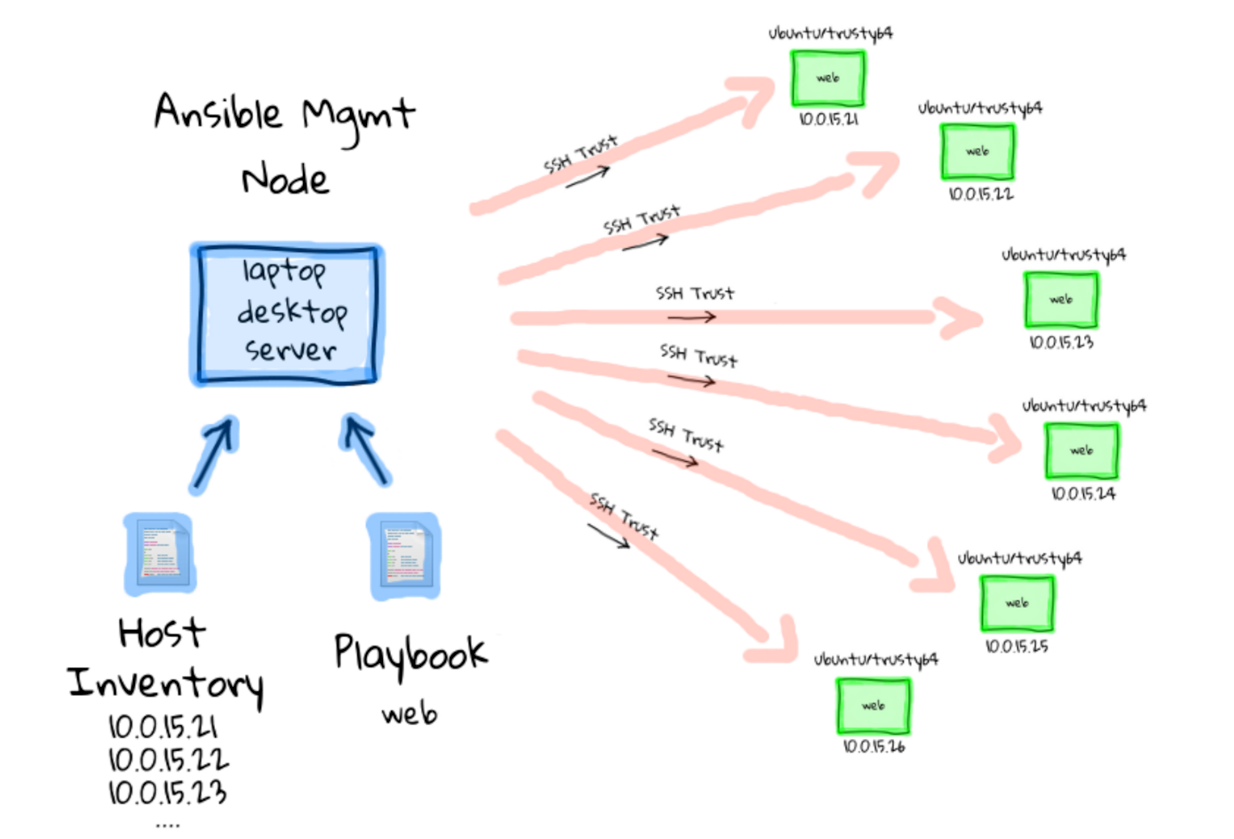
IT 인프라와 애플리케이션 운영 작업을 코드로 자동화하기 위한 오픈소스 도구입니다.
서버 설정, 애플리케이션 설치, 클라우드 리소스 생성 같은 반복 작업을 YAML 기반 플레이북으로 정의해 여러 환경에 동일하게 적용할 수 있습니다.
Ansible의 특징
1. Agentless
- 관리 대상 서버에 별도 에이전트 설치가 필요 없음
- SSH 기반으로 즉시 자동화 가능
- Puppet, Chef 대비 초기 도입과 운영 부담이 적음
2. 멱등성 (Idempotent)
- 동일한 작업을 여러 번 실행해도 항상 같은 결과
- 원하는 상태(desired state)를 기준으로 시스템을 유지
3. 쉬운 문법과 풍부한 모듈
- YAML 문법으로 사람이 읽고 쓰기 쉬움
- 파일 관리, 패키지 설치, 서비스 제어부터 클라우드 리소스 관리까지 다양한 모듈과 컬렉션 제공
Ansible 구성 요소 (커뮤니티 Ansible 기준)
전체 아키텍처
- Control Node + Managed Node
- 중앙 제어 노드에서 여러 관리 노드를 동시에 자동화
Control Node
- Ansible이 설치되어 실행되는 노드
- Linux 기반 환경이면 사용 가능
- Ansible은 Python 기반이므로 Python 필수
Managed Node
- Ansible이 제어하는 원격 서버
- Linux 또는 Windows 가능
- 에이전트 설치 불필요
- Control Node와 SSH 통신 가능, Python 설치 필요
Inventory
- 관리 대상 노드를 정의한 파일
- 호스트를 그룹 단위로 관리 가능
Module
- Ansible이 작업 수행 시 관리 노드로 전송(push) 하는 스크립트
- 작업 완료 후 자동 제거
- 시스템의 상태를 기준으로 동작
Plugin
- Ansible 제어 노드에서 실행
- 로깅, 데이터 변환, 인벤토리 연동 등 핵심 기능 확장
- 모듈을 보조하는 내부 확장 메커니즘
Playbook
- 실제 자동화를 정의하는 핵심 파일
- YAML 형식으로 작업을 순서대로 기술
Ansible 실습 환경
다음 서버를 생성하여 Ansible 실습을 진행하겠습니다.
| Node | OS | Kernel | vCPU | Memory | Disk | NIC2 IP | 관리자 계정 | (기본) 일반 계정 |
| server | Ubuntu 24.04 | 6.8.0 | 2 | 1.5GB | 30GB | 10.10.1.10 | root / qwe123 | vagrant / qwe123 |
| tnode1 | 상동 | 상동 | 2 | 1.5GB | 30GB | 10.10.1.11 | root / qwe123 | vagrant / qwe123 |
| tnode2 | 상동 | 상동 | 2 | 1.5GB | 30GB | 10.10.1.12 | root / qwe123 | vagrant / qwe123 |
| tnode3 | Rocky Linux 9 | 5.14.0 | 2 | 1.5GB | 60GB | 10.10.1.13 | root / qwe123 | vagrant / qwe123 |
> vagrant ssh server

root@server:~# whoami
root

# 파이썬 버전 확인
root@server:~# python3 --version
Python 3.12.3

# 설치
root@server:~# apt install software-properties-common -y
root@server:~# add-apt-repository --yes --update ppa:ansible/ansible
root@server:~# apt install ansible -y

# 확인
root@server:~# ansible --version
ansible [core 2.19.5]
  config file = /etc/ansible/ansible.cfg
  configured module search path = ['/root/.ansible/plugins/modules', '/usr/share/ansible/plugins/modules']
  ansible python module location = /usr/lib/python3/dist-packages/ansible
  ansible collection location = /root/.ansible/collections:/usr/share/ansible/collections
  executable location = /usr/bin/ansible
  python version = 3.12.3 (main, Aug 14 2025, 17:47:21) [GCC 13.3.0] (/usr/bin/python3)
  jinja version = 3.1.2
  pyyaml version = 6.0.1 (with libyaml v0.2.5)
root@server:~# cat /etc/ansible/ansible.cfg
# Since Ansible 2.12 (core):
# To generate an example config file (a "disabled" one with all default settings, commented out):
#               $ ansible-config init --disabled > ansible.cfg
#
# Also you can now have a more complete file by including existing plugins:
# ansible-config init --disabled -t all > ansible.cfg

# For previous versions of Ansible you can check for examples in the 'stable' branches of each version
# Note that this file was always incomplete  and lagging changes to configuration settings

# for example, for 2.9: https://github.com/ansible/ansible/blob/stable-2.9/examples/ansible.cfg


# ssh-keygen 명령어를 이용하여 SSH 키 생성
root@server:~/my-ansible# tree ~/.ssh
/root/.ssh
└── authorized_keys

1 directory, 1 file

root@server:~/my-ansible# ssh-keygen -t rsa -N "" -f /root/.ssh/id_rsa

# 공개키를 관리 노드에 복사
root@server:~/my-ansible# for i in {1..3}; do sshpass -p 'qwe123' ssh-copy-id -o StrictHostKeyChecking=no root@tnode$i; done

# ssh 접속 테스트
root@server:~/my-ansible# for i in {1..3}; do echo ">> tnode$i <<"; ssh tnode$i hostname; echo; done

# python 정보 확인
root@server:~/my-ansible# for i in {1..3}; do echo ">> tnode$i <<"; ssh tnode$i python3 -V; echo; done
>> tnode1 <<
Python 3.12.3

>> tnode2 <<
Python 3.12.3

>> tnode3 <<
Python 3.9.21
Host 선정
인벤토리 파일
- 텍스트 파일로, Ansible이 자동화 대상으로 하는 관리 호스트를 지정
ansible config 적용 우선 순위
- 현재 프로젝트 디렉터리 내에 ansible.cfg 라는 앤서블 환경 설정 파일을 구성 시, -i 옵션을 사용하지 않아도 ansible.cfg 설정 파일에 정의된 인벤토리의 호스트 정보를 확인 가능
- ANSIBLE_CONFIG (environment variable if set)
- ansible.cfg (in the current directory)
- ~/.ansible.cfg (in the home directory)
- /etc/ansible/ansible.cfg
# IP를 이용한 인벤토리 파일 생성
root@server:~/my-ansible# cat <<EOT > inventory
10.10.1.11
10.10.1.12
10.10.1.13
EOT

root@server:~/my-ansible# ansible-inventory -i ./inventory --list | jq
{
  "_meta": {
    "hostvars": {},
    "profile": "inventory_legacy"
  },
  "all": {
    "children": [
      "ungrouped"
    ]
  },
  "ungrouped": {
    "hosts": [
      "10.10.1.11",
      "10.10.1.12",
      "10.10.1.13"
    ]
  }
}


# 호스트명을 이용한 인벤토리 파일 생성
root@server:~/my-ansible# cat /etc/hosts
127.0.0.1 localhost

# The following lines are desirable for IPv6 capable hosts
::1     ip6-localhost ip6-loopback
fe00::0 ip6-localnet
ff00::0 ip6-mcastprefix
ff02::1 ip6-allnodes
ff02::2 ip6-allrouters
10.10.1.10 server
10.10.1.11 tnode1
10.10.1.12 tnode2
10.10.1.13 tnode3

root@server:~/my-ansible# cat <<EOT > inventory
tnode1
tnode2
tnode3
EOT

root@server:~/my-ansible# ansible-inventory -i ./inventory --list | jq
{
  "_meta": {
    "hostvars": {},
    "profile": "inventory_legacy"
  },
  "all": {
    "children": [
      "ungrouped"
    ]
  },
  "ungrouped": {
    "hosts": [
      "tnode1",
      "tnode2",
      "tnode3"
    ]
  }
}

# 인벤토리 그룹 구성 / ansible config 적용
root@server:~/my-ansible# cat <<EOT > inventory
[web]
tnode1
tnode2

[db]
tnode3

[all:children]
web
db
EOT

root@server:~/my-ansible# ansible-inventory -i ./inventory --list | jq
{
  "_meta": {
    "hostvars": {},
    "profile": "inventory_legacy"
  },
  "all": {
    "children": [
      "ungrouped",
      "web",
      "db"
    ]
  },
  "db": {
    "hosts": [
      "tnode3"
    ]
  },
  "web": {
    "hosts": [
      "tnode1",
      "tnode2"
    ]
  }
}

root@server:~/my-ansible# cat <<EOT > ansible.cfg
[defaults]
inventory = ./inventory
EOT

# inventory 목록 확인
root@server:~/my-ansible# ansible-inventory --list | jq


# ansible config 적용 우선 순위 확인
root@server:~/my-ansible# echo $ANSIBLE_CONFIG
root@server:~/my-ansible# cat $PWD/ansible.cfg   # kubespary 실행 시, 디렉터리 위치 고정 이유
root@server:~/my-ansible# ls ~/.ansible.cfg
root@server:~/my-ansible# tree ~/.ansible
root@server:~/my-ansible# cat /etc/ansible/ansible.cfg

#
root@server:~/my-ansible# ansible-config dump
root@server:~/my-ansible# ansible-config list
PlayBook 작성
- ansible.cfg 파일을 생성하면 다양한 앤서블 설정을 적용 가능
- 섹션 제목은 대괄호로 묶여 있으며, 기본적인 실행을 위해 다음 예제와 같이 [defaults]와 [privilege_escalation] 두 개의 섹션으로 구성
- default : ansible 작업을 위한 기본값 설정
- prvilege_escalation : 보안/감사로 인해 원격 호스트에 권한 없는 사용자 연결 후 관리 액세스 권한 에스컬레이션하여 루트 사용자로 가져올 때
root@server:~/my-ansible# cat <<EOT > ansible.cfg
[defaults]
inventory = ./inventory
remote_user = root
ask_pass = false

[privilege_escalation]
become = true
become_method = sudo
become_user = root
become_ask_pass = false
EOT

root@server:~/my-ansible# ansible-inventory -i ./inventory --list | jq
{
  "_meta": {
    "hostvars": {
      "tnode1": {
        "ansible_python_interpreter": "/usr/bin/python3"
      },
      "tnode2": {
        "ansible_python_interpreter": "/usr/bin/python3"
      },
      "tnode3": {
        "ansible_python_interpreter": "/usr/bin/python3"
      }
    },
    "profile": "inventory_legacy"
  },
  "all": {
    "children": [
      "ungrouped",
      "web",
      "db"
    ]
  },
  "db": {
    "hosts": [
      "tnode3"
    ]
  },
  "web": {
    "hosts": [
      "tnode1",
      "tnode2"
    ]
  }
}

# ad hoc ansible ping 모듈
root@server:~/my-ansible# ansible -m ping web
tnode1 | SUCCESS => {
    "changed": false,
    "ping": "pong"
}
tnode2 | SUCCESS => {
    "changed": false,
    "ping": "pong"
}

root@server:~/my-ansible# ansible -m ping db
tnode3 | SUCCESS => {
    "changed": false,
    "ping": "pong"
}

# 옵션 설정으로 암호 입력 후 실행 확인
root@server:~/my-ansible# ansible -m ping --ask-pass web
SSH password:
tnode1 | SUCCESS => {
    "changed": false,
    "ping": "pong"
}
tnode2 | SUCCESS => {
    "changed": false,
    "ping": "pong"
}

# 다른 사용자 계정으로 실행 확인
root@server:~/my-ansible# ansible -m ping web -u vagrant
[ERROR]: Task failed: Failed to connect to the host via ssh: vagrant@tnode1: Permission denied (publickey,password).
Origin: <adhoc 'ping' task>

{'action': 'ping', 'args': {}, 'timeout': 0, 'async_val': 0, 'poll': 15}

tnode1 | UNREACHABLE! => {
    "changed": false,
    "msg": "Task failed: Failed to connect to the host via ssh: vagrant@tnode1: Permission denied (publickey,password).",
    "unreachable": true
}
[ERROR]: Task failed: Failed to connect to the host via ssh: vagrant@tnode2: Permission denied (publickey,password).
Origin: <adhoc 'ping' task>

{'action': 'ping', 'args': {}, 'timeout': 0, 'async_val': 0, 'poll': 15}

tnode2 | UNREACHABLE! => {
    "changed": false,
    "msg": "Task failed: Failed to connect to the host via ssh: vagrant@tnode2: Permission denied (publickey,password).",
    "unreachable": true
}


# ad hoc ansible shell 모듈
root@server:~/my-ansible# ansible -m shell -a uptime db
tnode3 | CHANGED | rc=0 >>
 07:34:16 up  1:20,  1 user,  load average: 0.00, 0.00, 0.00

root@server:~/my-ansible# ansible -m shell -a "free -h" web
tnode1 | CHANGED | rc=0 >>
               total        used        free      shared  buff/cache   available
Mem:           1.3Gi       264Mi       448Mi       4.8Mi       702Mi       1.0Gi
Swap:          3.7Gi          0B       3.7Gi
tnode2 | CHANGED | rc=0 >>
               total        used        free      shared  buff/cache   available
Mem:           1.3Gi       248Mi       463Mi       4.8Mi       703Mi       1.1Gi
Swap:          3.7Gi          0B       3.7Gi
변수
변수를 사용하여 사용자, 설치하고자 하는 패키지, 재시작할 서비스, 생성 또는 삭제할 파일 명 등 시스템 작업 시 사용되는 다양한 값 저장
변수 종류
- 추가 변수: 외부에서 플레이북 실행 시 파라미터러 전달되는 변수
- 플레이 변수: 플레이북 내에서 선언되는 변수 또는 별도 파일로 분리되는 변수
- 호스트 변수: 특정 호스트에서만 사용하는 변수
- 그룹 변수: 인벤토리 정의된 호스트 그룹에 적용하는 변수
- 작업 변수: 플레이북의 수행 결과를 저장 후 후속 작업에 사용할 때 사용된다.
변수 우선 순위
- 추가변수
- 플레이 변수
- 호스트 변수
- 그룹 변수
# ansible.builtin.user 모듈
### 그룹 변수
# my-ansible/inventory
[web]
tnode1 ansible_python_interpreter=/usr/bin/python3
tnode2 ansible_python_interpreter=/usr/bin/python3

[db]
tnode3 ansible_python_interpreter=/usr/bin/python3

[all:children]
web
db

[all:vars]
user=ansible

# create-user.yml
---

- hosts: all
  tasks:
  - name: Create User {{ user }}
    ansible.builtin.user:
      name: "{{ user }}"
      state: present


root@server:~/my-ansible# ansible-playbook create-user.yml

PLAY [all] ******************************************************************************************************************************************************************************

TASK [Gathering Facts] ******************************************************************************************************************************************************************
ok: [tnode1]
ok: [tnode3]
ok: [tnode2]

TASK [Create User ansible] **************************************************************************************************************************************************************
changed: [tnode3]
changed: [tnode2]
changed: [tnode1]

PLAY RECAP ******************************************************************************************************************************************************************************
tnode1                     : ok=2    changed=1    unreachable=0    failed=0    skipped=0    rescued=0    ignored=0
tnode2                     : ok=2    changed=1    unreachable=0    failed=0    skipped=0    rescued=0    ignored=0
tnode3                     : ok=2    changed=1    unreachable=0    failed=0    skipped=0    rescued=0    ignored=0


# 대상 host에서 ansible 사용자 확인
root@server:~/my-ansible# for i in {1..3}; do echo ">> tnode$i <<"; ssh tnode$i tail -n 3 /etc/passwd; echo; done
>> tnode1 <<
vagrant:x:1000:1000:vagrant:/home/vagrant:/bin/bash
vboxadd:x:999:1::/var/run/vboxadd:/bin/false
ansible:x:1001:1001::/home/ansible:/bin/sh

>> tnode2 <<
vagrant:x:1000:1000:vagrant:/home/vagrant:/bin/bash
vboxadd:x:999:1::/var/run/vboxadd:/bin/false
ansible:x:1001:1001::/home/ansible:/bin/sh

>> tnode3 <<
vagrant:x:1000:1000::/home/vagrant:/bin/bash
vboxadd:x:991:1::/var/run/vboxadd:/bin/false
ansible:x:1001:1001::/home/ansible:/bin/bash


### 호스트 변수
# my-ansible/inventory
[web]
tnode1 ansible_python_interpreter=/usr/bin/python3
tnode2 ansible_python_interpreter=/usr/bin/python3

[db]
tnode3 ansible_python_interpreter=/usr/bin/python3 user=ansible1

[all:children]
web
db

[all:vars]
user=ansible

# my-ansible/create-user1.yml
---

- hosts: db
  tasks:
  - name: Create User {{ user }}
    ansible.builtin.user:
      name: "{{ user }}"
      state: present

root@server:~/my-ansible# ansible-playbook create-user1.yml

PLAY [db] *******************************************************************************************************************************************************************************

TASK [Gathering Facts] ******************************************************************************************************************************************************************
ok: [tnode3]

TASK [Create User ansible1] *************************************************************************************************************************************************************
changed: [tnode3]

PLAY RECAP ******************************************************************************************************************************************************************************
tnode3                     : ok=2    changed=1    unreachable=0    failed=0    skipped=0    rescued=0    ignored=0


# 확인
root@server:~/my-ansible# for i in {1..3}; do echo ">> tnode$i <<"; ssh tnode$i tail -n 3 /etc/passwd; echo; done
>> tnode1 <<
vagrant:x:1000:1000:vagrant:/home/vagrant:/bin/bash
vboxadd:x:999:1::/var/run/vboxadd:/bin/false
ansible:x:1001:1001::/home/ansible:/bin/sh

>> tnode2 <<
vagrant:x:1000:1000:vagrant:/home/vagrant:/bin/bash
vboxadd:x:999:1::/var/run/vboxadd:/bin/false
ansible:x:1001:1001::/home/ansible:/bin/sh

>> tnode3 <<
vboxadd:x:991:1::/var/run/vboxadd:/bin/false
ansible:x:1001:1001::/home/ansible:/bin/bash
ansible1:x:1002:1002::/home/ansible1:/bin/bash


### 플레이 변수
# my-ansible/create-user2.yml
---

- hosts: all
  vars:
    user: ansible2

  tasks:
  - name: Create User {{ user }}
    ansible.builtin.user:
      name: "{{ user }}"
      state: present


root@server:~/my-ansible# ansible-playbook create-user2.yml

PLAY [all] ******************************************************************************************************************************************************************************

TASK [Gathering Facts] ******************************************************************************************************************************************************************
ok: [tnode1]
ok: [tnode2]
ok: [tnode3]

TASK [Create User ansible2] *************************************************************************************************************************************************************
changed: [tnode3]
changed: [tnode1]
changed: [tnode2]

PLAY RECAP ******************************************************************************************************************************************************************************
tnode1                     : ok=2    changed=1    unreachable=0    failed=0    skipped=0    rescued=0    ignored=0
tnode2                     : ok=2    changed=1    unreachable=0    failed=0    skipped=0    rescued=0    ignored=0
tnode3                     : ok=2    changed=1    unreachable=0    failed=0    skipped=0    rescued=0    ignored=0

# 확인
root@server:~/my-ansible# for i in {1..3}; do echo ">> tnode$i <<"; ssh tnode$i tail -n 3 /etc/passwd; echo; done
>> tnode1 <<
vboxadd:x:999:1::/var/run/vboxadd:/bin/false
ansible:x:1001:1001::/home/ansible:/bin/sh
ansible2:x:1002:1002::/home/ansible2:/bin/sh

>> tnode2 <<
vboxadd:x:999:1::/var/run/vboxadd:/bin/false
ansible:x:1001:1001::/home/ansible:/bin/sh
ansible2:x:1002:1002::/home/ansible2:/bin/sh

>> tnode3 <<
ansible:x:1001:1001::/home/ansible:/bin/bash
ansible1:x:1002:1002::/home/ansible1:/bin/bash
ansible2:x:1003:1003::/home/ansible2:/bin/bash


# ansible.builtin.debug 모듈
### 작업 변수
# my-ansible/create-user4.yml
---

- hosts: db
  tasks:
  - name: Create User {{ user }}
    ansible.builtin.user:
      name: "{{ user }}"
      state: present
    register: result

  - ansible.builtin.debug:
      var: result


root@server:~/my-ansible# ansible-playbook -e user=ansible5 create-user4.yml

PLAY [db] *******************************************************************************************************************************************************************************

TASK [Gathering Facts] ******************************************************************************************************************************************************************
ok: [tnode3]

TASK [Create User ansible5] *************************************************************************************************************************************************************
changed: [tnode3]

TASK [ansible.builtin.debug] ************************************************************************************************************************************************************
ok: [tnode3] => {
    "result": {
        "changed": true,
        "comment": "",
        "create_home": true,
        "failed": false,
        "group": 1004,
        "home": "/home/ansible5",
        "name": "ansible5",
        "shell": "/bin/bash",
        "state": "present",
        "system": false,
        "uid": 1004
    }
}

PLAY RECAP ******************************************************************************************************************************************************************************
tnode3                     : ok=3    changed=1    unreachable=0    failed=0    skipped=0    rescued=0    ignored=0
Facts
ansible이 관리 호스트에서 자동으로 검색한 변수
관리 호스트에서 수집된 일부 팩트에는 다음 내용들이 포함될 수 있습니다.
- 호스트 이름
- 커널 버전
- 네트워크 인터페이스 이름
- 운영체제 버전
- CPU 개수
- 사용 가능한 메모리
- 스토리지 장치의 크기 및 여유 공간
- 등등…
# my-ansible/facts.yml
---

- hosts: db

  tasks:
  - name: Print all facts
    ansible.builtin.debug:
      var: ansible_facts


# playbook 실행
root@server:~/my-ansible# ansible-playbook facts.yml

PLAY [db] *******************************************************************************************************************************************************************************

TASK [Gathering Facts] ******************************************************************************************************************************************************************
ok: [tnode3]

TASK [Print all facts] ******************************************************************************************************************************************************************
ok: [tnode3] => {
    "ansible_facts": {
        "all_ipv4_addresses": [
            "10.10.1.13",
            "10.0.2.15"
        ],
        "all_ipv6_addresses": [
            "fe80::a00:27ff:fe6e:6ffb",
            "fd17:625c:f037:2:a00:27ff:fe1f:ae8b",
            "fe80::a00:27ff:fe1f:ae8b"
        ],
        "ansible_local": {},
        "apparmor": {
            "status": "disabled"
        },
        "architecture": "aarch64",
        "bios_date": "NA",
        "bios_vendor": "NA",
        "bios_version": "NA",
        "board_asset_tag": "NA",
        "board_name": "NA",
   		...
        "env": {
            "BASH_FUNC_which%%": "() {  ( alias;\n eval ${which_declare} ) | /usr/bin/which --tty-only --read-alias --read-functions --show-tilde --show-dot $@\n}",
            "DBUS_SESSION_BUS_ADDRESS": "unix:path=/run/user/0/bus",
            "DEBUGINFOD_IMA_CERT_PATH": "/etc/keys/ima:",
            "DEBUGINFOD_URLS": "https://debuginfod.rockylinux.org/ ",
            "HOME": "/root",
            "LANG": "en_US.UTF-8",
            "LESSOPEN": "||/usr/bin/lesspipe.sh %s",
            "LOGNAME": "root",
            "LS_COLORS": "rs=0:di=01;34:ln=01;36:mh=00:pi=40;33:so=01;35:do=01;35:bd=40;33;01:cd=40;33;01:or=40;31;01:mi=01;37;41:su=37;41:sg=30;43:ca=30;41:tw=30;42:ow=34;42:st=37;44:ex=01;32:*.tar=01;31:*.tgz=01;31:*.arc=01;31:*.arj=01;31:*.taz=01;31:*.lha=01;31:*.lz4=01;31:*.lzh=01;31:*.lzma=01;31:*.tlz=01;31:*.txz=01;31:*.tzo=01;31:*.t7z=01;31:*.zip=01;31:*.z=01;31:*.dz=01;31:*.gz=01;31:*.lrz=01;31:*.lz=01;31:*.lzo=01;31:*.xz=01;31:*.zst=01;31:*.tzst=01;31:*.bz2=01;31:*.bz=01;31:*.tbz=01;31:*.tbz2=01;31:*.tz=01;31:*.deb=01;31:*.rpm=01;31:*.jar=01;31:*.war=01;31:*.ear=01;31:*.sar=01;31:*.rar=01;31:*.alz=01;31:*.ace=01;31:*.zoo=01;31:*.cpio=01;31:*.7z=01;31:*.rz=01;31:*.cab=01;31:*.wim=01;31:*.swm=01;31:*.dwm=01;31:*.esd=01;31:*.jpg=01;35:*.jpeg=01;35:*.mjpg=01;35:*.mjpeg=01;35:*.gif=01;35:*.bmp=01;35:*.pbm=01;35:*.pgm=01;35:*.ppm=01;35:*.tga=01;35:*.xbm=01;35:*.xpm=01;35:*.tif=01;35:*.tiff=01;35:*.png=01;35:*.svg=01;35:*.svgz=01;35:*.mng=01;35:*.pcx=01;35:*.mov=01;35:*.mpg=01;35:*.mpeg=01;35:*.m2v=01;35:*.mkv=01;35:*.webm=01;35:*.webp=01;35:*.ogm=01;35:*.mp4=01;35:*.m4v=01;35:*.mp4v=01;35:*.vob=01;35:*.qt=01;35:*.nuv=01;35:*.wmv=01;35:*.asf=01;35:*.rm=01;35:*.rmvb=01;35:*.flc=01;35:*.avi=01;35:*.fli=01;35:*.flv=01;35:*.gl=01;35:*.dl=01;35:*.xcf=01;35:*.xwd=01;35:*.yuv=01;35:*.cgm=01;35:*.emf=01;35:*.ogv=01;35:*.ogx=01;35:*.aac=01;36:*.au=01;36:*.flac=01;36:*.m4a=01;36:*.mid=01;36:*.midi=01;36:*.mka=01;36:*.mp3=01;36:*.mpc=01;36:*.ogg=01;36:*.ra=01;36:*.wav=01;36:*.oga=01;36:*.opus=01;36:*.spx=01;36:*.xspf=01;36:",
            "MOTD_SHOWN": "pam",
            "PATH": "/root/.local/bin:/root/bin:/usr/local/sbin:/usr/local/bin:/usr/sbin:/usr/bin",
            "PWD": "/root",
            "SELINUX_LEVEL_REQUESTED": "",
            "SELINUX_ROLE_REQUESTED": "",
            "SELINUX_USE_CURRENT_RANGE": "",
            "SHELL": "/bin/bash",
            "SHLVL": "1",
            "SSH_CLIENT": "10.10.1.10 40386 22",
            "SSH_CONNECTION": "10.10.1.10 40386 10.10.1.13 22",
            "SSH_TTY": "/dev/pts/0",
            "TERM": "xterm-256color",
            "USER": "root",
            "XDG_RUNTIME_DIR": "/run/user/0",
            "XDG_SESSION_CLASS": "user",
            "XDG_SESSION_ID": "35",
            "XDG_SESSION_TYPE": "tty",
            "_": "/usr/bin/python3",
            "which_declare": "declare -f"
        },
        "fibre_channel_wwn": [],
        "fips": false,
        "form_factor": "NA",
        "fqdn": "tnode3",
        "gather_subset": [
            "all"
        ],
        "hostname": "tnode3",
        "hostnqn": "nqn.2014-08.org.nvmexpress:uuid:b4201204-1135-498b-8536-3a8fe83e7131",
        "interfaces": [
            "enp0s8",
            "enp0s9",
            "lo"
        ],
        "is_chroot": false,
        "iscsi_iqn": "",
        "kernel": "5.14.0-570.52.1.el9_6.aarch64",
        "kernel_version": "#1 SMP PREEMPT_DYNAMIC Wed Oct 15 14:48:33 UTC 2025",
        "processor_cores": 1,
        "processor_count": 2,
        "processor_nproc": 2,
        "processor_threads_per_core": 1,
        "processor_vcpus": 2,
        "product_name": "NA",
        "product_serial": "NA",
        "product_uuid": "NA",
        "product_version": "NA",
        "python": {
            "executable": "/usr/bin/python3",
            "has_sslcontext": true,
            "type": "cpython",
            "version": {
                "major": 3,
                "micro": 21,
                "minor": 9,
                "releaselevel": "final",
                "serial": 0
            },
            "version_info": [
                3,
                9,
                21,
                "final",
                0
            ]
        },
        "python_version": "3.9.21",
        "real_group_id": 0,
        "real_user_id": 0,
        "selinux": {
            "config_mode": "permissive",
            "mode": "permissive",
            "policyvers": 33,
            "status": "enabled",
            "type": "targeted"
        },
        "selinux_python_present": true,
        "service_mgr": "systemd",
        "ssh_host_key_ecdsa_public": "AAAAE2VjZHNhLXNoYTItbmlzdHAyNTYAAAAIbmlzdHAyNTYAAABBBA3NDADxITYCQ+Yzl24Rv5+HTMqHFo1A1i6bGwRXfIvZ5ZPFQYMrR2CAi0vU69QVLwdWCJoLoQP8He+NBfrlrV8=",
        "ssh_host_key_ecdsa_public_keytype": "ecdsa-sha2-nistp256",
        "ssh_host_key_ed25519_public": "AAAAC3NzaC1lZDI1NTE5AAAAIKcCJWNOyGZ6SW350FH+dihyL+qJBcvRb7NIvkyes3Lt",
        "ssh_host_key_ed25519_public_keytype": "ssh-ed25519",
        "ssh_host_key_rsa_public": "AAAAB3NzaC1yc2EAAAADAQABAAABgQCQOhfEeFMicbWK5uXUAbgkFqTQRQGptB4FLBmiMIrpVVC0J9PFfBTJL2UIvDg1TCdwQ+DkJhtjffLDjWM/OU75gsYs9Ih0aGgE1zHf+93Wt0tM5+I8z0fTact/+4GaBAuSO4o7rjlebOC5XpgGT7aglCbuUn7UIefvf4m1OIdrWL8szWb6jZLGNH6AOn7itpri2cXWp9pnffr8FHYWIsKyHJWnRGtPXSOlU7/2wc7j0b8M1+H2FpBS8d4Y9+0Jdf0T9wq3tK7UkcW5hOGv09X1h42xMLzaCqivdvP2dxMz5xcvUWrC6g2wQgzg7IkA+hVszF6Nfazu2GYrNOTNyy3Pf+Krb8SthldVg4/Skw7sMkmGQ6TGCO5yTY0ul13sPiEx4SHBbtebJXk075W2+dB1yx6/6lxziUkUeW9jBJf2IVUpSMTf6PGLOefce1pLu/bSdD0pxR6CpukDfUhHaNGJCZpaiOEbk5FK2f9B+9TJ0y+w6ZaXzcfNmPj2hzzhN+8=",
        "ssh_host_key_rsa_public_keytype": "ssh-rsa",
        "swapfree_mb": 3902,
        "swaptotal_mb": 3902,
        "system": "Linux",
        "system_capabilities": [],
        "system_capabilities_enforced": "False",
        "system_vendor": "NA",
        "systemd": {
            "features": "+PAM +AUDIT +SELINUX -APPARMOR +IMA +SMACK +SECCOMP +GCRYPT +GNUTLS +OPENSSL +ACL +BLKID +CURL +ELFUTILS +FIDO2 +IDN2 -IDN -IPTC +KMOD +LIBCRYPTSETUP +LIBFDISK +PCRE2 -PWQUALITY +P11KIT -QRENCODE +TPM2 +BZIP2 +LZ4 +XZ +ZLIB +ZSTD -BPF_FRAMEWORK +XKBCOMMON +UTMP +SYSVINIT default-hierarchy=unified",
            "version": 252
        },
        "uptime_seconds": 6548,
        "user_dir": "/root",
        "user_gecos": "root",
        "user_gid": 0,
        "user_id": "root",
        "user_shell": "/bin/bash",
        "user_uid": 0,
        "userspace_bits": "64",
        "virtualization_role": "NA",
        "virtualization_tech_guest": [],
        "virtualization_tech_host": [],
        "virtualization_type": "NA"
    }
}

PLAY RECAP ******************************************************************************************************************************************************************************
tnode3                     : ok=2    changed=0    unreachable=0    failed=0    skipped=0    rescued=0    ignored=0


# facts를 통해 수집된 변수 중 특정 값만 추출
# my-ansible/facts1.yml
---

- hosts: db

  tasks:
  - name: Print all facts
    ansible.builtin.debug:
      msg: >
        The default IPv4 address of {{ ansible_facts.hostname }}
        is {{ ansible_facts.default_ipv4.address }}v


root@server:~/my-ansible# ansible-playbook facts1.yml

PLAY [db] *******************************************************************************************************************************************************************************

TASK [Gathering Facts] ******************************************************************************************************************************************************************
ok: [tnode3]

TASK [Print all facts] ******************************************************************************************************************************************************************
ok: [tnode3] => {
    "msg": "The default IPv4 address of tnode3 is 10.0.2.15"
}

PLAY RECAP ******************************************************************************************************************************************************************************
tnode3                     : ok=2    changed=0    unreachable=0    failed=0    skipped=0    rescued=0    ignored=0
반복문
loop 키워드를 작업에 추가하면 작업을 반복해야 하는 항목의 목록을 값으로 사용
# ~/my-ansible/check-services.yml
# sshd와 rsyslog 서비스가 시작되어 있지 않다면 시작
---
- hosts: all
  tasks:
    - name: Check sshd state on Debian
      ansible.builtin.service:
        name: ssh
        state: started
      when: ansible_facts['os_family'] == 'Debian'

    - name: Check sshd state on RedHat
      ansible.builtin.service:
        name: sshd
        state: started
      when: ansible_facts['os_family'] == 'RedHat'


    - name: Check rsyslog state
      ansible.builtin.service:
        name: rsyslog
        state: started


root@server:~/my-ansible# ansible -m shell -a "pstree |grep sshd" all
tnode1 | CHANGED | rc=0 >>
        |-sshd---sshd---sh---python3---sh-+-grep
tnode3 | CHANGED | rc=0 >>
        |-sshd---sshd---sshd---sh---python3---sh-+-grep
tnode2 | CHANGED | rc=0 >>
        |-sshd---sshd---sh---python3---sh-+-grep


root@server:~/my-ansible# ansible -m shell -a "pstree |grep rsyslog" all
tnode3 | CHANGED | rc=0 >>
        |-rsyslogd---2*[{rsyslogd}]
tnode2 | CHANGED | rc=0 >>
        |-rsyslogd---3*[{rsyslogd}]
tnode1 | CHANGED | rc=0 >>
        |-rsyslogd---3*[{rsyslogd}]

root@server:~/my-ansible# systemctl list-units --type=service
  UNIT                                                                                      LOAD   ACTIVE SUB     DESCRIPTION                                                           >
  apport.service                                                                            loaded active exited  automatic crash report generation
  blk-availability.service                                                                  loaded active exited  Availability of block devices
  console-setup.service                                                                     loaded active exited  Set console font and keymap
  cron.service                                                                              loaded active running Regular background program processing daemon
  dbus.service                                                                              loaded active running D-Bus System Message Bus
  finalrd.service                                                                           loaded active exited  Create final runtime dir for shutdown pivot root
  getty@tty1.service                                                                        loaded active running Getty on tty1
  keyboard-setup.service                                                                    loaded active exited  Set the console keyboard layout
  kmod-static-nodes.service                                                                 loaded active exited  Create List of Static Device Nodes
  lvm2-monitor.service                                                                      loaded active exited  Monitoring of LVM2 mirrors, snapshots etc. using dmeventd or progress >
  ModemManager.service                                                                      loaded active running Modem Manager
  multipathd.service                                                                        loaded active running Device-Mapper Multipath Device Controller
  plymouth-quit-wait.service                                                                loaded active exited  Hold until boot process finishes up
  plymouth-quit.service                                                                     loaded active exited  Terminate Plymouth Boot Screen
  plymouth-read-write.service                                                               loaded active exited  Tell Plymouth To Write Out Runtime Data
  polkit.service                                                                            loaded active running Authorization Manager
  rsyslog.service                                                                           loaded active running System Logging Service
  setvtrgb.service                                                                          loaded active exited  Set console scheme
  snapd.apparmor.service                                                                    loaded active exited  Load AppArmor profiles managed internally by snapd
  snapd.seeded.service                                                                      loaded active exited  Wait until snapd is fully seeded
  ssh.service                                                                               loaded active running OpenBSD Secure Shell server
  sysstat.service                                                                           loaded active exited  Resets System Activity Logs
  systemd-binfmt.service                                                                    loaded active exited  Set Up Additional Binary Formats
  systemd-fsck@dev-disk-by\x2duuid-58F1\x2dBD52.service                                     loaded active exited  File System Check on /dev/disk/by-uuid/58F1-BD52
  systemd-fsck@dev-disk-by\x2duuid-b8cd9c1e\x2d487d\x2d412b\x2d882b\x2dedeb25fd98bc.service loaded active exited  File System Check on /dev/disk/by-uuid/b8cd9c1e-487d-412b-882b-edeb25f>


root@server:~/my-ansible# ansible-playbook check-services.yml

PLAY [all] ******************************************************************************************************************************************************************************

TASK [Gathering Facts] ******************************************************************************************************************************************************************
ok: [tnode1]
ok: [tnode2]
ok: [tnode3]

TASK [Check sshd state on Debian] *******************************************************************************************************************************************************
skipping: [tnode3]
ok: [tnode2]
ok: [tnode1]

TASK [Check sshd state on RedHat] *******************************************************************************************************************************************************
skipping: [tnode1]
skipping: [tnode2]
ok: [tnode3]

TASK [Check rsyslog state] **************************************************************************************************************************************************************
ok: [tnode1]
ok: [tnode3]
ok: [tnode2]

PLAY RECAP ******************************************************************************************************************************************************************************
tnode1                     : ok=3    changed=0    unreachable=0    failed=0    skipped=1    rescued=0    ignored=0
tnode2                     : ok=3    changed=0    unreachable=0    failed=0    skipped=1    rescued=0    ignored=0
tnode3                     : ok=3    changed=0    unreachable=0    failed=0    skipped=1    rescued=0    ignored=0


# loop 반복문 적용
# my-ansible/check-services1.yml
---
- hosts: all
  tasks:
  - name: Check sshd and rsyslog state
    ansible.builtin.service:
      name: "{{ item }}"
      state: started
    loop:
      - vboxadd-service  # ssh
      - rsyslog

root@server:~/my-ansible# ansible-playbook check-services1.yml

PLAY [all] ******************************************************************************************************************************************************************************

TASK [Gathering Facts] ******************************************************************************************************************************************************************
ok: [tnode1]
ok: [tnode2]
ok: [tnode3]

TASK [Check sshd and rsyslog state] *****************************************************************************************************************************************************
ok: [tnode3] => (item=vboxadd-service)
ok: [tnode1] => (item=vboxadd-service)
ok: [tnode2] => (item=vboxadd-service)
ok: [tnode3] => (item=rsyslog)
ok: [tnode2] => (item=rsyslog)
ok: [tnode1] => (item=rsyslog)

PLAY RECAP ******************************************************************************************************************************************************************************
tnode1                     : ok=2    changed=0    unreachable=0    failed=0    skipped=0    rescued=0    ignored=0
tnode2                     : ok=2    changed=0    unreachable=0    failed=0    skipped=0    rescued=0    ignored=0
tnode3                     : ok=2    changed=0    unreachable=0    failed=0    skipped=0    rescued=0    ignored=0


# loop문에 사용하는 아이템을 변수에 저장하면 loop 키워드에 해당 변수명 사용 가능
# my-ansible/check-services2.yml
---
- hosts: all
  vars:
    services:
      - vboxadd-service  # ssh
      - rsyslog

  tasks:
  - name: Check sshd and rsyslog state
    ansible.builtin.service:
      name: "{{ item }}"
      state: started
    loop: "{{ services }}"


root@server:~/my-ansible# ansible-playbook check-services2.yml

PLAY [all] ******************************************************************************************************************************************************************************

TASK [Gathering Facts] ******************************************************************************************************************************************************************
ok: [tnode1]
ok: [tnode3]
ok: [tnode2]

TASK [Check sshd and rsyslog state] *****************************************************************************************************************************************************
ok: [tnode3] => (item=vboxadd-service)
ok: [tnode1] => (item=vboxadd-service)
ok: [tnode2] => (item=vboxadd-service)
ok: [tnode3] => (item=rsyslog)
ok: [tnode1] => (item=rsyslog)
ok: [tnode2] => (item=rsyslog)

PLAY RECAP ******************************************************************************************************************************************************************************
tnode1                     : ok=2    changed=0    unreachable=0    failed=0    skipped=0    rescued=0    ignored=0
tnode2                     : ok=2    changed=0    unreachable=0    failed=0    skipped=0    rescued=0    ignored=0
tnode3                     : ok=2    changed=0    unreachable=0    failed=0    skipped=0    rescued=0    ignored=0
조건문
조건문을 사용하여 특정 조건이 충족될 때 작업 또는 플레이를 실행
when 문은 조건부로 작업을 실행할 때 테스트할 조건을 값으로 사용
# my-ansible/when_task.yml
---
- hosts: localhost
  vars:
    run_my_task: true

  tasks:
  - name: echo message
    ansible.builtin.shell: "echo test"
    when: run_my_task
    register: result

  - name: Show result
    ansible.builtin.debug:
      var: result


root@server:~/my-ansible# ansible-playbook when_task.yml

PLAY [localhost] ************************************************************************************************************************************************************************

TASK [Gathering Facts] ******************************************************************************************************************************************************************
ok: [localhost]

TASK [echo message] *********************************************************************************************************************************************************************
changed: [localhost]

TASK [Show result] **********************************************************************************************************************************************************************
ok: [localhost] => {
    "result": {
        "changed": true,
        "cmd": "echo test",
        "delta": "0:00:00.001913",
        "end": "2026-01-18 08:13:22.691144",
        "failed": false,
        "msg": "",
        "rc": 0,
        "start": "2026-01-18 08:13:22.689231",
        "stderr": "",
        "stderr_lines": [],
        "stdout": "test",
        "stdout_lines": [
            "test"
        ]
    }
}

PLAY RECAP ******************************************************************************************************************************************************************************
localhost                  : ok=3    changed=1    unreachable=0    failed=0    skipped=0    rescued=0    ignored=0


# run_my_task값을 false로 수정 후 실행 확인
# 테스트 수행되지 않고 건너뜀 (skip)
root@server:~/my-ansible# ansible-playbook when_task.yml

PLAY [localhost] ************************************************************************************************************************************************************************

TASK [Gathering Facts] ******************************************************************************************************************************************************************
ok: [localhost]

TASK [echo message] *********************************************************************************************************************************************************************
skipping: [localhost]

TASK [Show result] **********************************************************************************************************************************************************************
ok: [localhost] => {
    "result": {
        "changed": false,
        "false_condition": "run_my_task",
        "skip_reason": "Conditional result was False",
        "skipped": true
    }
}

PLAY RECAP ******************************************************************************************************************************************************************************
localhost                  : ok=2    changed=0    unreachable=0    failed=0    skipped=1    rescued=0    ignored=0
핸들러 및 작업 실패 처리
앤서블에서 핸들러를 사용하려면 notify 문을 사용하여 명시적으로 호출된 경우에만 사용할 수 있습니다.
# my-ansible/handler-sample.yml
---
- hosts: tnode2
  tasks:
    - name: restart rsyslog
      ansible.builtin.service:
        name: "rsyslog"
        state: restarted
      notify:
        - print msg

  handlers:
    - name: print msg
      ansible.builtin.debug:
        msg: "rsyslog is restarted"


root@server:~/my-ansible# ansible-playbook handler-sample.yml

PLAY [tnode2] ***************************************************************************************************************************************************************************

TASK [Gathering Facts] ******************************************************************************************************************************************************************
ok: [tnode2]

TASK [restart rsyslog] ******************************************************************************************************************************************************************
changed: [tnode2]

RUNNING HANDLER [print msg] *************************************************************************************************************************************************************
ok: [tnode2] => {
    "msg": "rsyslog is restarted"
}

PLAY RECAP ******************************************************************************************************************************************************************************
tnode2                     : ok=3    changed=1    unreachable=0    failed=0    skipped=0    rescued=0    ignored=0


# 한번 더 실행 시 tnode2 노드에 rsyslog 서비스를 재시작하고, print msg라는 핸들러를 호출해 “rsyslog..” 메시지를 출력
root@server:~/my-ansible# ansible-playbook handler-sample.yml

PLAY [tnode2] ***************************************************************************************************************************************************************************

TASK [Gathering Facts] ******************************************************************************************************************************************************************
ok: [tnode2]

TASK [restart rsyslog] ******************************************************************************************************************************************************************
changed: [tnode2]

RUNNING HANDLER [print msg] *************************************************************************************************************************************************************
ok: [tnode2] => {
    "msg": "rsyslog is restarted"
}

PLAY RECAP ******************************************************************************************************************************************************************************
tnode2                     : ok=3    changed=1    unreachable=0    failed=0    skipped=0    rescued=0    ignored=0


# 작업 실패 무시
my-ansible/ignore-example-1.yml
---
- hosts : tnode1

  tasks:
    - name: Install apache3
      ansible.builtin.apt:
        name: apache3
        state: latest

    - name: Print msg
      ansible.builtin.debug:
        msg: "Before task is ignored"

my-ansible/ignore-example-2.yml
---
- hosts : tnode1

  tasks:
    - name: Install apache3
      ansible.builtin.apt:
        name: apache3
        state: latest
      ignore_errors: yes

    - name: Print msg
      ansible.builtin.debug:
        msg: "Before task is ignored"


root@server:~/my-ansible# ansible-playbook ignore-example-1.yml

PLAY [tnode1] ***************************************************************************************************************************************************************************

TASK [Gathering Facts] ******************************************************************************************************************************************************************
ok: [tnode1]

TASK [Install apache3] ******************************************************************************************************************************************************************
[ERROR]: Task failed: Module failed: No package matching 'apache3' is available
Origin: /root/my-ansible/ignore-example-1.yml:5:7

3
4   tasks:
5     - name: Install apache3
        ^ column 7

fatal: [tnode1]: FAILED! => {"changed": false, "msg": "No package matching 'apache3' is available"}

PLAY RECAP ******************************************************************************************************************************************************************************
tnode1                     : ok=1    changed=0    unreachable=0    failed=1    skipped=0    rescued=0    ignored=0


# 무시됨
root@server:~/my-ansible# ansible-playbook ignore-example-2.yml

PLAY [tnode1] ***************************************************************************************************************************************************************************

TASK [Gathering Facts] ******************************************************************************************************************************************************************
ok: [tnode1]

TASK [Install apache3] ******************************************************************************************************************************************************************
[ERROR]: Task failed: Module failed: No package matching 'apache3' is available
Origin: /root/my-ansible/ignore-example-2.yml:5:7

3
4   tasks:
5     - name: Install apache3
        ^ column 7

fatal: [tnode1]: FAILED! => {"changed": false, "msg": "No package matching 'apache3' is available"}
...ignoring

TASK [Print msg] ************************************************************************************************************************************************************************
ok: [tnode1] => {
    "msg": "Before task is ignored"
}

PLAY RECAP ******************************************************************************************************************************************************************************
tnode1                     : ok=3    changed=0    unreachable=0    failed=0    skipped=0    rescued=0    ignored=1
롤 구조 소개 및 사용법
롤은 플레이북 내용을 기능 단위로 나누어 공통 부품으로 관리/재사용하기 위한 구조
# 롤 생성
root@server:~/my-ansible# ansible-galaxy role init my-role
- Role my-role was created successfully

root@server:~/my-ansible# tree ./my-role/
./my-role/
├── defaults
│   └── main.yml
├── files
├── handlers
│   └── main.yml
├── meta
│   └── main.yml
├── README.md
├── tasks
│   └── main.yml
├── templates
├── tests
│   ├── inventory
│   └── test.yml
└── vars
    └── main.yml

9 directories, 8 files

# 롤을 이용한 플레이북 개발
```
- 롤 이름 : my-role
- tasks (메인 태스크)
    - install service : httpd 관련 패키지 설치
    - copy html file : index.html 파일 복사
- files (정적 파일)
    - index.html
- handlers (핸들러)
    - restart service : httpd 서비스 재시작
- defaults (가변 변수) : 메인 태스크에서 사용된 변수 선언
    - service_title
- vars (불변 변수) : 메인 태스크와 핸들러에서 사용된 변수 선언
    - service_name : 서비스명
    - src_file_path : 복사할 파일 경로
    - dest_file_path : 파일이 복사될 디렉터리 경로
    - httpd_packages : httpd 관련 패키지 목록
    - supported_distros : 지원 OS 목록
```

# 메인 테스크 작성
# my-ansible/my-role/tasks/main.yml
---
# tasks file for my-role

- name: install service {{ service_title }}
  ansible.builtin.apt:
    name: "{{ item }}"
    state: latest
  loop: "{{ httpd_packages }}"
  when: ansible_facts.distribution in supported_distros

- name: copy conf file
  ansible.builtin.copy:
    src: "{{ src_file_path }}"
    dest: "{{ dest_file_path }}"
  notify:
    - restart service

# index.html 정적파일 생성
# my-ansible/my-role/files/index.html
root@server:~/my-ansible/my-role# echo "Hello! Ansible" > files/index.html

# 핸들러 작성
# 특정 태스크가 끝나고 그 다음에 수행해야하는 태스크, service 모듈 이용하여 서비스를 재시작
# my-ansible/my-role/handlers/main.yml
---
# handlers file for my-role

- name: restart service
  ansible.builtin.service:
    name: "{{ service_name }}"
    state: restarted

# default 작성
# 외부로부터 재정의될 수 있는 기반 변수
root@server:~/my-ansible/my-role# echo 'service_title: "Apache Web Server"' >> defaults/main.yml

# vars 작성
# 한번 정의되면 외부로부터 변수 값을 수정할 수 없음, 롤 내의 플레이북에서만 사용되는 변수로 정의하는 것이 좋음
---
# vars file for my-role

service_name: apache2
src_file_path: ../files/index.html
dest_file_path: /var/www/html
httpd_packages:
  - apache2
  - apache2-doc

supported_distros:
  - Ubuntu


# 플레이북에 롤 추가하기
# 롤 실행을 위해 롤을 호출해주는 플레이북 필요
# my-ansible/role-example.yml
---
- hosts: tnode1

  tasks:
    - name: Print start play
      ansible.builtin.debug:
        msg: "Let's start role play"

    - name: Install Service by role
      ansible.builtin.import_role:
        name: my-role


# 실행 - my-role 내의 각 태스트와 핸들러가 순차적으로 수행
root@server:~/my-ansible# ansible-playbook role-example.yml

PLAY [tnode1] ***************************************************************************************************************************************************************************

TASK [Gathering Facts] ******************************************************************************************************************************************************************
ok: [tnode1]

TASK [Print start play] *****************************************************************************************************************************************************************
ok: [tnode1] => {
    "msg": "Let's start role play"
}

TASK [my-role : install service Apache Web Server] **************************************************************************************************************************************
changed: [tnode1] => (item=apache2)
changed: [tnode1] => (item=apache2-doc)

TASK [my-role : copy conf file] *********************************************************************************************************************************************************
changed: [tnode1]

RUNNING HANDLER [my-role : restart service] *********************************************************************************************************************************************
changed: [tnode1]

PLAY RECAP ******************************************************************************************************************************************************************************
tnode1                     : ok=5    changed=3    unreachable=0    failed=0    skipped=0    rescued=0    ignored=0
'스터디 > K8s Deploy' 카테고리의 다른 글
| [K8s Deploy] Kubespray offline 설치 (0) | 2026.02.15 |
|---|---|
| [K8s Deploy] Kubespary HA & Upgrade (0) | 2026.02.04 |
| [K8s] Kubespray 배포 분석 (0) | 2026.02.01 |
| [K8s Deploy] Kubeadm Deep Dive (0) | 2026.01.24 |
| [K8s Deploy] Bootstrap Kubernetes the hard way (0) | 2026.01.10 |