Cloudnet Cilium 6주차 스터디를 진행하며 정리한 글입니다.
Gateway API
쿠버네티스에서 Ingress는 오랫동안 외부 트래픽을 클러스터로 유입시키는 표준이었지만, 한계도 있었습니다.
- HTTP 외 프로토콜 지원 부족 (TCP, UDP, gRPC 등)
- 헤더 기반 라우팅이나 미러링 같은 고급 기능 제한
- 역할 분리(Role Separation)가 어려움
이런 문제를 해결하기 위해 등장한 것이 바로 Gateway API 입니다.
Gateway API 주요 기능
- 개선된 리소스 모델
GatewayClass, Gateway, HTTPRoute, TCPRoute 등 세분화된 CRD로 라우팅을 표현합니다. - 프로토콜 독립적
HTTP 외에도 TCP, UDP, TLS, gRPC를 지원합니다. - 강화된 보안
TLS Termination, Passthrough, 세밀한 Access Control 등을 지원합니다. - 교차 네임스페이스 지원
다른 네임스페이스 서비스로도 트래픽을 라우팅할 수 있습니다. - 확장성
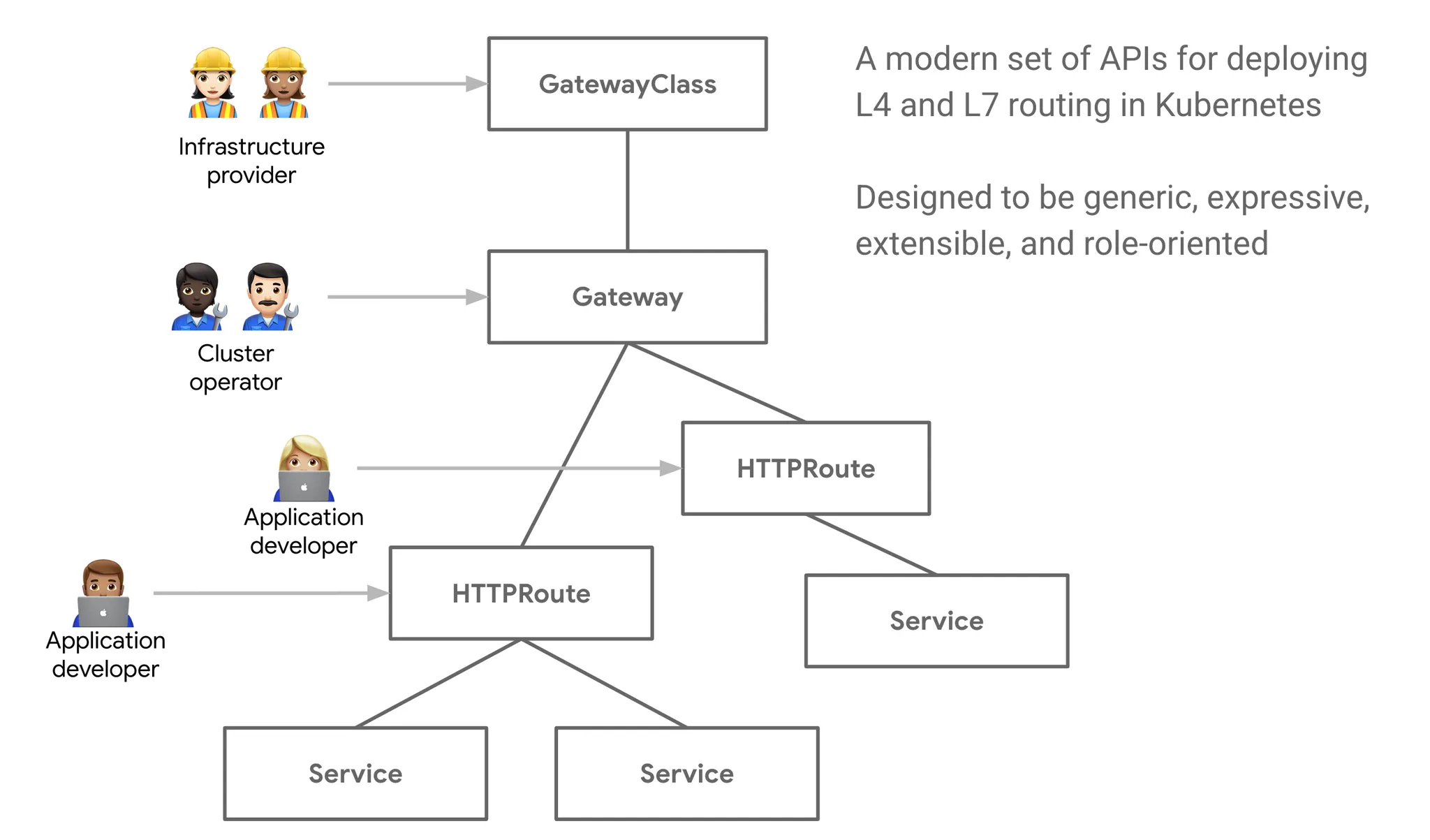
Custom Policy, 확장 CRD 연동이 가능합니다. - 역할 지향(Role-Oriented)
- Infra Provider: 인프라 제공
- Cluster Operator: 보안/정책 관리
- App Developer: 라우팅 규칙 관리
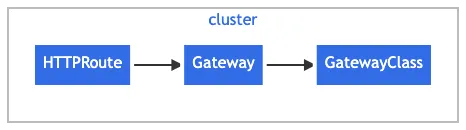
Gateway API 구성 요소
- GatewayClass: Gateway의 템플릿 (예: internet-facing, private)
- Gateway: 실제 인스턴스 (LB or HostNetwork)
- HTTPRoute: HTTP 규칙 정의
- TCPRoute/GRPCRoute/TLSRoute: L4, gRPC, TLS 트래픽 라우팅
- ReferenceGrant: 교차 네임스페이스 접근 허용
Cilium Gateway API
Cilium은 io.cilium/gateway-controller를 통해 Gateway API를 지원합니다.
- 지원 리소스: GatewayClass, Gateway, HTTPRoute, GRPCRoute, TLSRoute(실험적), ReferenceGrant
- 추가 CRD: CiliumGatewayClassConfig
사전 준비
- NodePort or kube-proxy replacement 모드 활성화
- L7 Proxy 활성화 (l7Proxy=true)
- Gateway API CRD 설치
Gateway API 설치
Gateway API는 쿠버네티스 기본 리소스가 아니므로, CRD를 먼저 설치해야 합니다.
root@k8s-ctr:~#
kubectl apply -f https://raw.githubusercontent.com/kubernetes-sigs/gateway-api/v1.2.0/config/crd/standard/gateway.networking.k8s.io_gatewayclasses.yaml
kubectl apply -f https://raw.githubusercontent.com/kubernetes-sigs/gateway-api/v1.2.0/config/crd/standard/gateway.networking.k8s.io_gateways.yaml
kubectl apply -f https://raw.githubusercontent.com/kubernetes-sigs/gateway-api/v1.2.0/config/crd/standard/gateway.networking.k8s.io_httproutes.yaml
kubectl apply -f https://raw.githubusercontent.com/kubernetes-sigs/gateway-api/v1.2.0/config/crd/standard/gateway.networking.k8s.io_referencegrants.yaml
kubectl apply -f https://raw.githubusercontent.com/kubernetes-sigs/gateway-api/v1.2.0/config/crd/standard/gateway.networking.k8s.io_grpcroutes.yaml
kubectl apply -f https://raw.githubusercontent.com/kubernetes-sigs/gateway-api/v1.2.0/config/crd/experimental/gateway.networking.k8s.io_tlsroutes.yaml

root@k8s-ctr:~# kubectl get crd | grep gateway.networking.k8s.io
gatewayclasses.gateway.networking.k8s.io     2025-08-23T16:06:03Z
gateways.gateway.networking.k8s.io           2025-08-23T16:06:04Z
grpcroutes.gateway.networking.k8s.io         2025-08-23T16:06:06Z
httproutes.gateway.networking.k8s.io         2025-08-23T16:06:05Z
referencegrants.gateway.networking.k8s.io    2025-08-23T16:06:06Z
tlsroutes.gateway.networking.k8s.io          2025-08-23T16:06:06Z
Cilium에 내장된 Envoy Proxy가 Gateway API 컨트롤러 역할을 수행할 수 있도록 기능을 켭니다.
enable-gateway-api: true 설정을 통해 Gateway API 리소스를 인식하고, Envoy 설정으로 번역할 준비가 된 것을 알 수 있습니다.
# Cilium Gateway API 설정
root@k8s-ctr:~# helm upgrade cilium cilium/cilium --version 1.18.1 --namespace kube-system --reuse-values \
--set ingressController.enabled=false --set gatewayAPI.enabled=true
I0824 01:01:52.637143   14062 warnings.go:110] "Warning: v1 Endpoints is deprecated in v1.33+; use discovery.k8s.io/v1 EndpointSlice"
Release "cilium" has been upgraded. Happy Helming!
NAME: cilium
LAST DEPLOYED: Sun Aug 24 01:01:48 2025
NAMESPACE: kube-system
STATUS: deployed
REVISION: 2
TEST SUITE: None
NOTES:
You have successfully installed Cilium with Hubble Relay and Hubble UI.

Your release version is 1.18.1.

For any further help, visit https://docs.cilium.io/en/v1.18/gettinghelp


root@k8s-ctr:~# kubectl -n kube-system rollout restart deployment/cilium-operator
deployment.apps/cilium-operator restarted

root@k8s-ctr:~# kubectl -n kube-system rollout restart ds/cilium
daemonset.apps/cilium restarted


root@k8s-ctr:~# cilium config view | grep gateway-api

enable-gateway-api                                true
enable-gateway-api-alpn                           false
enable-gateway-api-app-protocol                   false
enable-gateway-api-proxy-protocol                 false
enable-gateway-api-secrets-sync                   true
gateway-api-hostnetwork-enabled                   false
gateway-api-hostnetwork-nodelabelselector
gateway-api-secrets-namespace                     cilium-secrets
gateway-api-service-externaltrafficpolicy         Cluster
gateway-api-xff-num-trusted-hops                  0

root@k8s-ctr:~# kubectl get GatewayClass
NAME     CONTROLLER                     ACCEPTED   AGE
cilium   io.cilium/gateway-controller   True       53s

root@k8s-ctr:~# kubectl get gateway -A
No resources found
이제, Gateway 리소스를 생성해보겠습니다.
Cilium이 LoadBalancer 서비스(cilium-gateway-my-gateway)를 자동 생성합니다.
root@k8s-ctr:~# cat << EOF | kubectl apply -f -
> apiVersion: gateway.networking.k8s.io/v1
> kind: Gateway
> metadata:
>   name: my-gateway
> spec:
>   gatewayClassName: cilium
>   listeners:
>   - protocol: HTTP
>     port: 80
>     name: web-gw
>     allowedRoutes:
>       namespaces:
>         from: Same
> ---
> apiVersion: gateway.networking.k8s.io/v1
> kind: HTTPRoute
> metadata:
>   name: http-app-1
> spec:
>   parentRefs:
>   - name: my-gateway
>     namespace: default
>   rules:
>   - matches:
>     - path:
>         type: PathPrefix
>         value: /details
>     backendRefs:
>     - name: details
>       port: 9080
>   - matches:
>     - headers:
>       - type: Exact
>         name: magic
>         value: foo
>       queryParams:
>       - type: Exact
>         name: great
>         value: example
>       path:
>         type: PathPrefix
>         value: /
>       method: GET
>     backendRefs:
>     - name: productpage
>       port: 9080
> EOF
gateway.gateway.networking.k8s.io/my-gateway created
httproute.gateway.networking.k8s.io/http-app-1 created

root@k8s-ctr:~# kubectl get svc,ep cilium-gateway-my-gateway
Warning: v1 Endpoints is deprecated in v1.33+; use discovery.k8s.io/v1 EndpointSlice
NAME                                TYPE           CLUSTER-IP     EXTERNAL-IP      PORT(S)        AGE
service/cilium-gateway-my-gateway   LoadBalancer   10.96.134.15   192.168.10.211   80:31173/TCP   19s

NAME                                  ENDPOINTS              AGE
endpoints/cilium-gateway-my-gateway   192.192.192.192:9999   19s


root@k8s-ctr:~# kubectl get gateway
NAME         CLASS    ADDRESS          PROGRAMMED   AGE
my-gateway   cilium   192.168.10.211   True         13m

root@k8s-ctr:~# kubectl get httproutes -A
NAMESPACE   NAME         HOSTNAMES   AGE
default     http-app-1               22m
실체 호출해보겠습니다. HTTPRoute를 통해 세밀한 라우팅 가능한 것을 알 수 있습니다.
- /details 경로 → details 서비스로 전달
- 특정 Header(magic: foo)와 QueryParam(great=example) 매칭 시 → productpage 서비스로 전달
- Ingress보다 훨씬 강력한 조건 기반 라우팅이 가능
root@k8s-ctr:~# GATEWAY=$(kubectl get gateway my-gateway -o jsonpath='{.status.addresses[0].value}')

root@k8s-ctr:~# echo $GATEWAY
192.168.10.211


# HTTP Path matching
root@k8s-ctr:~# curl --fail -s http://"$GATEWAY"/details/1 | jq
{
  "id": 1,
  "author": "William Shakespeare",
  "year": 1595,
  "type": "paperback",
  "pages": 200,
  "publisher": "PublisherA",
  "language": "English",
  "ISBN-10": "1234567890",
  "ISBN-13": "123-1234567890"
}

root@router:~# curl -s --fail -v http://"$GATEWAY"/details/1
*   Trying 192.168.10.211:80...
* Connected to 192.168.10.211 (192.168.10.211) port 80
> GET /details/1 HTTP/1.1
> Host: 192.168.10.211
> User-Agent: curl/8.5.0
> Accept: */*
>
< HTTP/1.1 200 OK
< content-type: application/json
< server: envoy
< date: Sat, 23 Aug 2025 16:36:13 GMT
< content-length: 178
< x-envoy-upstream-service-time: 44
<
* Connection #0 to host 192.168.10.211 left intact
{"id":1,"author":"William Shakespeare","year":1595,"type":"paperback","pages":200,"publisher":"PublisherA","language":"English","ISBN-10":


# HTTP Header Matching
root@k8s-ctr:~# curl -v -H 'magic: foo' http://"$GATEWAY"\?great\=example
*   Trying 192.168.10.211:80...
* Connected to 192.168.10.211 (192.168.10.211) port 80
> GET /?great=example HTTP/1.1
> Host: 192.168.10.211
> User-Agent: curl/8.5.0
> Accept: */*
> magic: foo
>
< HTTP/1.1 200 OK
< server: envoy
< date: Sat, 23 Aug 2025 16:36:58 GMT
< content-type: text/html; charset=utf-8
< content-length: 2080
< x-envoy-upstream-service-time: 120
<

root@router:~# curl -s -v -H 'magic: foo' http://"$GATEWAY"\?great\=example
*   Trying 192.168.10.211:80...
* Connected to 192.168.10.211 (192.168.10.211) port 80
> GET /?great=example HTTP/1.1
> Host: 192.168.10.211
> User-Agent: curl/8.5.0
> Accept: */*
> magic: foo
>
< HTTP/1.1 200 OK
< server: envoy
< date: Sat, 23 Aug 2025 16:37:18 GMT
< content-type: text/html; charset=utf-8
< content-length: 2080
< x-envoy-upstream-service-time: 116
<
HTTPS Gateway를 생성하는 예제를 실습해보겠습니다.
Gateway가 클라이언트의 HTTPS 요청을 받아 TLS 종료(Termination) 하고, Envoy가 인증서를 직접 로드(Secret: demo-cert)해서 SSL 핸드셰이크 수행합니다,
내부 백엔드 서비스와의 통신은 HTTP 로 이루어집니다.
Gateway는 단순히 SNI 기반 라우팅만 수행하고, 실제 TLS 핸드셰이크는 백엔드 Pod(Nginx)에서 수행합니다.
즉, Gateway는 암호화된 트래픽을 그대로 전달(Passthrough)하여 엔드투엔드 암호화를 보장합니다.
root@k8s-ctr:~# cat << EOF | kubectl apply -f -
apiVersion: gateway.networking.k8s.io/v1
kind: Gateway
metadata:
  name: tls-gateway
spec:
  gatewayClassName: cilium
  listeners:
  - name: https-1
    protocol: HTTPS
    port: 443
    hostname: "bookinfo.cilium.rocks"
    tls:
      certificateRefs:
      - kind: Secret
        name: demo-cert
  - name: https-2
    protocol: HTTPS
EOF   port: 80bpodPrefix"rking.k8s.io/v1
gateway.gateway.networking.k8s.io/tls-gateway created
httproute.gateway.networking.k8s.io/https-app-route-1 created
httproute.gateway.networking.k8s.io/https-app-route-2 created

root@k8s-ctr:~# kubectl get gateway tls-gateway
NAME          CLASS    ADDRESS          PROGRAMMED   AGE
tls-gateway   cilium   192.168.10.213   True         15s

root@k8s-ctr:~# kubectl get httproutes https-app-route-1 https-app-route-2
NAME                HOSTNAMES                   AGE
https-app-route-1   ["bookinfo.cilium.rocks"]   25s
https-app-route-2   ["webpod.cilium.rocks"]     25s

root@k8s-ctr:~# GATEWAY2=$(kubectl get gateway tls-gateway -o jsonpath='{.status.addresses[0].value}')
root@k8s-ctr:~# echo $GATEWAY2
192.168.10.213


root@k8s-ctr:~# curl -s --resolve bookinfo.cilium.rocks:443:${GATEWAY2} https://bookinfo.cilium.rocks/details/1 | jq
root@k8s-ctr:~# curl -s --resolve webpod.cilium.rocks:443:${GATEWAY2}   https://webpod.cilium.rocks/ -v
* Added webpod.cilium.rocks:443:192.168.10.213 to DNS cache
* Hostname webpod.cilium.rocks was found in DNS cache
*   Trying 192.168.10.213:443...
* Connected to webpod.cilium.rocks (192.168.10.213) port 443
* ALPN: curl offers h2,http/1.1
* TLSv1.3 (OUT), TLS handshake, Client hello (1):
*  CAfile: /etc/ssl/certs/ca-certificates.crt
*  CApath: /etc/ssl/certs
* Recv failure: Connection reset by peer
* OpenSSL SSL_connect: Connection reset by peer in connection to webpod.cilium.rocks:443
* Closing connection
TLS Route : Terminate vs. Passthrough
- In Terminate:
- Client → Gateway: HTTPS
- Gateway → Pod: HTTP
- In Passthrough:
- Client → Gateway: HTTPS
- Gateway → Pod: HTTPS
이 때 실습을 위해 로컬 개발 환경에서 HTTPS 테스트를 위한 자체 서명 CA와 Wildcard 인증서를 발급받겠습니다.
root@k8s-ctr:~# apt install mkcert -y

root@k8s-ctr:~# mkcert '*.cilium.rocks'
Created a new local CA 💥
Note: the local CA is not installed in the system trust store.
Run "mkcert -install" for certificates to be trusted automatically ⚠️

Created a new certificate valid for the following names 📜
 - "*.cilium.rocks"

Reminder: X.509 wildcards only go one level deep, so this won't match a.b.cilium.rocks ℹ️

The certificate is at "./_wildcard.cilium.rocks.pem" and the key at "./_wildcard.cilium.rocks-key.pem" ✅

It will expire on 24 November 2027 🗓


root@k8s-ctr:~# ls -l *.pem
-rw------- 1 root root 1704 Aug 24 03:27 _wildcard.cilium.rocks-key.pem
-rw-r--r-- 1 root root 1452 Aug 24 03:27 _wildcard.cilium.rocks.pem

root@k8s-ctr:~# openssl x509 -in _wildcard.cilium.rocks.pem -text -noout
Certificate:
    Data:
        Version: 3 (0x2)
        Serial Number:
            db:c0:12:89:e0:eb:96:44:9f:58:b2:59:f2:1f:40:3a
        Signature Algorithm: sha256WithRSAEncryption
        Issuer: O = mkcert development CA, OU = root@k8s-ctr, CN = mkcert root@k8s-ctr
        Validity
            Not Before: Aug 23 18:27:36 2025 GMT
            Not After : Nov 23 18:27:36 2027 GMT
            ...


root@k8s-ctr:~# openssl rsa -in _wildcard.cilium.rocks-key.pem -text -noout
Private-Key: (2048 bit, 2 primes)
modulus:
    00:aa:ed:9e:87:57:8c:48:1c:e1:e0:8a:31:b6:9e:
    ed:46:7d:94:ca:54:a8:ba:0a:4b:1e:6d:c1:39:9a:
    ...
    53:78:8f:8a:33:82:66:18:43:86:90:7a:a5:b1:b0:
    7c:df
publicExponent: 65537 (0x10001)
privateExponent:
    73:38:ae:ce:a9:33:85:41:02:fa:ab:ed:8b:1f:62:
    ef:4b:a4:4b:27:fa:7d:3e:87:18:c1:ff:a8:e6:e0:
    ...
    6b:89:36:ea:da:5e:16:c6:32:2e:72:14:23:13:42:
    f1
prime1:
    00:d6:1a:8d:c1:c3:c2:5a:24:7e:21:f3:d3:ca:d8:
    33:57:b0:17:15:57:26:f6:e8:ce:eb:9b:1e:3d:ff:
    ...
    93:99:95:42:e0:56:38:f1:ff:05:e3:9c:88:a2:1d:
    da:77:fb:51:aa:2d:96:f1:5b
prime2:
    00:cc:60:34:24:54:21:78:1b:22:2b:fb:71:87:4c:
    87:61:83:bf:2f:07:4f:f6:8e:69:91:7c:3a:44:65:
    ...
    74:ae:8a:c3:bb:f3:94:5d:bc:13:34:21:b4:b2:c8:
    cb:4e:99:66:7c:06:6a:55:cd
exponent1:
    2e:a0:19:be:d8:a2:ba:7e:b7:f9:2c:e0:32:8c:62:
    a1:f5:f7:10:ee:a9:cd:9b:65:74:69:93:6c:6c:e7:
    ...
    9c:9f:a4:b0:b6:16:30:9d:18:eb:38:6b:88:e2:77:
    71:29:89:df:45:8e:59:81
exponent2:
    04:d4:9d:46:e2:8a:2b:f9:90:34:33:ec:3a:03:70:
    0b:b8:fe:72:d1:1c:6d:ba:6d:fa:57:52:55:3d:83:
    ...
    1b:fd:01:a5:56:9b:82:1f:a8:e0:89:8f:68:ce:60:
    27:ca:6e:66:ae:0c:23:5d
coefficient:
    70:7b:be:a8:fd:95:7b:31:21:76:4c:8a:20:ee:c7:
    ...
    c5:4d:d6:64:60:a3:ae:ef


root@k8s-ctr:~# kubectl create secret tls demo-cert --key=_wildcard.cilium.rocks-key.pem --cert=_wildcard.cilium.rocks.pem
secret/demo-cert created


# 시스템(OS) 신뢰 저장소에 CA 정보 확인
root@k8s-ctr:~# cat /etc/ssl/certs/ca-certificates.crt
root@k8s-ctr:~# ls -al /etc/ssl/certs/ca-certificates.crt
root@k8s-ctr:~# mkcert -install
The local CA is now installed in the system trust store! ⚡️

root@k8s-ctr:~# mkcert -CAROOT
/root/.local/share/mkcert

root@k8s-ctr:~# ls "$(mkcert -CAROOT)"
rootCA-key.pem	rootCA.pem
이제 https 요청을 호출해보게습니다.
HTTP Path/헤더 기반 라우팅, HTTPS TLS Termination, TLS Passthrough 각각 성공적으로 동작하는 것을 curl 결과로 확인할 수 있었습니다.
root@k8s-ctr:~#
cat <<'EOF' > nginx.conf
events {
}

http {
  log_format main '$remote_addr - $remote_user [$time_local]  $status '
  '"$request" $body_bytes_sent "$http_referer" '
  '"$http_user_agent" "$http_x_forwarded_for"';
  access_log /var/log/nginx/access.log main;
  error_log  /var/log/nginx/error.log;

  server {
    listen 443 ssl;

    root /usr/share/nginx/html;
    index index.html;

    server_name nginx.cilium.rocks;
    ssl_certificate /etc/nginx-server-certs/tls.crt;
    ssl_certificate_key /etc/nginx-server-certs/tls.key;
  }
}
EOF


root@k8s-ctr:~# kubectl create configmap nginx-configmap --from-file=nginx.conf=./nginx.conf

root@k8s-ctr:~# cat << EOF | kubectl apply -f -
apiVersion: v1
kind: Service
metadata:
  name: my-nginx
  labels:
    run: my-nginx
spec:
  ports:
    - port: 443
      protocol: TCP
  selector:
    run: my-nginx
---
apiVersion: apps/v1
kind: Deployment
metadata:
  name: my-nginx
spec:
  selector:
    matchLabels:
      run: my-nginx
  replicas: 1
  template:
    metadata:
      labels:
        run: my-nginx
    spec:
      containers:
        - name: my-nginx
          image: nginx
          ports:
            - containerPort: 443
          volumeMounts:
            - name: nginx-config
              mountPath: /etc/nginx
              readOnly: true
            - name: nginx-server-certs
              mountPath: /etc/nginx-server-certs
              readOnly: true
      volumes:
        - name: nginx-config
          configMap:
            name: nginx-configmap
        - name: nginx-server-certs
          secret:
            secretName: demo-cert
EOF


# Deploy the Gateway
root@k8s-ctr:~#
cat << EOF | kubectl apply -f -
apiVersion: gateway.networking.k8s.io/v1
kind: Gateway
metadata:
  name: cilium-tls-gateway
spec:
  gatewayClassName: cilium
  listeners:
    - name: https
      hostname: "nginx.cilium.rocks"
      port: 443
      protocol: TLS
      tls:
        mode: Passthrough
      allowedRoutes:
        namespaces:
          from: All
---
apiVersion: gateway.networking.k8s.io/v1alpha2
kind: TLSRoute
metadata:
  name: nginx
spec:
  parentRefs:
    - name: cilium-tls-gateway
  hostnames:
    - "nginx.cilium.rocks"
  rules:
    - backendRefs:
        - name: my-nginx
          port: 443
EOF


root@k8s-ctr:~# kubectl get gateway cilium-tls-gateway
NAME                 CLASS    ADDRESS          PROGRAMMED   AGE
cilium-tls-gateway   cilium   192.168.10.214   True         20m

root@k8s-ctr:~# GATEWAY=$(kubectl get gateway cilium-tls-gateway -o jsonpath='{.status.addresses[0].value}')

root@k8s-ctr:~# echo $GATEWAY
192.168.10.214

root@k8s-ctr:~# kubectl get tlsroutes.gateway.networking.k8s.io -o json | jq '.items[0].status.parents[0]'

{
  "conditions": [
    {
      "lastTransitionTime": "2025-08-23T18:11:12Z",
      "message": "Accepted TLSRoute",
      "observedGeneration": 1,
      "reason": "Accepted",
      "status": "True",
      "type": "Accepted"
    },
    {
      "lastTransitionTime": "2025-08-23T18:11:12Z",
      "message": "Service reference is valid",
      "observedGeneration": 1,
      "reason": "ResolvedRefs",
      "status": "True",
      "type": "ResolvedRefs"
    }
  ],
  "controllerName": "io.cilium/gateway-controller",
  "parentRef": {
    "group": "gateway.networking.k8s.io",
    "kind": "Gateway",
    "name": "cilium-tls-gateway"
  }
}


# Make TLS Requests
root@k8s-ctr:~# curl -v --resolve "nginx.cilium.rocks:443:$GATEWAY" "https://nginx.cilium.rocks:443"
* Added nginx.cilium.rocks:443:192.168.10.214 to DNS cache
* Hostname nginx.cilium.rocks was found in DNS cache
*   Trying 192.168.10.214:443...
* Connected to nginx.cilium.rocks (192.168.10.214) port 443
* ALPN: curl offers h2,http/1.1
* TLSv1.3 (OUT), TLS handshake, Client hello (1):
*  CAfile: /etc/ssl/certs/ca-certificates.crt
*  CApath: /etc/ssl/certs
* TLSv1.3 (IN), TLS handshake, Server hello (2):
* TLSv1.3 (IN), TLS handshake, Encrypted Extensions (8):
* TLSv1.3 (IN), TLS handshake, Certificate (11):
* TLSv1.3 (IN), TLS handshake, CERT verify (15):
* TLSv1.3 (IN), TLS handshake, Finished (20):
* TLSv1.3 (OUT), TLS change cipher, Change cipher spec (1):
* TLSv1.3 (OUT), TLS handshake, Finished (20):
* SSL connection using TLSv1.3 / TLS_AES_256_GCM_SHA384 / X25519 / RSASSA-PSS
* ALPN: server accepted http/1.1
* Server certificate:
*  subject: O=mkcert development certificate; OU=root@k8s-ctr
*  start date: Aug 23 18:27:36 2025 GMT
*  expire date: Nov 23 18:27:36 2027 GMT
*  subjectAltName: host "nginx.cilium.rocks" matched cert's "*.cilium.rocks"
*  issuer: O=mkcert development CA; OU=root@k8s-ctr; CN=mkcert root@k8s-ctr
*  SSL certificate verify ok.
*   Certificate level 0: Public key type RSA (2048/112 Bits/secBits), signed using sha256WithRSAEncryption
*   Certificate level 1: Public key type RSA (3072/128 Bits/secBits), signed using sha256WithRSAEncryption
* using HTTP/1.x
> GET / HTTP/1.1
> Host: nginx.cilium.rocks
> User-Agent: curl/8.5.0
> Accept: */*
>
* TLSv1.3 (IN), TLS handshake, Newsession Ticket (4):
* TLSv1.3 (IN), TLS handshake, Newsession Ticket (4):
* old SSL session ID is stale, removing
< HTTP/1.1 200 OK
< Server: nginx/1.29.1
< Date: Sat, 23 Aug 2025 18:48:40 GMT
< Content-Type: text/html
< Content-Length: 615
< Last-Modified: Wed, 13 Aug 2025 14:33:41 GMT
< Connection: keep-alive
< ETag: "689ca245-267"
< Accept-Ranges: bytes
<
<!DOCTYPE html>
<html>
<head>
<title>Welcome to nginx!</title>
<style>
html { color-scheme: light dark; }
body { width: 35em; margin: 0 auto;
font-family: Tahoma, Verdana, Arial, sans-serif; }
</style>
</head>
<body>
<h1>Welcome to nginx!</h1>
<p>If you see this page, the nginx web server is successfully installed and
working. Further configuration is required.</p>

<p>For online documentation and support please refer to
<a href="http://nginx.org/">nginx.org</a>.<br/>
Commercial support is available at
<a href="http://nginx.com/">nginx.com</a>.</p>

<p><em>Thank you for using nginx.</em></p>
</body>
</html>
* Connection #0 to host nginx.cilium.rocks left intact
'스터디 > Cilium' 카테고리의 다른 글
| [Cilium] Cilium Performance (1) | 2025.08.31 |
|---|---|
| [Cilium] K8s Performance with Kube-burner (1) | 2025.08.31 |
| [Cilium] Cilium Ingress (4) | 2025.08.23 |
| [Cilium] Cluster Mesh (2) | 2025.08.17 |
| [Cilium] BGP Control Plane (5) | 2025.08.17 |